


Unable to load Thunderbird

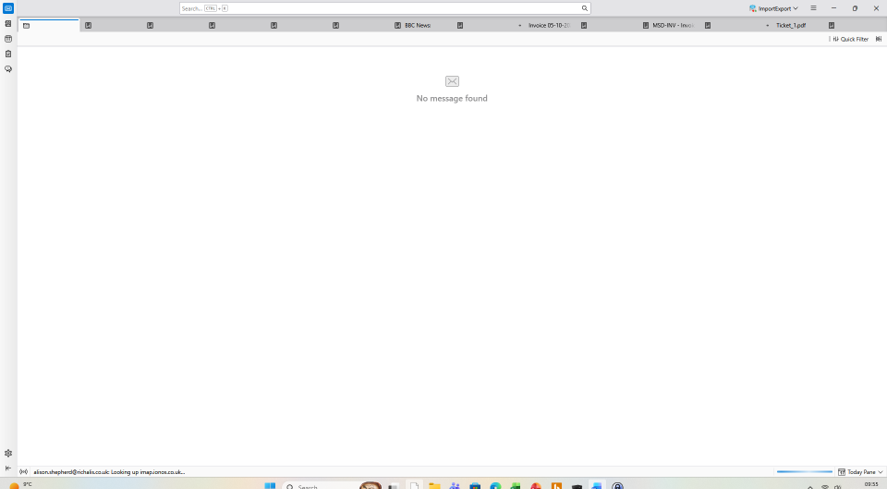
I am unable to access my emails in Thunderbird. Thunderbird opened but does not respond as there appear to be some files /emails that it could not accessed.
I tried deleting the Parent.lock file. I then deleted Thunderbird and re-installed it.
On opening the updated instance, it comes up with the same couple of files/emails in the list. With the same ones seemingly trying to be loaded. See attachment. The files are Invoice 03-10-20 and Ticket_1.pdf
All Replies (2)
Valitud lahendus
There are two bugs describing this issue https://bugzilla.mozilla.org/show_bug.cgi?id=2071123 https://bugzilla.mozilla.org/show_bug.cgi?id=2071951 The second is a duplicate of the first one.
The only temporary solution I know is to delete the guilty session.json file from the profile folder >> find your profile folder by pressing the Windows Key key and then start typing: %APPDATA%\Thunderbird\Profiles\ In folder Profiles you might find one or more profile folders with names like default, default-release, default-esr, .... Try to identify your actual/active profile folder by comparing modification dates of files, then delete the file session.json and close the folder Thunderbird. Restart Thunderbird and avoid opening very many messages and .pdf files in new tabs, until this bug will be fixed.
Hi
Thank you my problem is resolved now. I did as suggested the following:
find your profile folder by pressing the Windows Key key and then start typing: %APPDATA%\Thunderbird\Profiles\ In folder Profiles you might find one or more profile folders with names like default, default-release, default-esr, .... Try to identify your actual/active profile folder by comparing modification dates of files, then delete the file session.json and close the folder Thunderbird.