


After new installation use old profile

After new installation I want to use my profile of the former installation. In principle I followed the procedure of the article "An einem anderen Ort wiederherstellen". After that when starting thunderbird it always asks me to create a new account.
Does anyone know what is missing?
All Replies (3)

After new installation I want to use my profile of the former installation.
Why did you re-install Thunderbird in the first place?
At the top right of the Thunderbird window, click the menu button ≡, then select Help > Troubleshooting Information. Locate the line 'Profiles' at the bottom of the "Application Basics" information and click the about:profiles link. This will open a new tab showing the about:profiles information. Please post a screenshot. https://support.mozilla.org/kb/how-do-i-create-screenshot-my-problem
Do you see your old profile? If so, you can click the 'Launch Profile' button to load it.
Yes, I can see it and open it. The reason for the new installation is: PC with two partitions with windows installations, one of them crashed (of course the one with the TB on it. I thought, it will be a quick solution to install TB now on the second system..
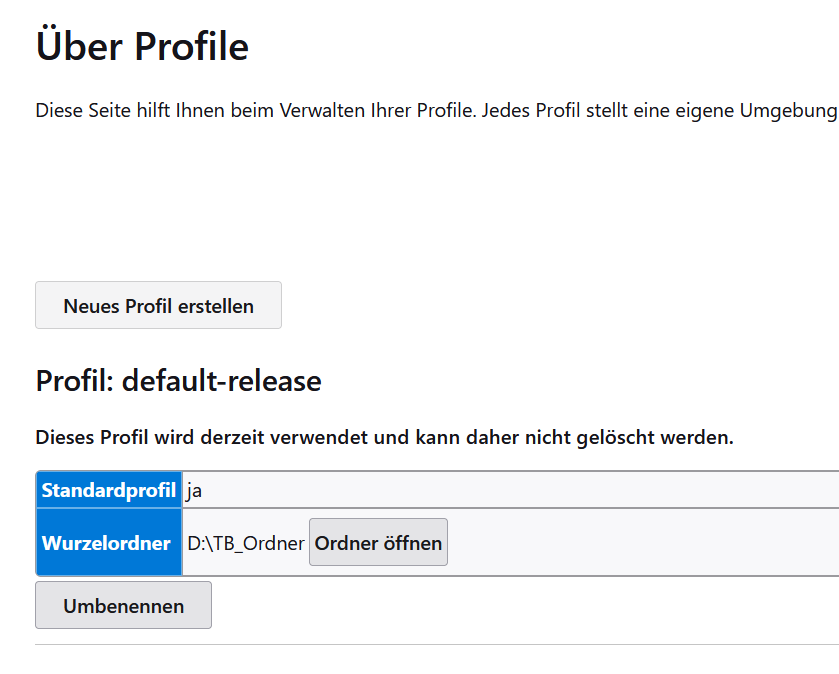
PC with two partitions with windows installations, one of them crashed (of course the one with the TB on it. I thought, it will be a quick solution to install TB now on the second system.
I don't understand this. Windows requires a C: drive. Where is your C: drive? Thunderbird expects the profile information at C:\Users\<your_user_id>\AppData\Roaming\Thunderbird. Please post the contents of your profiles.ini file.
In principle I followed the procedure of the article "An einem anderen Ort wiederherstellen".
What article? Please post a link. Also, please explain in detail the steps you did, including full path information.