


latest firefox is continuously refreshing the page on a Website, both Windows11 and Linux versions. Website loaded ok previously and still loads ok using Chrome. Why?

Firefox version 152.0 : Firefox is continuously refreshing the page on a particular Website, in both Windows11 and Linux versions, making the site unusable ( unable to click anything ). The website loaded ok previously using Firefox and still loads ok using Chrome. Disabling extensions doesn't help, neither does deleting the cache and cookies. What changed and why? Is there anything else to try?
All Replies (16)
Hi, could you please share a URL?
That would be difficult. It's a customer portal only reached after logging-in, and contains sensitive data. The public landing page is fine, and so are subsequent pages after logging in ( it is possible to stop the continual reloading by clicking the reload/stop button just at the right time ), and then the menus are clickable to select a different page. However, the main (logged-in) menu page is always continually refreshing when returned to. Is there any way I can start to debug this myself?
How big is this site operator? Would it be plausible they're targeting different browsers with different code versions? Does anything change if you use "Chrome Mask" extension? For separate, isolated investigation, would you be able to grab a copy of Firefox Nightly nightly.mozilla.org and use that for testing, to potentially eliminate any profile factors, and have a separate "factory" setup on the side — if it also reproduces in that fresh Nightly?
The site operator is a small holiday booking company. As mentioned, it's only when we login to the owner's section of the site that the menu page there continually refreshes. It only started in the last couple of weeks or so - I assume due to the upgrade to 152.0. I have tested with Firefox nightly on my Linux PC and can confirm that this also exhibits the same behaviour. Is it possible to downgrade to the previous version (?) - I would like to confirm that the upgrade is the problem. By way of note, the site also continually refreshes on my Android phone (using Firefox).
Yes! Absolutely, the nightlies are a great way to do arbitrary upgrades–downgrades in isolation, so that's a great idea. I've picked one random day from late in the v150 cycle, this is the folder with all the installers: archive.mozilla.org/pub/firefox/nightly/2026/03/2026-03-20-20-32-03-mozilla-central/ — would you be able to pick a binary for your platform out of these?
If you want more systemic approach to this, there's also mozregression — a tool to do all of the above in a more automated fashion for you incl. a desktop app for both Windows and Linux (you tell it a version or date range to download and launch for you with ephemeral profiles one by one to verify the same scenario across versions — potentially helping to narrow down any impactful change to just the exact changeset). I've posted some instructions for this recently here with pictures included if you ever need these.
Yep - progress. I extracted - firefox-150.0a1.en-US.linux-x86_64 - and it works just fine. No continuous refreshing. It did "Blink" once - quite noticeably - as it displayed the owner page, and I thought it was going to go into continuous refresh, but no, all OK. I'm now just being paranoid! So yes, version 150 is OK. I am happy to look into this further but am a bit busy at the moment so if there is more to look into then please let me know, but the feedback will be a bit slower. Many thanks, Jeremy
Oh wow that's definitely intriguing! I did check if there are any recent bugs filed using a few relevant keywords to save investigation effort since this sounds like a regression, and came back empty handed. Since you're potentially the only one with access to the reproduction example (as I doubt they'd have a publicly accessible demo for their platform, that could be used to see it exhibit this way too?) it would be greatly appreciated if you could assist narrowing down the regression window.
The mozilla.github.io/mozregression site has some info and a video, but I also recently documented this process for support.mozilla.org/questions/1589917#answer-1829099 you can glance for inspiration — I annotated some of the screens there, you can either go for a default empty profile and sign back in each time, or use the "clone-first" option I mentioned there to keep your cookies/session between the test runs so you don't have to sign back in constantly, keep the other contraptions default (as you reproduce in default blank slate, so you don't have to complicate the runs), just select the release versions as "good" 150, "bad" 153 and let it run — it should start opening up individual versions and as it narrows the range from both sides you should ideally see it alternating between some "bad" and some "good" versions — to hopefully land on the culprit, in case it's not "just" intermittent of sorts or flaky on the site side.
OK, so I have run mozregression and it has found a result. How do I report the findings, or has it all been uploaded to you already? For what it's worth, the final few lines are:
2026-07-07T09:29:38.535000: DEBUG : Found commit message: Bug 2034984. In the jxl decoder make sure to apply color management before premultiplying alpha. r=saschanaz
Differential Revision: https://phabricator.services.mozilla.com/D297307
2026-07-07T09:29:38.536000: DEBUG : Did not find a branch, checking all integration branches 2026-07-07T09:29:38.536000: INFO : The bisection is done. 2026-07-07T09:29:38.537000: INFO : Stopped
Cheers, Jeremy
Thanks Jeremy, this one's a little weird as that pertains to images (but that gives me some things to try to test separately) — would you have any of the logs, results or screen shots of these from the few last steps, e.g. "Narrowed regression window to ID#1, ID#2, ID#3 ~ 3 steps left" or something similar, to see the bigger context around the change? (Or, basically, to save your last IDs for "last good" and "first bad" for posterity to add to the ticket later?)
OK, well the easiest for me would be to supply the whole log... I've uploaded it to google-drive, so you can grab it sometime soon, then I can delete it...
https://drive.google.com/file/d/1NdtMx-fGV3Yq0paQANTnP8X3zHbUFw5I/view?usp=drive_link
Hope that works ??
Muudetud jmc1517 poolt
Thanks, I'm not sure my previous reply got through or not (I think it went off for approval by moderators). I'll try again - posting a link to the complete logfile in my Google drive so you can grab what you need, also a screenshot of the final view of the mozregression window. Hope it helps!
log file here: https://drive.google.com/file/d/1NdtMx-fGV3Yq0paQANTnP8X3zHbUFw5I/view?usp=drive_link
And screenshot attached.
Thanks, Jeremy
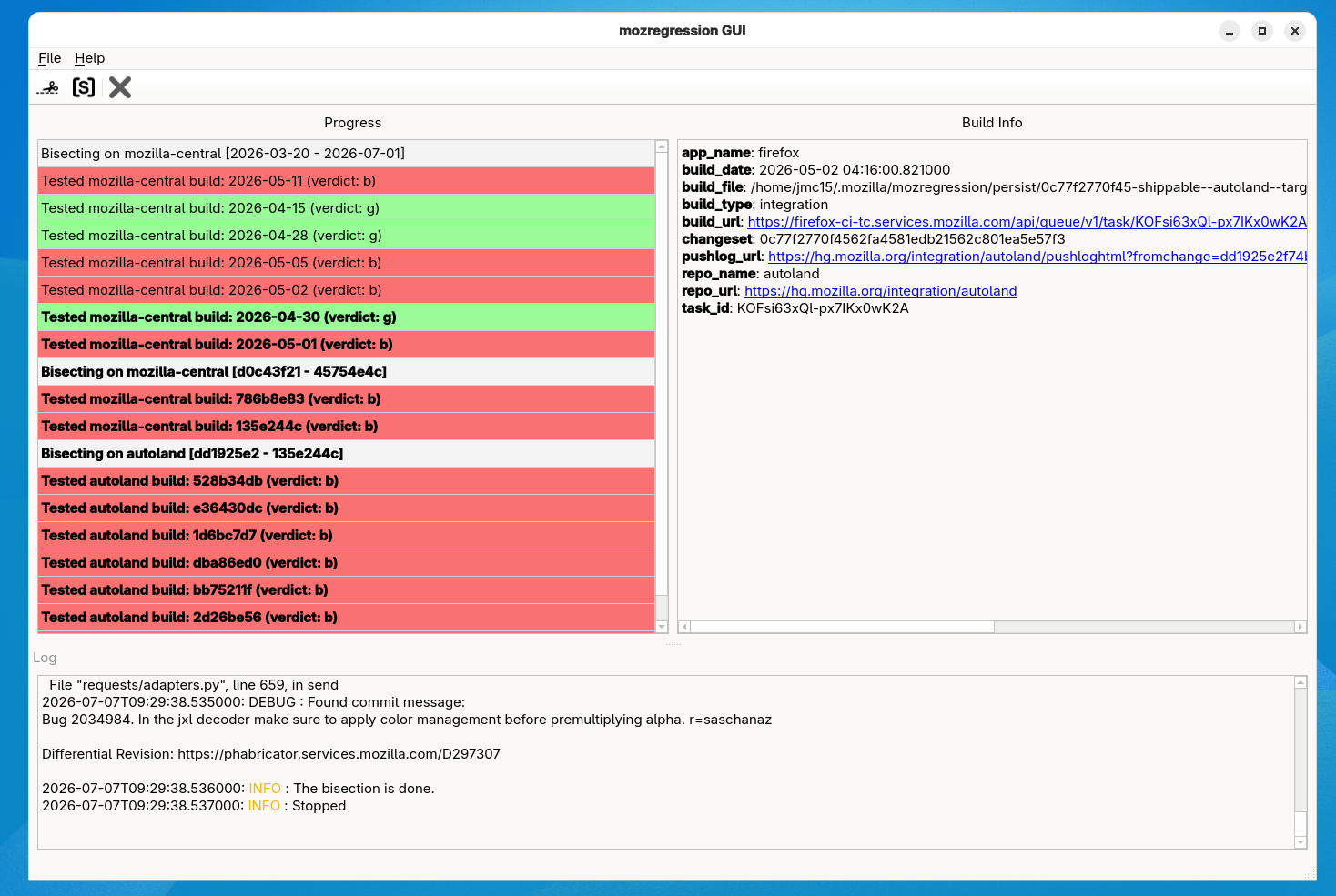
Wonderful (great instincts for capturing all these!) — thanks so much. This might need an extra run or two with more fine–grained passes to confirm it points at the right revision, I seem to be stuck around May 6th for the JPEG XL changes, however this appears like something around May 1st really.
When you get a chance, and are in a mood for one more run, could you please repeat the steps as before, just this time not selecting "release" for the dropdown range on the last wizard step, but keeping a date range instead and running it between 2026-04-29 and 2026-05-02 (word of caution: one of the date fields has 2025 pre–set, so please make sure you're running this year's builds, not from months back;D) and see if you land on the same changeset? Thanks!
Yes that's no problem, but I am a little unsure about the options you mention. I am using mozregression-gui-ubuntu-22.04 (I'm running on Fedora, but it's ok)
(1) In the Wizard, firstly I see Application [firefox], Build architecture [x86_64] and then "Build Type", previously left it as [shippable]; the other options are [ opt / pgo / debug / asan / asan-debug]. Is it one of those you want me to select?
(2) Moving on to profile and custom add-ons, I didn't enter anything at all, but it has persistence set to [clone].
(3) Finally last page of the wizard I see a tick-box for bug instead of regression [ ] previously left blank, and then the two date ranges for last good build / first bad build.
Sorry to be a pain, but could you specify exactly what you would like entered according to the above? I am mindful that I am testing on a live site, so need to cause as little disturbance as necessary - too many logins/logouts might get me blocked... Thanks!.
Muudetud jmc1517 poolt
Sorry I should have been more specific, the only change is the range selection on the last card — 1) as before, default "shippable" fine (the app will figure out once it needs to switch to a more granular); 2) as before, but a note below for convenience; 3) checkbox left blank, date ranges:
last good:  2026-04-29
first bad:  2026-05-02
(if you're picking the dates from the calendar, please be mindful of the correct year as the first input tends to default to year ago)
The only workflow improvement for site logins is, if they persist the session reasonably between restarts, in step 2) to select "clone-first" from the dropdown, meaning it would start with blank slate, but then will reuse that one profile for the whole run, which might help to keep you signed in. After you log in during the first instance, you can even go to its Settings before shutting it down and select "Open previous windows and tabs" in that profile, and since it's persisted now for this run, the subsequent launches would directly reopen your site if you left it in a tab, and also restore session and cookie storage, so chances are you'd still be logged in and appear as the same session as before.
Thanks jbr, that was an extremely easy way to repeatedly log-in (having firefox do it for you!). So I've repeated the test as you suggested and it seems to have come up with something different - I'll leave it up to you to check. The link below is to the whole MozRegression sub-folder, so you have both yesterday's and today's results together with screenshots. I'll attach today's screenshot here as well for convenience. Happy bug-hunting, eh?
https://drive.google.com/drive/folders/1DPOYKFbUpus1O_TCvAAk1BEPRma99f3H?usp=drive_link
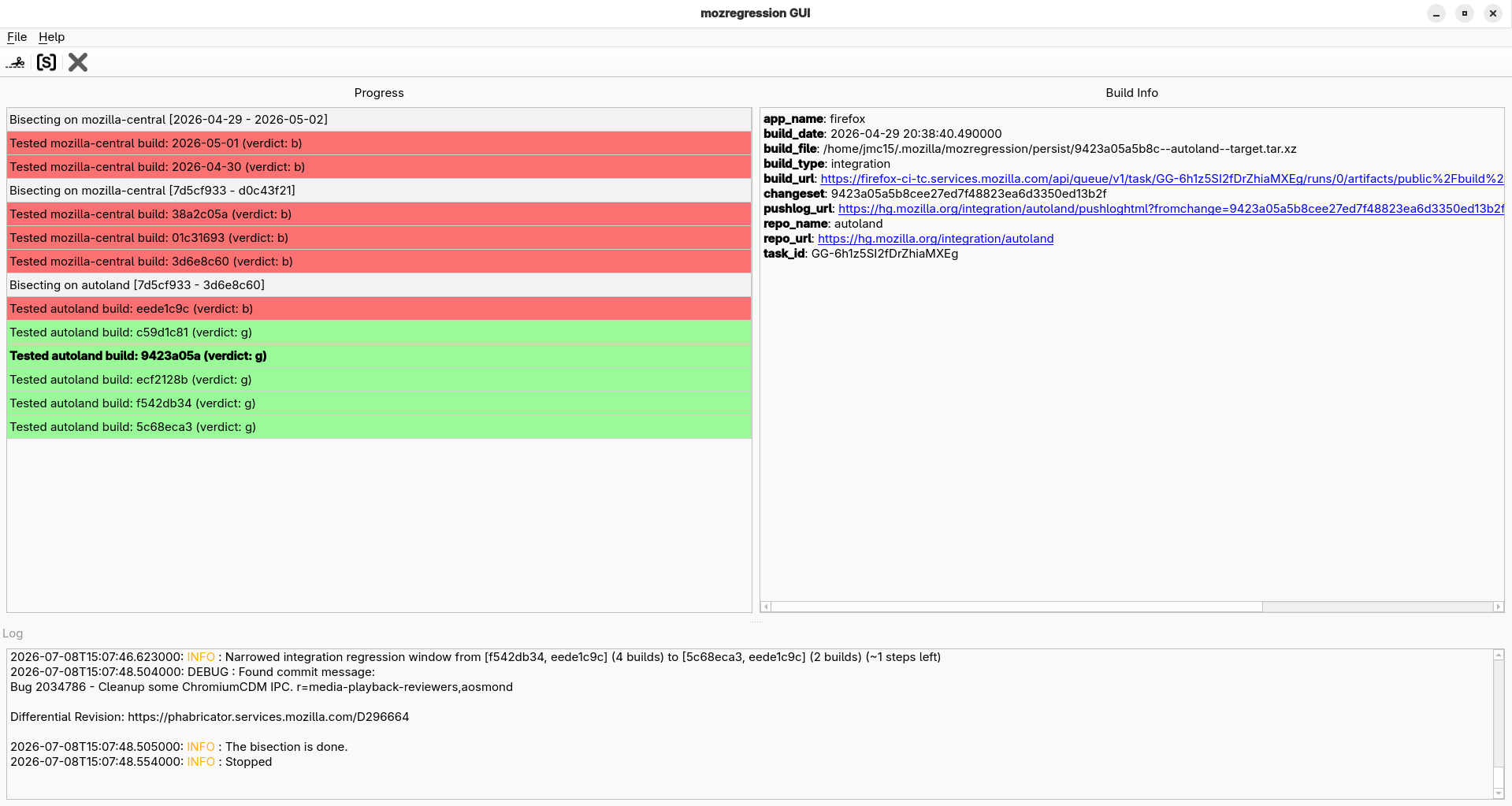
Thanks Jeremy, I'm looking into it, just don't have anything tangible to report back at the moment. While it also says "AV/media" on the tin, the actual underlying change in that range is a security patch of a vulnerability uncovered, so I just run into a lot of red tape currently.