


Mehrere Probleme beim Update von Firefox DEVELOPER

The details:
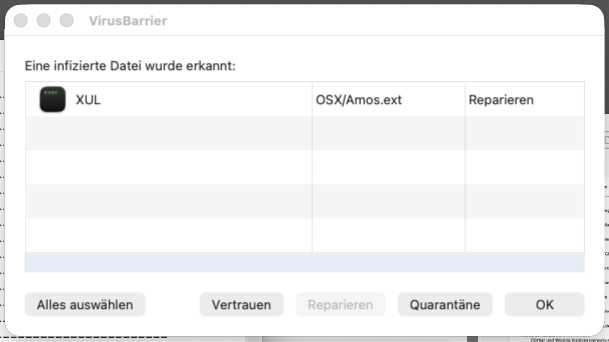
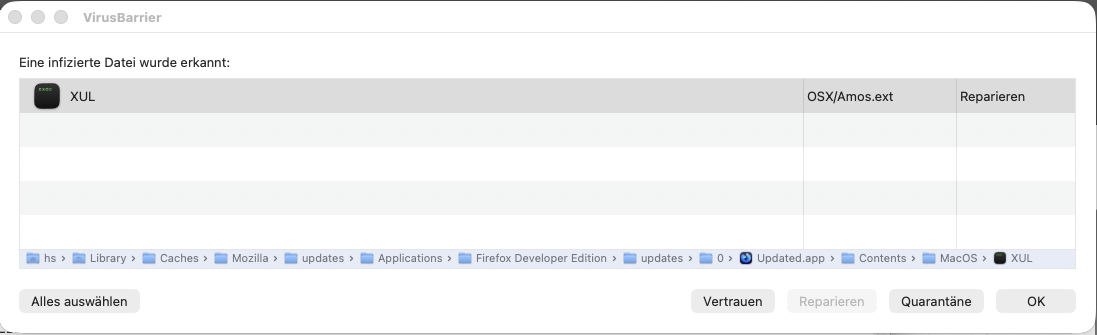
1.) After downloading the update, my antivirus scanner reports an infected file (see screenshots / message + path).
2.) When I try to “Restart Firefox to complete the update,” Firefox briefly “disappears” (whatever happens there) and then “reappears”—but the prompt “Restart Firefox to complete the update” is still there. Unfortunately, this can be repeated as many times as you like without anything changing.
3.) Restarting the computer (Platform: macOS Tahoe 26.5.1) does not resolve the issue either (see screenshot). I always performed previous updates before shutting down the computer—and the next day (since Firefox, as expected, had been closed and restarted), the updated version of Firefox was running.
4.) The suggested solution is to download the “Firefox installer.” But that doesn’t help me, since I need “Firefox DEVELOPER.”
Would uninstalling Firefox DEVELOPER and reinstalling it >WITHOUT DATA LOSS< be a solution??

All Replies (6)
Sorry, here's the summary in English Several issues with the Firefox DEVELOPER update
Valitud lahendus
Yeah you can always download the DMG/PKG in full and use that instead of updating:
Just throw the old icon in Applications to trash, and drag the new one from the installer image in its place. The profile data is not affected by this.
Thank you very much!!
But what about the supposedly infected file? Or maybe the virus scanner is the one that's “infected” …
Oh I'd attribute that to just a false positive in the binary having signature close to some heuristics — given you don't need the updater content anymore now, you can probably just delete the folder so it doesn't bother your AV scanner.
Basically the whole ~/Library/Caches/Mozilla might be just temporary files so I expect you can safely remove these — or just the one that's giving you the alerts. Now when you've replaced the whole app bundle with a newer one, this partial update won't be needed any longer.
That sounds great—thanks again!!
Anything a antivirus or such scanners find in the Cache is harmless if left alone until overwritten or if you delete the Cache in Firefox settings.
An old article on this is https://support.mozilla.org/en-US/kb/Firefox%20cache%20file%20was%20infected%20with%20a%20virus though the steps in Settings have changed https://support.mozilla.org/en-US/kb/how-clear-firefox-cache
A definitions update in the antivirus scanner can fix the false positive.
Keep in mind that the Developers Edition is the same as Beta channel but with additional developer features. A version on the Beta channel usually gets nine to fifteen builds in testing before the version is on the Release channel.