


importing

somehow i managed to import from one email account to another thinking i would like it but i don't like since it just makes me have same mail in 2 places but i don't know and can't find how to cancel the import, can someone tell me how
All Replies (3)
re :import from one email account to another
If people have two email address eg: one in outlook and one in gmail
If they want to accumulate all emails in gmail, then this is usually done via the webmail accounts. Basically forwarding all emails from one server to another. Then in Thunderbird, you would just have the gmail account set up and you would see all email. Both those sent direct to gmail address and all those forwarded from the outlook server to gmail server.
But you say "makes me have same mail in 2 places" so I'm trying to think what might cause that sort of view.
Have you set up a 'Message Filter' to 'Copy' emails from one account to another? The would be in 'Tools' > 'Message Filters' Look for a filter that copies all emails to another account Inbox. Either disable it or delete it.
I notice that previously you asked a question and said you had two email address using 'suddenlink', both set up as Pop accounts. I presume you had set them up as normal mail accounts so each account was shown in Folder Pane and each account had it's own set of folders.
I'm wondering if you have not 'imported' nor 'copied' anything, but are seeing a set up that would display each account Inbox separately and also all in one place in a virtual folder like a Unified Inbox. Did you enable the 'Unified View' in the Folder Pane ?
- 'View' > 'Folders' > You normally would have 'All folders' selected, but have you got 'Unified Folders' selected ?
If yes, then click on the 'Unified Folders' option to remove the selection and go back to a standard view of Folder Pane.
I somehow managed to have my suddenlink email sent to my yahoo email account which makes me have both of them in yahoo. I would like to stop the suddenlink from being importing into the yahoo, it isn't a forward or afilter that i can tell any way, can't remember how it was done to undo it
I can only guess. because you apparently have no idea what you have done and are unable to offer any indication of where to start, but there are only really two possibilities.
1. You directed your mail from Suddenlink into Yahoo. Optimum offer instructions for that here https://myemail.suddenlink.net/webmail/help/richui-English/Ux%20Suite%20Online%20Help/Settings/Mail%20options/Setting%20up%20Auto-forward.htm
2. You asked Yahoo to retrieve your Suddenlink mail. Yahoo offers instructions on how to do that and how to undo that here https://au.help.yahoo.com/kb/SLN36713.html
Thunderbird does offer unified folders that merge mail from multiple accounts into a unified inbox, but that is not placing one account into another it is a discreet folder for say inbox that merges the content of all configured accounts into a global folder and offers the individual account as a sub folder. AN example is shown below.
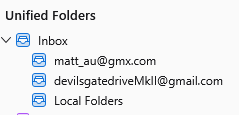
The more traditional "All folders" view represents those same accounts this way.
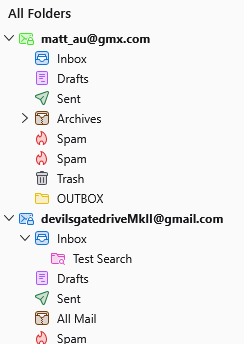
Which view or views you use is controlled from the following menu
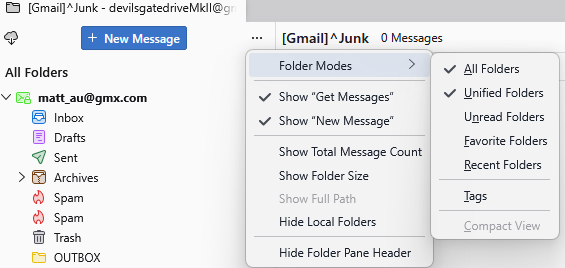
I have no idea if you have merged your accounts as you initially said using your service providers tools, or are only referring to the way the information of presented in Thunderbird. It is up to you to make that call no one but you has access to either your Thunderbird or your mail accounts, so you are going to have to work it out.