


There's a frightening ambiguity in the "add new account" page please help

Hello. I am trying to add a new provider, which means adding a new account. When I click "Add new account" it takes me to a page that asks me to enter my existing account. Does this mean the currently running account or the new account?
All Replies (27)

Thank you for reporting this.
I think the existing account in the "Set up your existing email address" means that you should already have a working email address to add a new account in Thunderbird.
Thunderbird will not create an new email address for you, it just uses your existing email to setup a so-called account in its user interface so that you can use it.
Do you agree?
So you mean I have a working account somewhere else and I want to make a new Thunderbird account? No, I have a working Thunderbird account and I want to add a new account. When it says "Add a working account", that's the account that I already have. Where does the new account come it to this?
For me,
menu - new account - email
will display a new account setup interface, and the "Full Name" field is filled with an existing account name. You can just change that and follow the steps.
Do you have different interfaces?
What I'm seeing is nothing like that. There is no menu - new account - email.
In the new account setup screen, the "Full Name" field is not filled with an existing account name, just a "John Doe" frinstance.
The screen strongly suggests that if I enter a new mail service, Firefox will nuke everything that I have. It does NOT say add an additional provider.
45rpm said
I am trying to add a new provider, which means adding a new account.
Did you already create an email address with your new provider? Usually you do this in the web interface of the provider.
45rpm said
When I click "Add new account" it takes me to a page that asks me to enter my existing account.
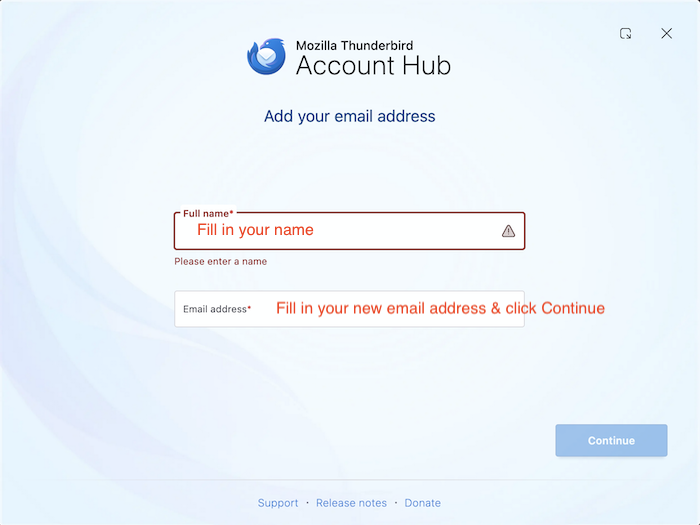
This page is also called Account Hub which serves to set up a new account.
45rpm said
Does this mean the currently running account or the new account?
This means that you fill in the email address of your new provider. In one of the next steps you'll also be prompted to fill in your password to log in your new account.
Muudetud Mapenzi poolt
45rpm said
In the new account setup screen, the "Full Name" field is not filled with an existing account name, just a "John Doe" frinstance.
This is OK
45rpm said
The screen strongly suggests that if I enter a new mail service, Firefox will nuke everything that I have. It does NOT say add an additional provider.
This has nothing to do with Firefox which is a web browser. Thunderbird is an email client. You don't fill in your new provider's name but your name and your new email address and click "Continue" ... etc Setting up a new email account doesn't wipe out already existing other email accounts.
Oops, I meant "Thunderbird" not "Firefox".
And are you now able to add your new email address or do you still need help?
Later. I gotta do life for a while.
Okay, there is still a lot of information fog here.
You say, "Setting up a new email account doesn't wipe out already existing other email accounts. " That doesn't address my problem. My problem is that I want to connect to a new online provider without losing all my saved items: Inbox, Folders, addresses, etc.. I perceive that you are saying that they will still reside in my original account. Okay, great. How do I have them reside in my new account?
Your problem description is not clear at all. Do you want to migrate the data of an existing email account to another provider ? Or did you create a new email address with another provider and now want to set up an account for this new email address ?
Honest, I'm really trying to be clear here. I'm changing providers. I want to keep all my stuff. . The two options that you name sound like the same thing to me. I have been told that the way to do what I want to do is to set up another account. To me, it seems like a new account would be empty. If I need a new account, if that's what I have to do, I want it to have all my stuff in it. If I don't, that would probably solve everything. . Does that make sense? I'm not a computer guy and I don't think like computer guys.
To be on the safe side, whatever you are intending to do, the first action is to create a backup copy of your Thunderbird profile folder: go to Help > Troubleshooting information > Profile Folder > Open Folder... Now quit Thunderbird and copy the profile folder "xxxxxxxx.default-release" (or similar name) to some directory, e.g. Documents.
Your actual email account is it a POP or an IMAP account?" Click on the App button ≡ in the upper right corner and select "Account settings". In the Account Settings tab click "Server Settings" and verify the "Server Type": POP or IMAP?
Muudetud Mapenzi poolt
It says "POP Mail Server".
Then you should know the difference between POP and IMAP. https://support.mozilla.org/en-US/kb/unify-your-pop-email-accounts-global-inbox
45rpm said
It says "POP Mail Server".
Your actual email account is a POP account which means that all messages (received, sent, archived, ...) are stored locally in your Thunderbird profile. DO NOT delete this account. Now you can safely set up your email account which will be hosted by your new provider.
Which brings us to my original question: When I launch my new email provider will I automatically have all my Thunderbird contents in it or not? And if not, how do I make that happen? Am I talking funny or does this make sense?
No, your new email provider can't automatically import the messages stored in your actual POP account. You have first to set up your account with the new provider; if you wish choose the POP protocol again. When your new account is functional you can import messages from your actual account using the "ImportExportTools NG" add-on https://services.addons.thunderbird.net/en-US/thunderbird/addon/importexporttools-ng/

45rpm said
When I launch my new email provider will I automatically have all my Thunderbird contents in it or not? And if not, how do I make that happen?
If you set up your new account in Thunderbird as a POP account, you could copy your folders from the old account to the new account easily. You would not need an add-on to do this. After verifying the copies, you could delete your old account.
Another approach would be to copy your old folders to local folders (not into your new account). You might want to do that if keeping messages from your old account and your new account segregated is useful.
If you set up your new account as an IMAP account (not a POP account) and you want your old messages in your new account, a different approach is required that takes longer and may involve some errors and frustration.
I somehow felt my way to Account Settings > Account Actions > Add Mail Account.
It took me to a page that says "Set up your Existing Email Address", which isn't really what it means, it means set up my new email address, which I'm told I have running but I haven't tried yet. If I put my new mail address in here, is it going to overwrite my current presence or add a second account to it? When I open Thunderbird will I be asked somehow which account I want to connect to? Or does everything just come in?
I am grateful for your kind attention.
UPDATE:
I just hauled off and put my new email address in the "Existing Email Address" box, and after a couple of steps, Firefox opened with a left-hand column folder for my old account and a folder for my new account, which is satisfactory. I suppose I can copy all my old material into corresponding folders under the new account, and I'll be whole. And this gives me a transition period, which is nice.
.
AP
Muudetud 45rpm poolt