


Display Font Unreadable

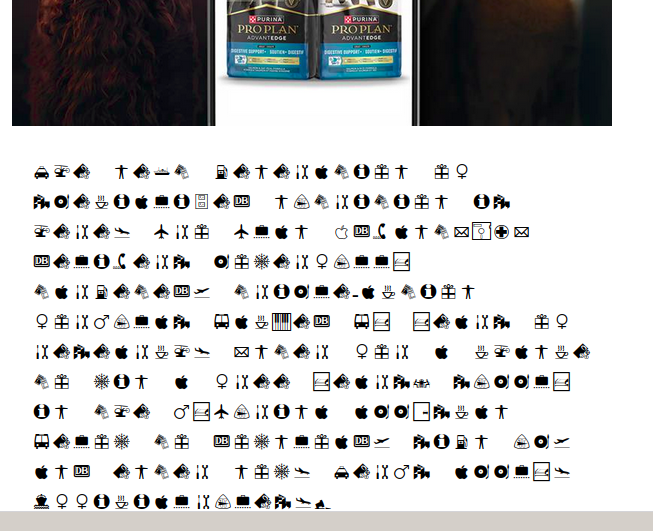
I can't seem to get Thunderbird on Linux Mint to work. Everything font related is a mess. I don't know what default Thunderbird uses when it doesn't know a font but the setting is unreadable. I've messed with a ton of font settings but nothing seems to change anything. Note if I copy the garbage and paste it into a notepad, it is totally readable but there appears to be no way to change this default in Thunderbird. Please help.
All Replies (20)
The text in the image should read:
The next generation of specialized nutrition is here. Pro Plan AdvantEDGE delivers powerfully targeted, triple-action formulas backed by years of research. Enter for a chance to win a free years’ supply in the myPurina app—scan below to download, sign up, and enter now. Terms apply. Official rules.*
Hello there cherry.
What is that photo , is it unknown editor or just text in the email?
What else is not working that you not mentioned
after that installation of Linux Mint , is this version Mint from Linux 2025/2026 ?okay.
Thunderbird is possibly using old code for this subject such as iso-8859-7 code instead of UTF-8.
Is other software having this issues to?
Looking at linux Linux is not the bad runner here. Thunderbird often gives these issues but not widespread.
Looking at UTF-8 Go to >settings>general>fonts and colours>advanced.->to make sure that outgoing and incoming mail options Is set to UTF-8.
Giving that second solution forced encoding , to : Disable the option : Tools > Options > Display > Formatting > Advanced. Use the default encoding in replies whenever possible. After you saw that thunderbird is taking over the senders encryption as displayed in your picture.
.
Muudetud Googlethunderbird. poolt
The photo is the content of the message as displayed in Thunderbird. Only Thunderbird ever looks like this.
The other thing that isn't working is when I compose an email to send in HTML format, the font is like 6 or 8 points. Almost unreadable. Once I send the message, the font is good and easily read. It is only during composition that is so tiny.
Linux Mint 22.3 x86_64 Cinnamon 6.6.7 Thunderbird 140.8.1esr (64-bit)
Thanks
"Go to >settings>general>fonts and colours>advanced."
My Thunderbird doesn't have that option. Settings>General>Fonts and then Default Font. Currently set to Arial 12
Hello there cherry7
Yes , that path had to be for arial 12 settings not UTF-8. I did not intend to give you that. My mistake , to be sure of the situation that UTF-8 is the new format. Go to > Settings > General > Fonts > Advanced And then choose the option utf-8 for incoming and outgoing mail .
Looking at html To do this, adjust the visual or zoom display in thunderbird.
Muudetud Googlethunderbird. poolt

Hello there Cherry 7
Changing the theme Yes, it s better to find out using that default setting. The app version keeps scrambled,yes. Switching to default themes fixes that scrambled view.
Muudetud Googlethunderbird. poolt
"Go to > Settings > General > Fonts > Advanced"
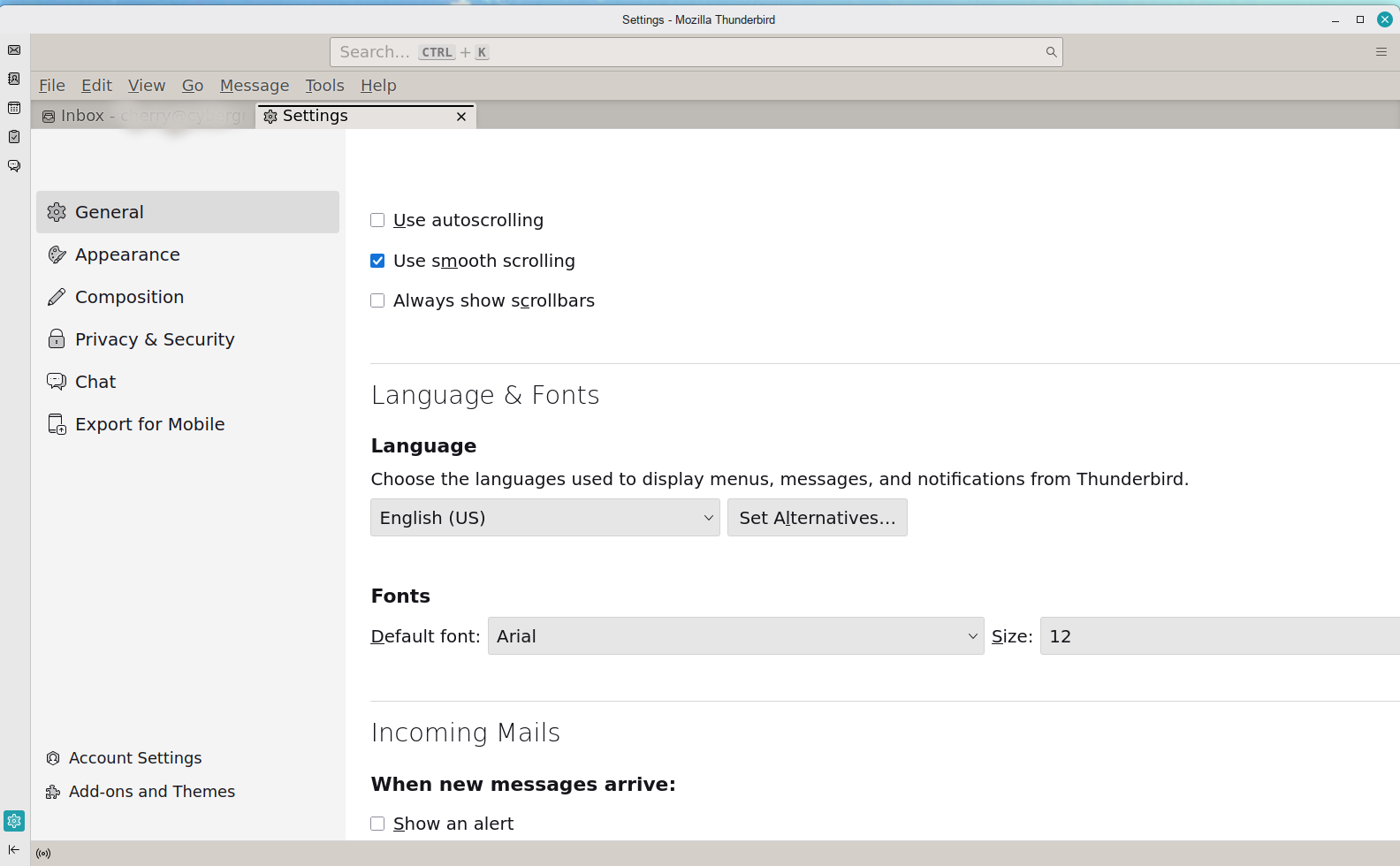
The only thing in Fonts is the Default Font setting. There is no "Advanced" option anywhere. I've used the sans-serif default and Arial as a default but the message is still in hieroglyphics.
Muudetud cherry7 poolt
I'm using the default theme. I never changed it. But, I have always gotten this scrambled font in some, not all, html messages. Only TB does this. None of the 5 web browsers I have do this. None of the document viewers or editors do this. The only place I see this hieroglyphic font is in Thunderbird.
Hello ther e Cherry 7
Hardware acceleration You might look at the hardware acceleration? Can you stop this function? Is it changed to normal view?
Going to the hardware acceleration Settings>General>performance> Uncheck / check ; use the hardware acceleration when available. Restart thunderbird. Did it change behavior?
Muudetud Googlethunderbird. poolt
"You might look at the hardware acceleration?"
No, this is a font substitution issue, not a rendering issue. I have no idea what the hieroglyphic font even is and why it is is the default when Thunderbird doesn't know what to do.
Hello there Cherry 7
Graphic cards can scramble text , and email programs to. Did you change it to UTF-8.?
Muudetud Googlethunderbird. poolt
Hello there Cherry 7
Looking for the better option To be more sure you can use troubleshoot mode. To find out if bad add ons are there ? You can delete or update them. Turning of the antivirus scanners for a moment and see if they had been involved in this issue for having slowly pc and scrambled text.
Use https://support.mozilla.org/en-US/kb/troubleshoot-mode-thunderbird
Muudetud Googlethunderbird. poolt
"Did you change it to UTF-8.?"
No. there is no place to change it. There is no Advanced option. As shown earlier, all you have is font and size - nothing else under fonts.
"To be more sure you can use troubleshoot mode. To find out if bad add ons are there ? You can delete or update them. Turning of the antivirus scanners for a moment and see if they had been involved in this issue for having slowly pc and scrambled text."
I used trouble shoot mode but there was nothing relevant to fonts. I'm on Linux so I don't have any antivirus scanners. I only have one add-on and it is disabled (delete duplicate messages). PC is fast I had this with the previous two releases of Linux Mint and several upgrades of Thunderbird. This is not a new problem.
Cherry, more ideas than solutions:
In Settings > General, you have tried various fonts, but this message always remains in a symbol font?
I used trouble shoot mode but there was nothing relevant to fonts.
This statement suggests that you may not actually have tried troubleshooting mode. Troubleshooting mode is not something that could have something specific to fonts or anything else. It's just another way of launching Thunderbird. Did you go the "help" menu and select "Troubleshoot mode"? It is different from "Troubleshooting information". If not, would you please try that and see if the problem occurs?
About the very small font in the composition window: Have you checked the font size setting in Settings > Composition > HTML style?
Which version of Thunderbird? Where did you get it? I am curious about the absence of an "Advanced" button.
Troubleshoot mode, all add-ons disabled (I only have one) Message remains scrambled Show remote content or not, message is still scrambled Yes, I have tried other fonts - no difference when TB shows symbol fonts Yes, Setting is currently Font: Arial, Helvetica Size: Medium. I have tried others too. Thunderbird 140.8.1esr (64-bit) from the Linux Software Repository Settings are under Edit and there is no Advanced option. I have posted images earlier of what I see. NOTE: Windows versions are different than Linux versions.
Graphic cards can scramble text , and email programs to. Did you change it to UTF-8.?
It's a laptop with Intel Iris Xe graphics controller There is no place to set UTF-8 that I can find. It isn't in any font related setting area.
Under the View menu is an option to show the HTML source. Can you see what font is set for that message with the system font?