


Why does it take 30 minutes or more before Thunderbird downloads the new messages for the day (win10)

Why does it take 30 minutes or more before Thunderbird downloads the new messages for the day. Most of the time Thunderbird will not download new message for 30 minutes or more. And some times it will let me know i have new messages and not download them Pleas help. I must have missed some indicator
Thank You Richard Merrell <redacted>
Muudetud Wayne Mery poolt
Valitud lahendus
> Dont use safe mode
I don't think there will be much point in continuing investigation here unless we know whether the problem reproduces in safe mode https://support.microsoft.com/en-us/help/12376/windows-10-start-your-pc-in-safe-mode
> Av no idea
I believe Help > Troubleshooting Information will list them. Likely there will be at least Windows Defender.
All Replies (14)
"30 minutes or more", from what action?
Check the first few steps of https://wiki.mozilla.org/Thunderbird:Testing:Memory_Usage_Problems
Richard, what have you learned?
Nothing There is still a delay of 20 minutes or more. However once it downloads the backlog new messages come in a timely fashion
I do not leave my computer on 25/7 When i am finished for the day i close all apps

Did you verify parameter : Server Setting \ Check for new messages every <NNNN> minutes
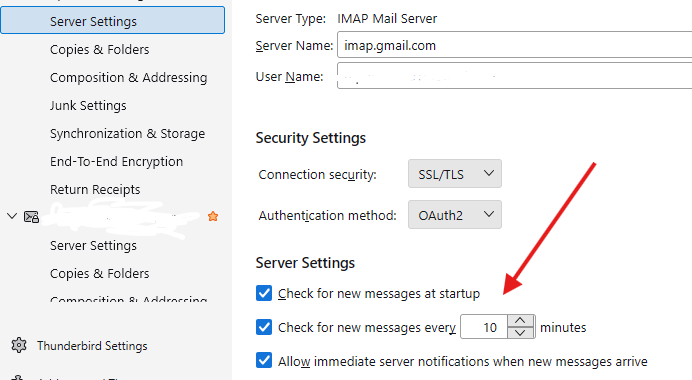
Also, please post the account settings fshown at Help > Troubleshooting Information
Yes Check for messages on startup is on Check for messages ever 2 minutes
Now try setting it to check messages every 15 minutes. Might sound odd, but your initial download for the day may be running over your timed download causing these issues. More frequent is not more efficient.
Set the check messages to 15 minutes now 40 minutes and waiting Not sure why but it now takes longer
Who is your mail provider? What are your settings at account settings > server settings? What AV and networking software are installed? You tested WIndows starting in safe mode?
mediacom mail.mediacombb.net port 993 SSL mail.mediacombb.net port 465 SSL/TLS Dont use safe mode Av no idea Microsoft edge? Shift Browser?
Valitud lahendus
> Dont use safe mode
I don't think there will be much point in continuing investigation here unless we know whether the problem reproduces in safe mode https://support.microsoft.com/en-us/help/12376/windows-10-start-your-pc-in-safe-mode
> Av no idea
I believe Help > Troubleshooting Information will list them. Likely there will be at least Windows Defender.
I did resolve the issue without safe mode I am tired of flippant responses where they appear to be a way to avoid doing actual research I have been working on computers since the 1960s and working with PCs since the 1980s You should be ashamed of the response apparently to avoid providing actual help
Can you share please your solution? It would be most helpful to other users.
p.s. thanks for sharing that you solved it.