


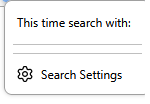
"This time search with" field suddenly started showing up again and cant be removed

I have disabled all the other search settings in order to get rid of this field years ago. Now, suddenly it starts to show up again. I go to the settings, somehow it has all renabled itself, so I disable it. And yet, it STILL shows up with no content in it. How do I remove this?
Valitud lahendus
What helped was going into the about:config and toggling this: browser.urlbar.scotchBonnet.enableOverride
Loe vastust kontekstis 👍 1All Replies (3)
Hello
According to your remarks and screenshot.
Take a look at https://connect.mozilla.org/t5/discussions/address-bar-updates-now-live-in-firefox-nightly/m-p/77329/highlight/true#M29547 and for information purposes, with the help of userChrome.css
Muudetud Agent virtuel poolt
Valitud lahendus
What helped was going into the about:config and toggling this: browser.urlbar.scotchBonnet.enableOverride
Hello
Take a look at https://bugzilla.mozilla.org/show_bug.cgi?id=1949207#c4