


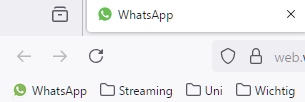
Desaturated icons in bookmarks toolbar

The icons in the bookmarks toolbar are desatured compared to the icons shown in tab bar (e.g. WhatsApp). The problem only occurs on Windows. Is there any way to fix this?
All Replies (2)
I get a different icon, strangely, it's reversed (green outline, green phone, transparent otherwise).
What I notice is that the green definitely looks brighter on the tab when it's the active tab and has a white background, but when it's a background tab and both the tab and bookmarks toolbar have a similar gray background, they both look equally dull. That might mean that the icon uses some transparency even in the colored areas. ??
Or maybe Firefox desaturates on both the Bookmarks Toolbar and the inactive tab. I doubt there is a setting for that, but you could ask the style wizards on https://www.reddit.com/r/FirefoxCSS/ to take a look at whether there is a custom CSS solution.