


Lockwise seems not to be enabled for some websites

Long time Bitwarden user. Trying out Lockwise. So far I like it but it seems not to work on some of my websites where I need to log in. On this website https://www.ewealthmanager.com/eWMLogin/account/login/ for example, on right click in username field does not show fill login. I have verified that the web address, username, and password are correct in Lockwise.
All Replies (2)
That look like a weird form.
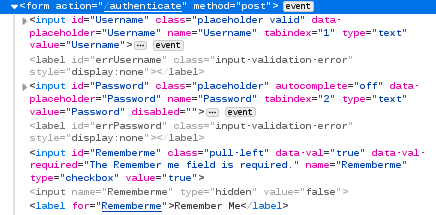
If I use the Inspector then both fields have type="text" and the password field is disabled (i.e. I can't click it).
If I type in the name field and press the tab key to go to the password field then the password field is enabled and gets type="password" and I see "Fill Password" in the context menu.
I don't know how the Firefox Password Manager handles such a login form.
Ok, so now what?