

Teema arhiveeriti.
Please ask a new question if you need help.

Solved
Archived
Can't close pinned tabs

Hello, I want to bring to the attention something that seemed overlooked. On macOS, when you pin a tab, there is no option to close that tab, I have to unpin it and then I can close it. This is really absurd. Could you please add an option to close the specific pinned tab? Every other browser has it.
Thank you
Hello, I want to bring to the attention something that seemed overlooked. On macOS, when you pin a tab, there is no option to close that tab, I have to unpin it and then I can close it. This is really absurd. Could you please add an option to close the specific pinned tab? Every other browser has it.
Thank you
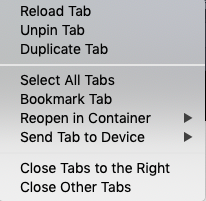
Muudetud afern247 poolt
All Replies (2)
Valitud lahendus
I'm still seeing this item.
Start Firefox in Safe Mode to check if one of the extensions ("3-bar" menu button or Tools -> Add-ons -> Extensions) or if hardware acceleration is is causing the problem.
- switch to the DEFAULT theme: "3-bar" menu button or Tools -> Add-ons -> Themes
- do NOT click the "Refresh Firefox" button on the Safe Mode start window
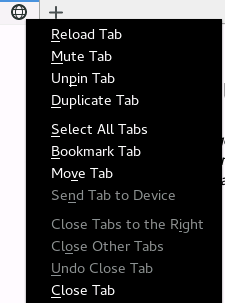
I had forgotten that I modified it on the chrome.css. Thanks