


Autofill blocking captcha

How can I turn off autofill trying to fill in my Captcha box with previously saved Captchas? I'm not even sure why previously used Captchas are being saved.
This is incredibly frustrating because the drop down menu blocks the new Captcha I need to enter. Please help. :(
Valitud lahendus
You can press the ESC key to close the drop-down list.
Loe vastust kontekstis 👍 1All Replies (6)
See screenshot.
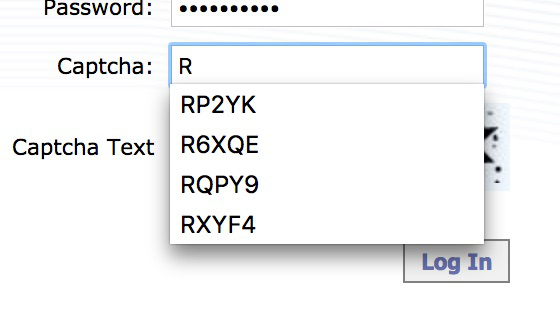

That would be the form filler built into Firefox.
Type about:preferences#privacy<enter> in the address bar.
The button next to History, select Use Custom Settings.
Turn on Remember My Browsing And Download History At the bottom of the page, turn on Clear History When Firefox Closes. At the far right, press the Settings button. Turn on ONLY Cache and Form And Search History leaving the others off.
Valitud lahendus
You can press the ESC key to close the drop-down list.
FredMcD said
That would be the form filler built into Firefox. Type about:preferences#privacy<enter> in the address bar. The button next to History, select Use Custom Settings. Turn on Remember My Browsing And Download History At the bottom of the page, turn on Clear History When Firefox Closes. At the far right, press the Settings button. Turn on ONLY Cache and Form And Search History leaving the others off.
Thank you for your help and clear and precise instructions! I appreciate that. I just did everything you said. We'll see how it plays out. Thank you again for replying and helping.
Glad to help. Safe Surfing.