


Synchronization with a dead pc

I reinstalled the OS 'cause of problems with my PC. New Firefox has no sync by a Firefox Sync key. How can I take my bookmarks back?
Solución elegida
in this case you'd probably have to download the prior firefox version, disable automatic updating for the moment (in options > advanced > update), link it to the old sync account and upgrade after you have successfully restored your data this way...
Todas las respuestas (6)
Should be able to go to the little icon on the top right and see a little section that says Sign in near the bottom of the drop down menu.
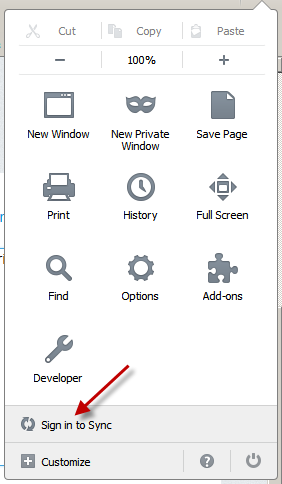
Sorry, this is a better representation to what I was saying

The problem that there's only a new sync, and my bookmarks was synchronized by the old one (that used a Firefox Sync Key).
Solución elegida
in this case you'd probably have to download the prior firefox version, disable automatic updating for the moment (in options > advanced > update), link it to the old sync account and upgrade after you have successfully restored your data this way...
Found this little gem for ya: How to update to the new Firefox Sync
Modificadas por cryptochange el
Thank you, it worked!