I had a version of the browser 3.6 and then I install the latest version 4 BETA 6 and then after a few hours I uninstall the new one ( 4 beta 6 ) and when i go to the old version i found that all passwords had gone, Is there a way to recover it , ?

I had a version of the browser 3.6 and then I install the latest version 4 BETA 6 and then after a few hours I uninstall the new one ( 4 beta 6 ) and when i go to the old version i found that all passwords had gone, Is there a way to recover it , ?
Todas las respuestas (2)
The two Firefox version are not compatible. You should always create a new profile when you want to try out test builds like the Firefox 4.0 beta version. It is always possible that files need to be upgraded to work with such new versions and in that case you can't downgrade without losing data.
If you need to access the passwords then you have to reinstall the beta version.
See also http://kb.mozillazine.org/Password_Manager#Printing_passwords
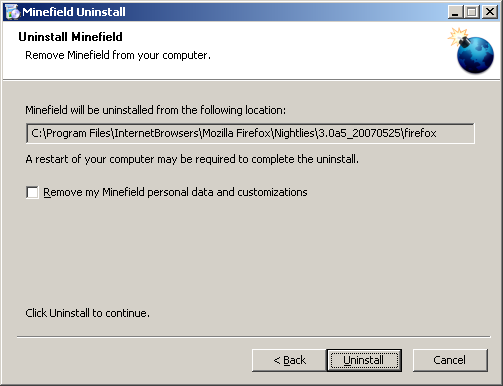
When you uninstalled 4.0b6 did you use the option to Remove my Minefield personal data and customizations ?
See screenshot
If so, all your Firefox / Minefield data was removed. The uninstaller doesn't differentiate between Profiles for specific versions, it deletes all your Firefox / Minefield Profiles including the \Profile\ folder and the profiles.ini file.