


v144.0.1 - how to fix: calendar goes off screen to the right

How can I set the calendar to completely show on the screen - currently in Full Screen mode half of Sunday is off the screen, including the settings icon next to Day/Week/Multiweek/Month. My monitor is a 19" diagonal 4:3 - not a widescreen 16:9. For what it's worth the mail screen displays fine
Thanks, Marc
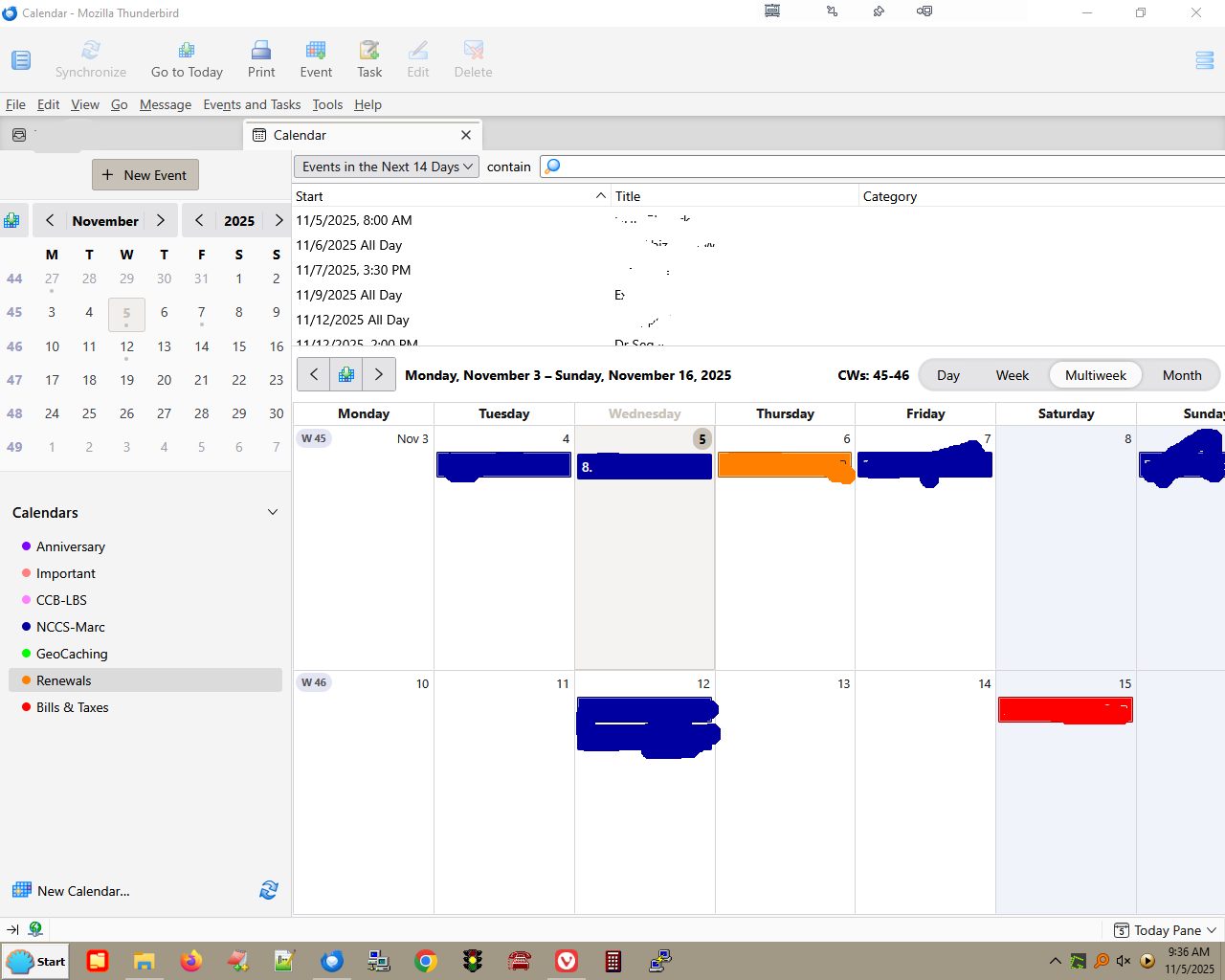
Modificadas por major4579 el
Solución elegida
Possibly a broken layout. Launch again in safe mode, check 'reset toolbars...', and 'make changes and restart'.
https://kb.mozillazine.org/Safe_Mode#Safe_Mode_options
Leer esta respuesta en su contexto 👍 0Todas las respuestas (3)
Does it look correct in safe/troubleshoot mode (hold Shift when launching TB)?
When I started TB in troubleshooting mode, I did NOT check "Disable all add-ons" or "Reset toolbars and controls". Yes it looked correct in this mode - what does that mean? Thanks
Solución elegida
Possibly a broken layout. Launch again in safe mode, check 'reset toolbars...', and 'make changes and restart'.