Windows 10 reached EOS (end of support) on October 14, 2025. If you are on Windows 10, see this article.

Buscar en Ayuda

Avoid support scams. We will never ask you to call or text a phone number or share personal information. Please report suspicious activity using the “Report Abuse” option.

Learn More

Sponsored Content on New Tab

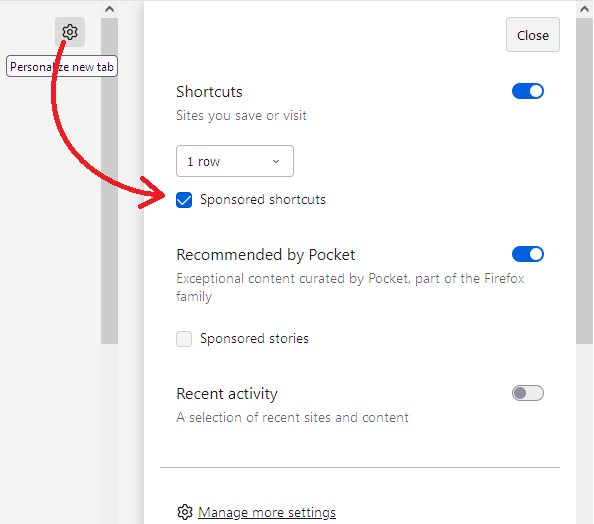
I often see a Shortcut on my New Tab that I have never gone to, which says "sponsored" on it. I do not want these ads. I have looked up the answer: https://support.mozilla.org/en-US/kb/sponsor-privacy?as=u&utm_source=inproduct I can manually delete a sponsored shortcut once, but this does not stop them from coming onto future New Tabs. My problem is, the long-term answer simply does not work. Settings -> Home -> Firefox Home Content simply does not contain a section that says "Sponsored shortcuts" and therefore this solution is not accessable. I am on Version 120 as suggested. What is going wrong? How do I prevent these ads from appearing on the New Tab page?

I often see a Shortcut on my New Tab that I have never gone to, which says "sponsored" on it. I do not want these ads. I have looked up the answer: https://support.mozilla.org/en-US/kb/sponsor-privacy?as=u&utm_source=inproduct I can manually delete a sponsored shortcut once, but this does not stop them from coming onto future New Tabs. My problem is, the long-term answer simply does not work. Settings -> Home -> Firefox Home Content simply does not contain a section that says "Sponsored shortcuts" and therefore this solution is not accessable. I am on Version 120 as suggested. What is going wrong? How do I prevent these ads from appearing on the New Tab page?

Todas las respuestas (2)

See the article, sections How to delete, How to disable.

https://support.mozilla.org/en-US/kb/sponsor-privacy

Hmm, the Sponsored shortcuts box is missing? The attached image is from the little gear/wheel/cog on the new tag page: