


Fedora Linux with Intel - videos don't play/very slow-to-load, and freezing
I ran a loghttps://pastebin.com/jydVHHs0 of playing a youtube video mediaencoder? not sure if encoding issue or something else
The videos take a long time to play. I upgraded my system recently and was removing and reinstalling audio-related utilities with DNF.
Solución elegida
jonzn4SUSE said
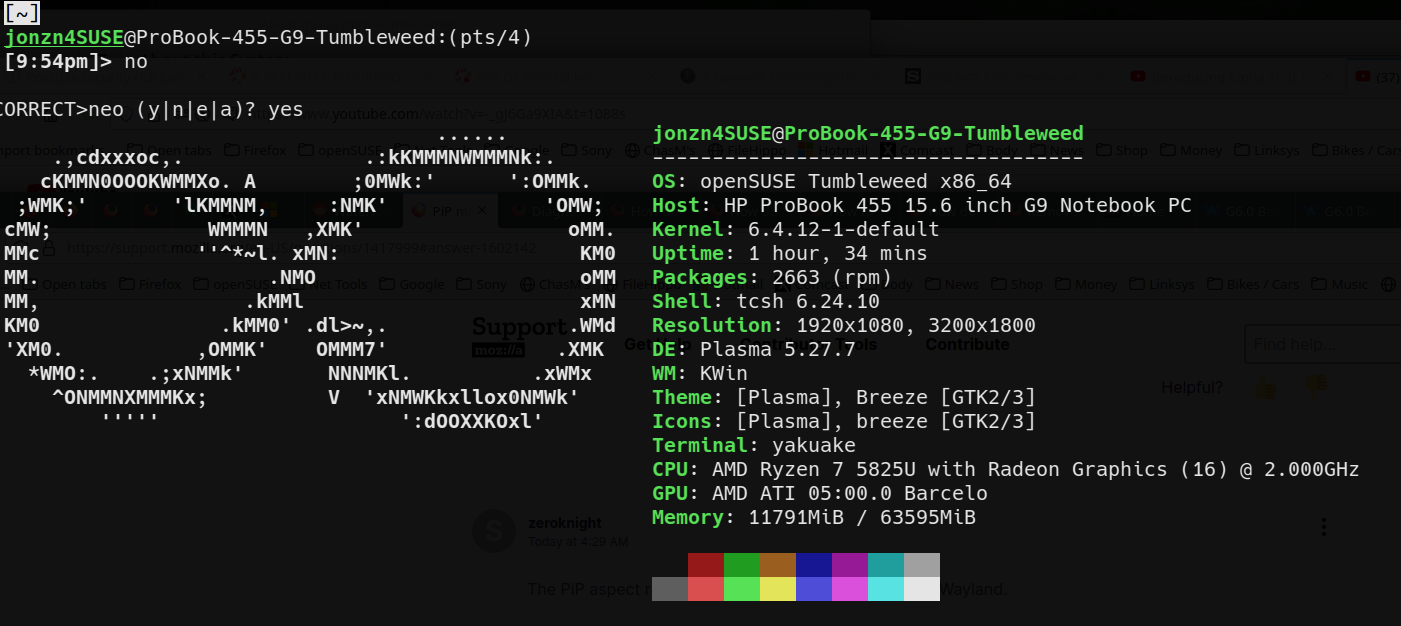
Can we get a link to the video? Are you in X11 or Wayland? What Desktop? Can we get a screenshot of neofetch to see what you're working with? Did you try Firefox in Safe Mode? https://support.mozilla.org/en-US/kb/diagnose-firefox-issues-using-troubleshoot-mode#search104
Not why this would be the solution for me but a fix to my presenting problem was found iin replacing wireplumber with pipewire-media-session and removing wireplumber-libs. This presenting glitch was not occurring with wireplumber for a couple of weeks. Possibly some configuration relating to wireplumber maybe changed when I was using dnf to remove a bunch of sound utilities. I thought I actually removed wireplumber but I hadn't.
Just for thoroughness, however, herehttps://youtu.be/5x94t6qGGv8 is info in case it could help others: safemode made no difference. I installed pipewire-media-session before trying troubleshoot mode so I am inclined to believe that would not have otherwise made a difference.
my specs: OS: Fedora Linux 38 (Workstation Edition) x86_64 Host: HP Spectre x360 2-in-1 Laptop 16-f1xxx Kernel: 6.4.15-200.fc38.x86_64 Uptime: 14 mins Packages: 2361 (rpm), 45 (flatpak) Shell: bash 5.2.15 Resolution: 3072x1920 DE: Hyprland Theme: Adwaita [GTK3] Icons: Adwaita [GTK3] Terminal: gnome-terminal CPU: 12th Gen Intel i7-12700H (20) @ 4.600GHz GPU: Intel Alder Lake-P Memory: 2314MiB / 15670MiB
thanks for the questions
Todas las respuestas (4)
sudo dnf install ffmpeg
or
flatpak install org.freedesktop.Platform.ffmpeg-full
flatpak install org.freedesktop.Platform.VAAPI.Intel
zeroknight said
sudo dnf install ffmpegorflatpak install org.freedesktop.Platform.ffmpeg-full flatpak install org.freedesktop.Platform.VAAPI.Intel
I already have ffmpeg. Didn't have the flatpak plugin. Had the vaapi flatpak plugin.
No difference in flatpak or regular install. Both have same behavior.
Can we get a link to the video? Are you in X11 or Wayland? What Desktop? Can we get a screenshot of neofetch to see what you're working with? Did you try Firefox in Safe Mode? https://support.mozilla.org/en-US/kb/diagnose-firefox-issues-using-troubleshoot-mode#search104
Solución elegida
jonzn4SUSE said
Can we get a link to the video? Are you in X11 or Wayland? What Desktop? Can we get a screenshot of neofetch to see what you're working with? Did you try Firefox in Safe Mode? https://support.mozilla.org/en-US/kb/diagnose-firefox-issues-using-troubleshoot-mode#search104
Not why this would be the solution for me but a fix to my presenting problem was found iin replacing wireplumber with pipewire-media-session and removing wireplumber-libs. This presenting glitch was not occurring with wireplumber for a couple of weeks. Possibly some configuration relating to wireplumber maybe changed when I was using dnf to remove a bunch of sound utilities. I thought I actually removed wireplumber but I hadn't.
Just for thoroughness, however, herehttps://youtu.be/5x94t6qGGv8 is info in case it could help others: safemode made no difference. I installed pipewire-media-session before trying troubleshoot mode so I am inclined to believe that would not have otherwise made a difference.
my specs: OS: Fedora Linux 38 (Workstation Edition) x86_64 Host: HP Spectre x360 2-in-1 Laptop 16-f1xxx Kernel: 6.4.15-200.fc38.x86_64 Uptime: 14 mins Packages: 2361 (rpm), 45 (flatpak) Shell: bash 5.2.15 Resolution: 3072x1920 DE: Hyprland Theme: Adwaita [GTK3] Icons: Adwaita [GTK3] Terminal: gnome-terminal CPU: 12th Gen Intel i7-12700H (20) @ 4.600GHz GPU: Intel Alder Lake-P Memory: 2314MiB / 15670MiB
thanks for the questions