


Wrong Download File Type

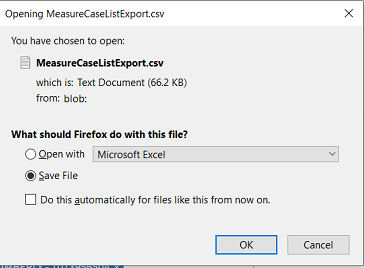
When I try to open a file from a particular site, a .csv file, Firefox seems to think it's a txt file, as seen in the attached image. When I save the file it downloads fine as a .csv, as it should. Why is it that this .csv is seen as a .txt only when selecting "open" but not "save" and how can I fix this? Thank you.
When I try to open a file from a particular site, a .csv file, Firefox seems to think it's a txt file, as seen in the attached image. When I save the file it downloads fine as a .csv, as it should. Why is it that this .csv is seen as a .txt only when selecting "open" but not "save" and how can I fix this? Thank you.
Todas las respuestas (2)

What's your computer system and Firefox version?
This might be a system issue. Open the computer's file browser and locate that file. Right-click on it and select Properties.
Select General. What does it say to the right of Opens With ?
This usually happens if the server isn't configured properly and sends the file as a text file.
You can check the HTTP response headers in the Web Console or in the Browser Console.