Windows 10 reached EOS (end of support) on October 14, 2025. For more information, see this article.

Buscar en Ayuda

Avoid support scams. We will never ask you to call or text a phone number or share personal information. Please report suspicious activity using the “Report Abuse” option.

Learn More

Firefox has no sync now in the menu

  • 1 respuesta
  • 2 tienen este problema
  • 35 visitas
  • Última respuesta de cor-el

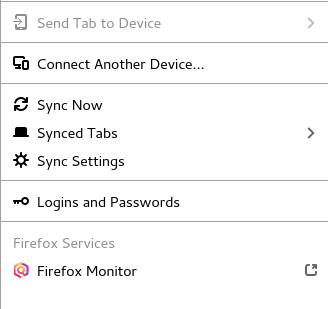
I have been trying to set up my Note 9 and my computer to sync. I was following instructions and I have no "sync now" menu item. I am logged in and under my email account, I can't even take a screen shot of the menu so this is what is under my email protection dashboard new window new private window restore previous session zoom Edit library logins and passwords add-ons Option Customize Open file save page as Print find in this page more web dev help exit Help hasn't provided any help to this problem. I am also up-to-date with firefox. Has Sync been eliminated? I did notice a lot of other problems when looking for help.

I have been trying to set up my Note 9 and my computer to sync. I was following instructions and I have no "sync now" menu item. I am logged in and under my email account, I can't even take a screen shot of the menu so this is what is under my email protection dashboard new window new private window restore previous session zoom Edit library logins and passwords add-ons Option Customize Open file save page as Print find in this page more web dev help exit Help hasn't provided any help to this problem. I am also up-to-date with firefox. Has Sync been eliminated? I did notice a lot of other problems when looking for help.

Todas las respuestas (1)

You should find "Sync Now" in the Firefox Account toolbar button's drop-down list. You can also access this menu via your email address in the "3-bar" Firefox menu button drop-down list.