


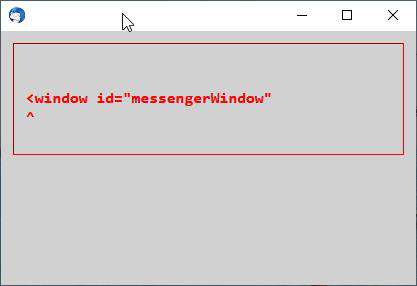
error message read <window <="" id="messengerWindow" p=""></window>
I cannot open Thunderbird as I get an error message - <window id="messengerWindow" . i have uninstalled and reinstalled but same message < p></window>
Modificadas por Wayne Mery el
Solución elegida
If you are using version 78, please try https://archive.mozilla.org/pub/thunderbird/candidates/78.1.0-candidates/build1/
Leer esta respuesta en su contexto 👍 3Todas las respuestas (14)

pmitchell1 said
Eureka Thanks Wayne - I found the build and it worked a treat Thanks to all for your patience and help Pete
Hello PMitchel (or Wayne).
Please, I have exactly the same problem. Tell me how do you solve it, using the "build method".
I have no idea what to do!
Thanks
Wayne Mery said
If you are using version 78, please try https://archive.mozilla.org/pub/thunderbird/candidates/78.1.0-candidates/build1/
PLEASE Wayne, tell me what to do exactly....with this solution that you said.....
I have no idea...
Thank you!
Wayne Mery said
If you are using version 78, please try https://archive.mozilla.org/pub/thunderbird/candidates/78.1.0-candidates/build1/
Just registered to say that this solution solved my identical problem. Cheers.
dcldesign said
Wayne Mery said
If you are using version 78, please try https://archive.mozilla.org/pub/thunderbird/candidates/78.1.0-candidates/build1/Just registered to say that this solution solved my identical problem. Cheers.
Ok, but I want to know what to do. What I suppose to do with this directory? https://archive.mozilla.org/pub/thunderbird/candidates/78.1.0-candidates/build1/
Thank you.
Plus 1 with the exact same problem after migrating a profile to a new pc. Like many of the above can only open TB in safe mode. Also wanting to know how to install 78.1.0 bulid.
Same problem here.
I fixed it by uninstalling the current version (78.4.3) and installing older version from https://archive.mozilla.org/pub/thunderbird/candidates/78.1.0-candidates/build1/win64/en-GB
Once installed I checked for updates, and it downloaded and installed 78.4.3 again and this time it works.
Thanks to previous posters for helping.
Thanks Wayne, the new build Thunderbird Setup 78.1.0.exe 48M 28-Jul-2020 21:37 US-EN solved the issue. The previous one worked only starting in safe mode but just adding Exquilla (I have two exchange accounts) prevented startap.
Hello Pietro, For some unknown reason i can't open my mails for when i click on ThunderbirdPortable.exe, all i get is a grey window that opens in the top left corner of my laptop desk with the following message written in red:
window id="" id="messengerWindow"
Is there any way you could help me? Thank you very much in advance. Kind regards Alain
Modificadas por Wayne Mery el
Sorry, this is the exact message: window id="messengerWindow"
Some users have fixed this problem by disabling hardware acceleration in Options/General/Indexing.
Hello,
I've made an account so that I can share my solution with y'all. The problem in my case turned out to be either the dutch language addon or the google calender addon. The solution is to go into your profile folder and remove these addons/xpi stored in the extension folder (cut and paste them somewhere else). If that does not work try that with all the addons and start the program. If it starts normally, either manually add the addons from scratch (new install through webpage) or add them one by one from your saved location. Do a restart between each added addon to isolate the problem. I'm on linux by the way, that should not make a difference. Problem started after a fresh install of the OS and putting backed-up profile contents into the new profile. Make a backup of your profile first just in case! Greetings

Same problem here with my 78.6.0 (64 bits) since this morning
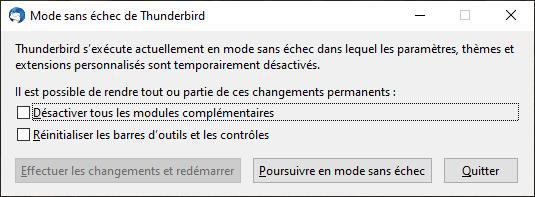
I tried in safe mode (holding Shift and "Continue in safe mode") => OK
But, in the dialog:
- 'Disable all add-ons'n and restart => Nope
- 'Reset toolbars and controls' and restart => Nope
Also tried to uninstall / install again => Nope Disable hardware acceleration => "Nope"
'thunderbird.exe -jsconsole' => blank console
Modificadas por Arfy el
Same thing happened to me (with thunderbird 78.6.0) after I cloned my harddrive to a ssd. Bit-by-bit copy ... strange. But got it solved!
Started from terminal using thunderbird --safe-mode, all add-ons etc. edisabled, then simply re-installed my add-ons. Language pack and dictionary so far. Exited. Next time thunderbird started normally without the safe mode & everything was fine again.
Modificadas por mathieu3 el
After LOT OF tests, I did the following:
- copy Thunderbird full path in clipboard
- open a cmd.exe
- paste it to cmd.exe with option to launch Profile Manager
On my W10:
"C:\Program Files\Mozilla Thunderbird\thunderbird.exe" -ProfileManager
I selected "default" profile Thunderbird launched well ... without safe mode.
After quitting it and relaunching it, it worked without problem =)
And bug created there also: https://bugzilla.mozilla.org/show_bug.cgi?id=1684008