


Google reminders are not synchronized / shown in my lightning calendar.

I have just installer Thunderbird and I synchronized my Calendar and it appears to be working for all events. My problem is that my reminders are not being synchronized (or shown). Do I need to configure something extra? How can I make it show up in my calendar?
Todas las respuestas (2)
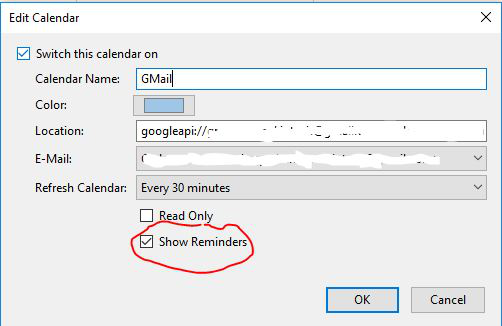
I also have this problem, and have been experimenting to find the root cause. I would have thought that checking the option for "Show reminders" (Edit-->Calendar Properties") was all that should be required. See attached image. But no success yet.
Using TB 52.9.1 (32-bit), Lightning 5.4.9.1 and Provider for Google 4.4.2.
I don't think this can be resolved without a new API from Google for reminders. Only events can be accessed at the moment...
"Reminders are not part of the API for third party calendars."
See: https://productforums.google.com/forum/#!topic/calendar/DoaZhLR4ue4