


updated version firefox is not recognized when trying installing a addons

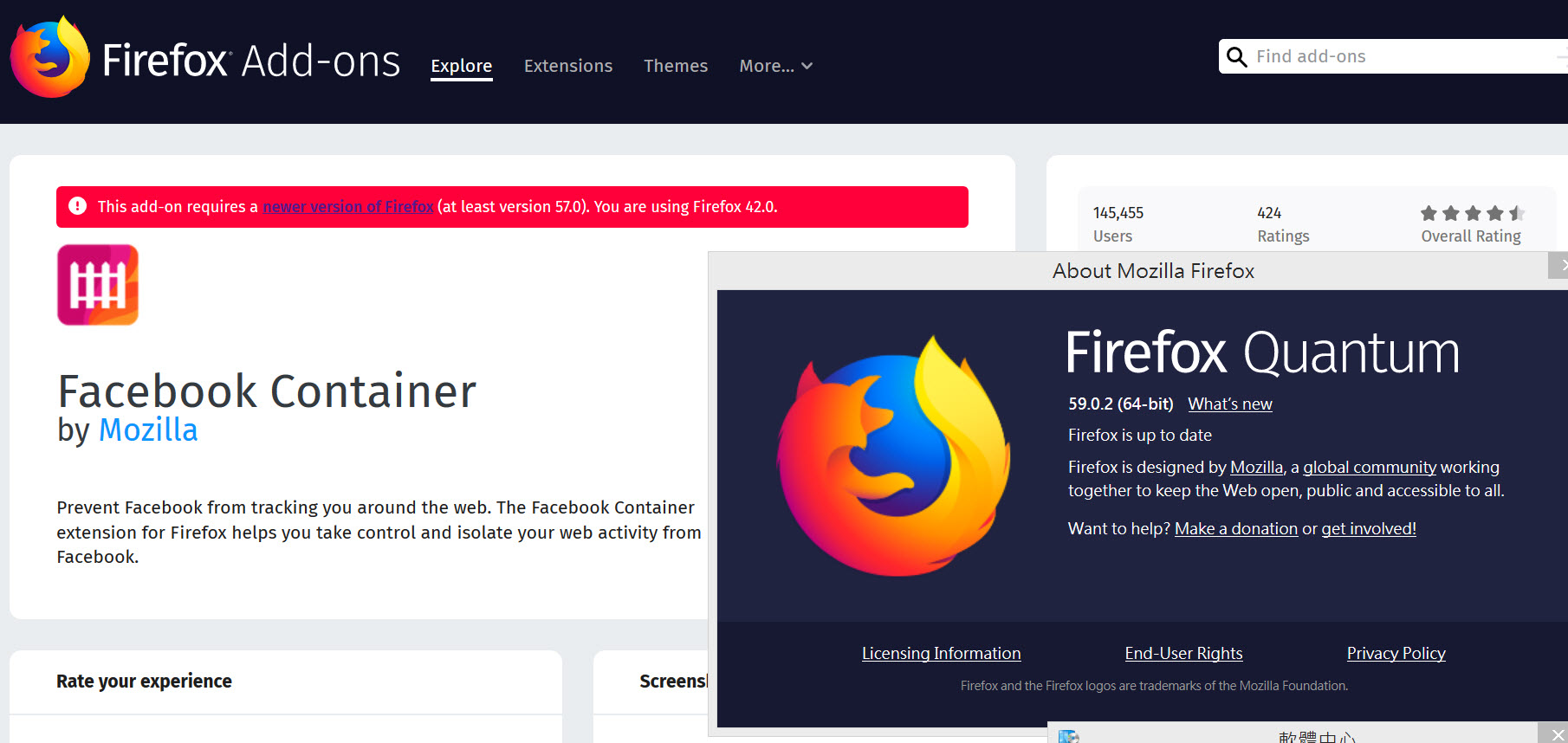
As the screenshot shows. I installed ver. 59 but the system recognize I am still at ver .42 this unable to install new addons
what's the problem and I can solve it?
As the screenshot shows. I installed ver. 59 but the system recognize I am still at ver .42 this unable to install new addons
what's the problem and I can solve it?
Solución elegida
Looks like your UserAgent is locked at Firefox 42.0 or something has changed it to 42.0. Please see this support article to learn how to fix it.
https://support.mozilla.org/en-US/kb/how-reset-default-user-agent-firefox
Leer esta respuesta en su contexto 👍 0Todas las respuestas (3)
pix not uploaded in last post, sorry
Solución elegida
Looks like your UserAgent is locked at Firefox 42.0 or something has changed it to 42.0. Please see this support article to learn how to fix it.
https://support.mozilla.org/en-US/kb/how-reset-default-user-agent-firefox
the-edmeister said
Looks like your UserAgent is locked at Firefox 42.0 or something has changed it to 42.0. Please see this support article to learn how to fix it. https://support.mozilla.org/en-US/kb/how-reset-default-user-agent-firefox
So Thank you! It works once I reset "general.useragent.override"