


Bookmark sub-folders seem to have disappeared in Firefox Quantum

I have been autoupdated to firefox quantum. All my bookmarks seem to have disappeared.
Right-click Library-> customise opens the customise window and I can add the bookmark button to the overflow menu (Why not the main menu, it is one of the buttons I use most) but all of my bookmarks show up individually, not in sub-folders (as I had them organised before quantum). If I try and organise the bookmarks, I can see my folders, and I can make new ones and copy rthe bookmarks over, but they still appear as individual entries on the bookmarks menu (which is still hidden in the overflow menu).
How do I get my bookmark organisation back please?
Stephen
Todas las respuestas (2)
Solución elegida
Hi Stephen, you should be able to move the Bookmarks Menu button to a more visible part of the main toolbar. If you open the overflow menu and right-click it, you should be able to "Unpin" it. (Sample screenshot attached.) Hopefully it will work normally there.
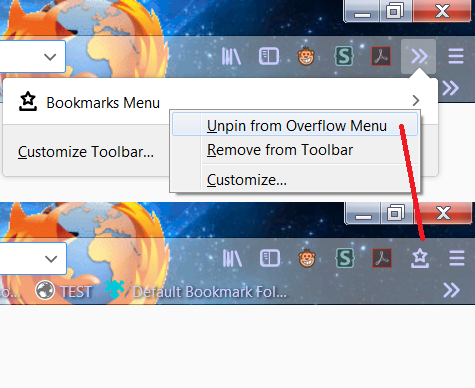
Thanks, Unpinning the bookmarks icon from the overflow menu makes it visible all the time and when I click on it, I get the same menu I had before, complete with my folders and all the stuff I keep meaning to remove.
Thanks, Stephen