


Timestamp displaying wrong date and time information in Thunderbird

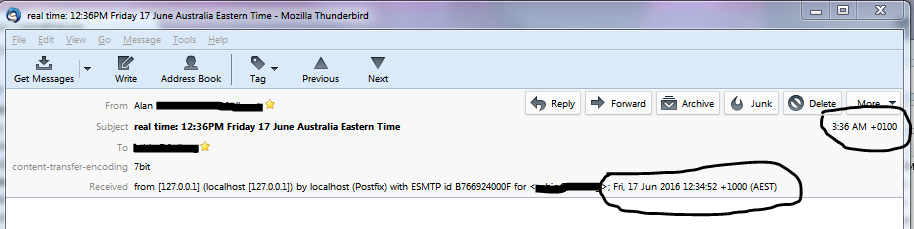
I am running a Windows 7 OS with version 45.1.1 of Thunderbird. For the last few years I have had an incredibly annoying problem with the way the date/timestamp of an email is displayed in the message header and Inbox/mailbox view. This has gone on for a long time, as mentioned, and each time I've tried to fix it I've just given up and lived with the problem. I'm trying again. Part of the issue might be related to the complex mail routing issues involved. I am using an SSH tunnel to connect to an IMAP server in Canada, but I am receiving the mail in Australia. I think the time being displayed is from North America. I have seen the odd support query about timezone settings and the general response is to check the timezone setting on the local machine. I have done this. It is set correctly. I cannot find anywhere in the settings where it may be entered in conflict. This is my current setting: "(UTC+10:00) Brisbane". I have attached an image of a message I sent to myself to illustrate the problem. This image is of the mail header when I open a message. In the upper right corner is the incorrect time that is shown in the Date and Received columns in my Inbox. I have also circled the time in the Received line of the mail header itself. This time is accurate, but it is not the one that is used to display in my list of message in my mail folder. This timezone error is also effecting the calendar functions. I only just noticed this a week or so ago, as I do not generally use the calendar. It was showing yesterday's date as today's date when I was looking at the interface during my morning (which would have been the previous date in North America). This kind of error would make using the calendar problematic if I ever wanted to get full use of the software.
A couple of weeks ago I even tried creating a new profile. I was very loathe to go to such extremes because I have been using Thunderbird for 15 years or so, maybe longer? I followed some steps to make backups, etc. I then created the new profile and set it as the default. I then followed some more instructions to re-import my mail and address book and other settings. If my profile is screwed up then I may have just migrated the issue to the new profile; however, I couldn't really avoid restoring all of the history (mail, addresses, settings) that I had created through my use over so many years.
This issue has been driving me a little crazy over the years so I've finally decided to try and get some help directly from the community. Hopefully someone will be able to assist.
Thanks.
Todas las respuestas (2)
I really have trouble trying to see those images.
First and foremost, the calendar has it's own time zone information in options.
Now to the time.
the time can be turned to rubbish a number of ways. I stopped using Bigpond email when they implemented a spam filter that took god messages in and returned messages with a date that the filter had invented. I tried telling them, they insisted my copy of outlook was to blame. But I digress.
All mail data and time information should be displayed in the headers in UTC with an offset. This can be messed up as I have said, it can also be messed up by servers that are not in the right timezone. But that is not the case here. I assume you are already using the preference "mailnews.display.original_date", True
I really need access to the whole message header. can you please access it by pressing Ctrl+U and then copy and paste into an email to unicorn dot consulting at gmail dot com With the whole header I might be able to work out where the problem is occurring.
Matt, I sent you an email with the requested details, but it might be sitting in your junk folder. Check for a hotmail address.