Showing questions tagged:

Firefox crashes when launching Brave

Hello! I updated FLOORP on the 5th May, FLOORP crashed and then Brave, Firefox, Waterfox, LibreWolf and Vivaldi started crashing. I had Brave and Vivaldi open when I laun… (read more)

Hello! I updated FLOORP on the 5th May, FLOORP crashed and then Brave, Firefox, Waterfox, LibreWolf and Vivaldi started crashing. I had Brave and Vivaldi open when I launched FLOORP and FLOORP asked consent to update itself and after updating, it did not open in “previous session” and I could not open “previous session” through History. When I launched “Settings” from menu, “previous session” opened! I had pinned “Settings” earlier.

Now the bizarre happens; suddenly LibreWolf launches by itself also without “previous session” and open tabs in Brave and Vivaldi disappear to single New Tab. After some tinkering, I was able to restore “previous session” in LibreWolf, Brave and Vivaldi.

Now I close all browsers and open Firefox, no “previous session” and some random windows in its history, opening these random windows also opened “previous session”! 🙄But then Waterfox launches also without “previous session”, here clicking on OneTab extension recovered “previous session”.

Cutting short; I uninstalled, Waterfox, LibreWolf and FLOORP, this did not help, I ran System Restore twice to two different points and it has not resolved the issue.

Thankful for any help!

Archived 36 505

Recaptcha Not Working in Firefox Specifically.

Recaptcha isn't working in Firefox. It works in Chrome, Opera, and Edge with no issues, it will either just go to a check mark or open the window with the pictures to cho… (read more)

Recaptcha isn't working in Firefox. It works in Chrome, Opera, and Edge with no issues, it will either just go to a check mark or open the window with the pictures to choose, on both regular pages and on the Google Recaptcha Demo site Google Recaptcha Demo site. But when I load a page that requires Recaptcha in Firefox, it just spins forever. It was working fine a few hours ago, and I didn't change any settings or anything in Firefox. I was filling out a job application and it worked fine, then I went to another job application and Recaptcha won't work at all, even on the Recaptcha Demo site.

I'm on version 125.0.3 (64-bit), on Windows 10. Not using a VPN or anything like that, just a standard Ethernet connection, with whatever Charter gives me.

Steps I've tried, none of which have helped:

1. Cleared Cookies. 2. Restart Browser. 3. Restart Computer. 4. Restart Modem and Router. 5. Opening Firefox in troubleshooting mode. 6. Ensured Firefox was up to date. 7. Reinstalling Firefox. 8. Turned Connection Settings to no proxy. 9. Turned off Enhanced Tracking Protection. (It's set on standard otherwise, and I didn't change it) 10. Release/Renew IP via Command Prompt.

I'm genuinely at a loss of what to do, after a couple of hours of searching around for solutions. I don't get how it just stopped working in the span of like ten minutes when I didn't change any settings or anything. Firefox is my main browser and it would be a tremendous pain to have to use another browser for any pages that require Recaptcha.

Any assistance or advice to solve this problem would be greatly appreciated!
Solved Archived 31 4213

Lost all tabs from previous session and standard fixes don't work

My Firefox settings are configured to "Open previous windows and tabs" on Startup. This worked fine until this morning, when I lost all of the tabs in my session, includi… (read more)

My Firefox settings are configured to "Open previous windows and tabs" on Startup. This worked fine until this morning, when I lost all of the tabs in my session, including the pinned ones. The last time I closed Firefox, there was only one window open.

I have already tried these ideas to restore the tabs:

  • CTRL+SHIFT+T: Does nothing
  • CTRL+SHIFT+N: Does nothing
  • Three bar menu -> History -> Recently closed tabs: The list is empty
  • Three bar menu -> History -> Recently closed windows: The option is greyed out
  • Three bar menu -> History -> Restore previous session: The option does not exist in the menu
  • Open user profile folder and open sessionstore-backups folder: There are three files named "previous.jsonlz4", "recovery.baklz4" and "recovery.baklz4". They are each 2KB and contain only an empty tab with the URL "about:home". There are three additional files starting with "upgrade" but they are from too long ago, so they don't contain the tabs I require.

The contents of these tabs are vitally important for my work, so this is causing me significant stress. If anyone can suggest ways to recover my previous tab beyond the documented fixes, I would greatly appreciate it. Thank you so much to anyone who can help!

Archived 16 508

Log into Wise

In the past I have easily logged into my Wise account with Firefox, my default browser. Had to us Google Chrome to get into my Wise Account. WHY???

Solved Archived 15 254

Enhanced Tracking Protection Blocks x.com in Windows

I've added https://x.com as an exception site but it is still blocked. This is outright censorship which is something [edited] do. Tell me how to fix your browser so … (read more)

I've added https://x.com as an exception site but it is still blocked.

This is outright censorship which is something [edited] do.

Tell me how to fix your browser so I may access x.com again or I stop using Firefox forever.

Locked Archived 15 315

Sync Not working

Sync just does NOT work. I installed FF on my Mac brand new and fresh... brand new machine. Signed into Sync. NOTHING. After 6-7 HOURS... nothing. It just gets NOTHING A… (read more)

Sync just does NOT work. I installed FF on my Mac brand new and fresh... brand new machine. Signed into Sync. NOTHING. After 6-7 HOURS... nothing. It just gets NOTHING AT ALL from my Windows Desktop.

I've signed out of ALL Firefox/Mozilla sync sessions... signed in clean- all browsers are up to date. And the about:sync-log page shows a LONG streak of errors... NON STOP ERRORS.

Why?! Why can't we just sync extensions to install and bookmarks across machines? How is this that hard for Mozilla?!

The sync-log page list: File:error-sync-1714085057059.txt 6 KB 4/25/2024 17:44:17 File:error-sync-1714088658041.txt 18 KB 4/25/2024 18:44:18 File:error-sync-1714189161327.txt 6 KB 4/26/2024 22:39:21 File:error-sync-1714498425099.txt 13 KB 4/30/2024 12:33:45 File:error-sync-1714588968223.txt 10 KB 5/1/2024 13:42:48 File:error-sync-1714589121080.txt 9 KB 5/1/2024 13:45:21 File:error-sync-1714600674960.txt 7 KB 5/1/2024 16:57:55 File:error-sync-1714604277834.txt 24 KB 5/1/2024 17:57:57 File:error-sync-1714838021899.txt 24 KB 5/4/2024 10:53:41 File:error-sync-1714839602488.txt 11 KB 5/4/2024 11:20:02 File:error-sync-1714839613709.txt 10 KB 5/4/2024 11:20:13 File:error-sync-1714844303035.txt 16 KB 5/4/2024 12:38:23 File:error-sync-1714844919123.txt 15 KB 5/4/2024 12:48:39 File:error-sync-1714846872373.txt 17 KB 5/4/2024 13:21:12 File:error-sync-1714846956569.txt 12 KB 5/4/2024 13:22:36 File:error-sync-1714941772713.txt 15 KB 5/5/2024 15:42:52 File:error-sync-1714941774043.txt 14 KB 5/5/2024 15:42:54 File:error-sync-1714941849730.txt 14 KB 5/5/2024 15:44:09 File:error-sync-1714942633097.txt 14 KB 5/5/2024 15:57:13 File:error-sync-1714942674714.txt 48 KB 5/5/2024 15:57:54

Day after day and attempt after attempt of failures for a basic function of the browser.

Here is the text of the latest log and showing constant connection errors- mind you NOTHING is breaking on my internet as I'm often streaming things and watching stuff while surfing, or others in the house are. Our connection, and Firefox getting online, are all working fine. I am at a loss. I don't understand how this is so terribly broken out of the box that you can't just sign in and let it talk to their servers. I know Google has billions behind Chrome, but this shouldn't be so 1990's bad by comparison to Chrome sync.

1714081299909 Sync.SyncScheduler DEBUG Next sync in 3600000 ms. (why=schedule) 1714081300746 Sync.SyncScheduler DEBUG Network link status changed to "changed". Offline?: false 1714082945349 Sync.SyncScheduler DEBUG Network link status changed to "changed". Offline?: false 1714082945373 Sync.SyncScheduler DEBUG Network link status changed to "down". Offline?: false 1714082945373 Sync.SyncScheduler DEBUG Clearing sync triggers and the global score. 1714082945374 Sync.SyncScheduler DEBUG Next sync in 3600000 ms. (why=schedule) 1714085055761 Sync.SyncScheduler DEBUG Woke from sleep. 1714085056643 Sync.SyncScheduler DEBUG Network link status changed to "changed". Offline?: false 1714085056786 Sync.SyncScheduler DEBUG Network link status changed to "up". Offline?: false 1714085056786 Sync.SyncScheduler DEBUG Network link looks up. Syncing. 1714085056899 Sync.SyncScheduler DEBUG Network link status changed to "changed". Offline?: false 1714085056902 Sync.Service DEBUG User-Agent: Firefox/125.0.2 (Windows NT 10.0; Win64; x64) FxSync/1.127.0.20240419144423.desktop 1714085056902 Sync.Service INFO Starting sync at 2024-04-25 17:44:16 in browser session V0xN5aUmAS9A 1714085056902 Sync.SyncScheduler DEBUG Clearing sync triggers and the global score. 1714085056904 Sync.Status INFO Resetting Status. 1714085056904 Sync.Status DEBUG Status.service: success.status_ok => success.status_ok 1714085056904 FirefoxAccounts DEBUG FxAccountsProfileClient: Requested profile 1714085056904 FirefoxAccounts DEBUG getOAuthToken enter 1714085056905 FirefoxAccounts TRACE getCachedToken returning cached token 1714085056905 FirefoxAccounts DEBUG getOAuthToken returning a cached token 1714085056905 Services.Common.RESTRequest DEBUG GET request to https://profile.accounts.firefox.com/v1/profile 1714085056905 Sync.SyncAuthManager INFO Getting sync key 1714085056905 FirefoxAccounts DEBUG getOAuthToken enter 1714085056905 FirefoxAccounts TRACE getCachedToken returning cached token 1714085056905 FirefoxAccounts DEBUG getOAuthToken returning a cached token 1714085056905 Sync.SyncAuthManager INFO Getting a sync token from: https://token.services.mozilla.com/1.0/sync/1.5 1714085056905 Sync.SyncAuthManager DEBUG Getting a token using OAuth 1714085056905 Services.Common.TokenServerClient DEBUG Beginning OAuth token exchange: https://token.services.mozilla.com/1.0/sync/1.5 1714085056906 Services.Common.RESTRequest DEBUG GET request to https://token.services.mozilla.com/1.0/sync/1.5 1714085057025 Services.Common.RESTRequest DEBUG GET https://profile.accounts.firefox.com/v1/profile failed: 2152398878 - NS_ERROR_UNKNOWN_HOST 1714085057025 FirefoxAccounts ERROR Background refresh of profile failed: {"name":"FxAccountsProfileClientError","code":null,"errno":998,"error":"NETWORK_ERROR","message":"[Exception... \"NS_ERROR_UNKNOWN_HOST\" nsresult: \"0x804b001e (NS_ERROR_UNKNOWN_HOST)\" location: \"JS frame :: resource://services-common/rest.sys.mjs :: onStopRequest :: line 478\" data: no]"} 1714085057031 Services.Common.RESTRequest DEBUG GET https://token.services.mozilla.com/1.0/sync/1.5 failed: 2152398878 - NS_ERROR_UNKNOWN_HOST 1714085057031 Sync.SyncAuthManager ERROR Non-authentication error in _fetchTokenForUser: TokenServerClientNetworkError({"error":{}})(resource://services-common/tokenserverclient.sys.mjs:28:36) JS Stack trace: TokenServerClientNetworkError@tokenserverclient.sys.mjs:51:16 _tokenServerExchangeRequest@tokenserverclient.sys.mjs:235:13 1714085057031 Sync.Status DEBUG Status.login: success.login => error.login.reason.network 1714085057031 Sync.Status DEBUG Status.service: success.status_ok => error.login.failed 1714085057031 Sync.SyncAuthManager ERROR Failed to fetch a token for authentication: TokenServerClientNetworkError({"error":{}})(resource://services-common/tokenserverclient.sys.mjs:28:36) JS Stack trace: TokenServerClientNetworkError@tokenserverclient.sys.mjs:51:16 _tokenServerExchangeRequest@tokenserverclient.sys.mjs:235:13 1714085057032 FirefoxAccounts TRACE not checking freshness of profile as it remains recent 1714085057055 Sync.Resource WARN GET request to https://sync-1-us-west1-g.sync.services.mozilla.com/1.5/209631697/info/collections failed: [Exception... "The lookup of the hostname failed" nsresult: "0x804b001e (NS_ERROR_UNKNOWN_HOST)" location: "<unknown>" data: no] No traceback available 1714085057056 Sync.Status DEBUG Status.sync: success.sync => error.login.reason.network 1714085057056 Sync.Status DEBUG Status.service: error.login.failed => error.sync.failed 1714085057056 Sync.ErrorHandler ERROR Sync encountered an error: [Exception... "The lookup of the hostname failed" nsresult: "0x804b001e (NS_ERROR_UNKNOWN_HOST)" location: "<unknown>" data: no] No traceback available 1714085057056 Sync.SyncScheduler DEBUG Next sync in 3600000 ms. (why=reschedule) 1714085057057 Sync.Telemetry INFO Early submission of sync telemetry due to changed IDs/NodeType 1714085057059 Sync.Service DEBUG Exception calling anonymous function: [Exception... "The lookup of the hostname failed" nsresult: "0x804b001e (NS_ERROR_UNKNOWN_HOST)" location: "<unknown>" data: no] No traceback available

Solved Locked Archived 15 3194

Firefox automatically download files .docx from facebook page as pdf

Hello, I have problem with firefox. When I try download from facebook page files .docx, .xlsx (Microsoft Office) Firefox automatically download it as PDF and file is brok… (read more)

Hello, I have problem with firefox. When I try download from facebook page files .docx, .xlsx (Microsoft Office) Firefox automatically download it as PDF and file is broken. I don't know how to repair this. Please help, it is very frustrating.

Solved Archived 14 578

Firefox does not display background color in option tags

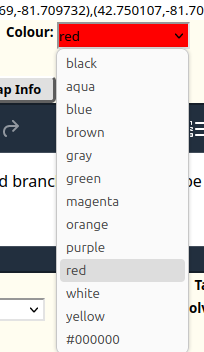
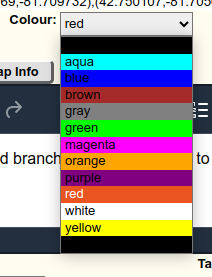
I am trying to use a <select> tag to display a color selector. So each <option> has a background color to match its displayed text: ```<select id="strokeC… (read more)

I am trying to use a <select> tag to display a color selector. So each <option> has a background color to match its displayed text:

```<select id="strokeColor" name="strokeColor" style="width: 10em;">

             <option value="black" style="background: #000000; text: #FFFFFF">
                     black
             </option>

<option value="aqua" style="background: #00FFFF">

                     aqua
             </option>

<option value="blue" style="background: #0000FF">

                     blue
             </option>

<option value="brown" style="background: #A52A2A">

                     brown
             </option>

<option value="gray" style="background: #808080">

                     gray
             </option>

<option value="green" style="background: #00FF00">

                     green
             </option>

<option value="magenta" style="background: #FF00FF">

                     magenta
             </option>

<option value="orange" style="background: #FFA500">

                     orange
             </option>

<option value="purple" style="background: #800080">

                     purple
             </option>

<option value="red" style="background: #FF0000">

                     red
             </option>

<option value="white" style="background: #FFFFFF">

                     white
             </option>

<option value="yellow" style="background: #FFFF00">

                     yellow
             </option>

<option value="#000000" selected="" style="background: #000000">

                     #000000
             </option>
         </select>```

On Chrome this displays as expected:

https://assets-prod.sumo.prod.webservices.mozgcp.net/media/uploads/images/2024-04-18-22-02-25-eebbd5.png

But on Firefox the background colors are ignored:

https://assets-prod.sumo.prod.webservices.mozgcp.net/media/uploads/images/2024-04-18-22-02-35-bd90ee.png

How can I get Firefox to display the background colors?

Archived 14 324

Firefox is creating cookies.sqlite.bak file when i enter twitch.tv

Hi, Today I discovered that firefox has logged me out of every site. I checked the cookies and there were cookies.sqlite and cookies.sqlite.bak. When I delete the newly … (read more)

Hi, Today I discovered that firefox has logged me out of every site. I checked the cookies and there were cookies.sqlite and cookies.sqlite.bak. When I delete the newly created cookies.sqlite and rename cookies.sqlite.bak to cookies.sqlite, I am logged back in to all sites and everything works fine. I notice that the cookies.sqlite.bak file is created when I go to twitch.tv. Can I check what is causing this problem and fix it somehow? I've already tried deleting the cookies just from the twitch.tv site, but that doesn't help.

Archived 12 289

URL autocomplete - I want to start over.

I don’t understand what Firefox is doing. For example, I used to start typing the first few letters of “weather.com”, which I visit pretty much daily, and it would auto f… (read more)

I don’t understand what Firefox is doing. For example, I used to start typing the first few letters of “weather.com”, which I visit pretty much daily, and it would auto fill “weather.com”. Now it auto fills every time with http://www.weatherbase.com/. I don’t know where that came from. Similarly, I used to type the first few letters of “duckduckgo.com” and it would bring up “duckduckgo.com”. Now it brings up a magnifying glass below the url with “Search with duckduckgo”. I am thinking it might be best if I can start over, i.e. clear out any information it’s saved about where it thinks I want to go, and start remembering the sites I am entering now.

Archived 12 99

Thin white border left when fit screen

Hi, i just got a new laptop (Asus Zephryus G16, 2560 x 1600 screen) and after installing Firefox there is a thin white border to the left of the screen when running in fi… (read more)

Hi, i just got a new laptop (Asus Zephryus G16, 2560 x 1600 screen) and after installing Firefox there is a thin white border to the left of the screen when running in fit screen. This problem is not present when in a windowed mode or in F11 full screen.

I tried updating the Intel Arc drivers but this did not fix the problem. Changing to compatibility mode also did not fix te problem.

PS: in the uploaded screenshots it is quite dificult to see the white line(because the background is also white), but when the image is viewed in a new tab it is visible.

Thanks

Solved Archived 12 758

Primary Password issue

I am migrating to a new laptop. The new laptop keeps asking me for a primary password. I have never set one up. This issue doesn't happen on the old machine, only the new… (read more)

I am migrating to a new laptop. The new laptop keeps asking me for a primary password. I have never set one up. This issue doesn't happen on the old machine, only the new one. It also won't let me disable the pop-up that asks for the primary password. Please advise.

Archived 12 198

ABOUT TABS

WHY THE TABS ARE CLOSED IN TASK MANAGER ONBOARD INSTEAD TO BE SUSPENDED LIKE ON CHROME,OPERA,EDGE ETC. ?

Archived 11 153

Not able to load sites

I was able to open reddit.com without any problems earlier, but recentrly I'm not able to load it up anymore. The loading screen is eternal and it doesnt show any kind of… (read more)

I was able to open reddit.com without any problems earlier, but recentrly I'm not able to load it up anymore. The loading screen is eternal and it doesnt show any kind of error (unless it tries to connect for too long like a couple of minutes, then the error does shows up). The site still sends me notificarions through the browser though. Any other site loads up without a problem. I tried to use methods mentioned in the help article (turned off proxy, turned on network.dns.disableIPv6, deleted cookies and cache). In other browsers (Edge, for example) reddit.com loads just fine. Please help me if you can.

Archived 11 180

"Failed to check for updates" et al

Hey, so, I've seen this question a couple times when I searched, but (a) there didn't seem to be any solution and (b) they were all regarding Macs and I'm on Windows 11 v… (read more)

Hey, so, I've seen this question a couple times when I searched, but (a) there didn't seem to be any solution and (b) they were all regarding Macs and I'm on Windows 11 v 23H2. I keep getting bubbles saying that Firefox wasn't able to check for updates- not that it couldn't download or install updates, but it couldn't search for one. I also did the "about Firefox" thing and it gives me the same message. Both of these have been going on for a couple days and I have attempted restarting Firefox multiple times and did a manual update [125.0.1 (64-bit)] just in case there was a problem there. Now, I've tried the tips from the other threads (turning off the proxy, checking any anti-update policies, and checking the add.update.url in the config settings) with no luck. So in an effort to either bump the question or get any Windows oriented answers... Thanks muchly

Solved Archived 9 390

Search defaults to UK. How undo? Using Duck Duck Go for search.

My default search engine is Duck Duck Go. I frequently use a VPN. I am usually in North America and want to search sites in North America. When I run a search by typi… (read more)

My default search engine is Duck Duck Go. I frequently use a VPN.

I am usually in North America and want to search sites in North America. When I run a search by typing a search term in Firefox, I get results beginning in UK, and I see that a blue toggle switch has been set to UK. (See image.)

This started 2-3 weeks ago.

How do I set things so that my searches begin in North America?

I have checked "about:config" preferences and do not see anywhere that UK is specified. I don't see a region preference setting, either.

Thank you.

Archived 8 288

Only display fully downloaded files in the download folder

Hello dear community, I have a program that continuously monitors the download folder under Windows 11 for a specific file and retrieves it. I download this file in Firef… (read more)

Hello dear community,

I have a program that continuously monitors the download folder under Windows 11 for a specific file and retrieves it. I download this file in Firefox, but the said program gives an error.

I have noticed that when files are downloaded in FireFox, they already appear in the Downloads folder with the corresponding file extension with 0 bytes and these are then apparently swapped or merged with the .parts file.

The problem is that the mentioned program now tries to retrieve the unfinished file, which then leads to an error.

Does anyone know if it is possible to customize Firefox so that the file only appears in the download folder when the download is fully complete?

Many thanks for your help :D

Archived 8 216

Browser crash due to memory overflow

This isn't the first time this has happened. After each occurrence, I have to completely uninstall the browser and reinstall it from scratch. This means I have to reopen … (read more)

This isn't the first time this has happened. After each occurrence, I have to completely uninstall the browser and reinstall it from scratch. This means I have to reopen all my tabs, which is very annoying. In Chrome, I have had a large number of tabs open for many years and it works fine.

With Mozilla, something terrible is happening... I have many tabs open in Mozilla, and there comes a moment when, upon launching the browser and opening two or three tabs, Mozilla starts consuming up to 10 gigabytes of RAM. If I open a few more tabs, the browser crashes. I don't need to open 50 or 100 tabs, just 7-8-10 tabs are enough to make the browser crash. Moreover, if I open a new tab and go to google.com, the browser takes a very long time to load, even if it's the second tab.

This problem has happened before. I don't do anything with the browser, just visit sites like YouTube.

Clearing the cache and other recommended actions do not yield positive results. This is very annoying. Mozilla is my first and favorite browser, which I have been using for almost 20 years. I wouldn't want to uninstall Mozilla.

Archived 7 117

The "Triage Manager" for Mozilla Refuses to assign anyone to a seven year old open problem

I need to go over the head of the Mozilla Triage manager who has left https://bugzilla.mozilla.org/show_bug.cgi?id=1406865 open without a resolution for **seven years**. … (read more)

I need to go over the head of the Mozilla Triage manager who has left https://bugzilla.mozilla.org/show_bug.cgi?id=1406865 open without a resolution for **seven years**. How do I do that? This is a bug reported in Firefox 57 and **still** not fixed in Firefox 125. I cannot find any support category anywhere in the Mozilla website that covers appealing a decision by one of their employees. The last comment from this uncooperative indivisual is "But given we support it on macOS and Windows yeah, it seems not very objectionable." Who is this **clerk** to override the fact that a number of customers very much find this "objectionable". I cannot find anything on https://www.mozilla.org/en-US/contact/ that addresses this issue. I cannot find even a surface mail address for Mozilla. For example my complaint has nothing to do with any of the following:

   I’m having problems with using Firefox
   I want to donate to Mozilla
   I have questions about using Mozilla’s trademarks
   I’d like to report misuse of a Mozilla trademark
   I want to hold an event in a Mozilla space
   I want Mozilla to sponsor my event
   I’d like permission to use a Mozilla logo
   I’m interested in Pocket’s sponsored content on Firefox
   I’m a member of the Press and have a question for Mozilla

Yes I am having a problem with Firefox, but the clerk responsible has, through sitting on this issue for **seven years**, basically told the entire community that he doesn't give a reservoir.

In particular I feel this unacceptable behaviour should be brought to the attention of senior management, but there are no contacts for anybody in senior management.

Archived 7 63