


Calendar problem with week view

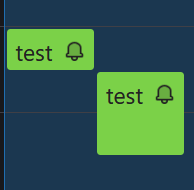
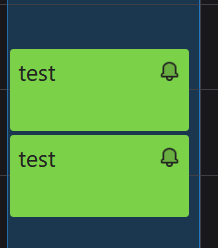
This will make more sense if you look at the attached images first. If I create two one-hour appointments back to back on the same day--meaning the first appointment ends at the same time the next one begins (or with a 1 min gap), and then I look at my calendar in Week view, I'll see 2 full-column 1-hour blocks stacked one above the other as in the "1hr appt.png" attached. This appears to be the correct way it should appear.
But if the earlier appointment is only 30 minutes, they appear differently, as in the other image "30min appt.png". squeezed into two columns. I would like them to appear as a single, full column (as with the 1 hour appointments), which it does in the Day view.
Is this a bug? Can I change this behavior?
Όλες οι απαντήσεις (3)

Is it possible that your thunderbird is not in "full screen" or its height is not big enought and Thunderbird could not show it as 2 blocks one after another.
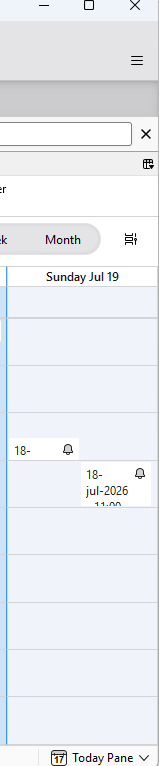
I just attached 2 screen shots : they both contain the same day with 2 appt , first one is 30 minutes and the second is 1 hour, one after the other. The first screen shot is when Thunderbird height is short and the second is when Thunderbird height is longer

Τροποποιήθηκε στις από τον/την Michel T
If I hide the calendar on the left, the 30min appointment example behaves properly. But shouldn't the 1hr and 30min appointments behave the same way under the same display setup?
You don't have to hide the calendar on the left. You could adjust the height ( make it bigger or longer ) and it would display correctly.
You can also file a bug to Thunderbird team here https://bugzilla.mozilla.org/home