


Windows 10 reached EOS (end of support) on October 14, 2025. If you are on Windows 10, see this article.

Αναζήτηση στην υποστήριξη

Προσοχή στις απάτες! Δεν θα σας ζητήσουμε ποτέ να καλέσετε ή να στείλετε μήνυμα σε κάποιον αριθμό τηλεφώνου ή να μοιραστείτε προσωπικά δεδομένα. Αναφέρετε τυχόν ύποπτη δραστηριότητα μέσω της επιλογής «Αναφορά παραβίασης».

Μάθετε περισσότερα

Thunderbird - Sending e-mails stopped working

  • Καμία απάντηση
  • 0 έχουν αυτό το πρόβλημα
  • Ανοικτό

Using Thunderbird forever, on my PC and also on my Android. On my PC sending messages stopped working "suddenly". (That means I did not change anything in Thunderbird. Windows related settings - who knows.)

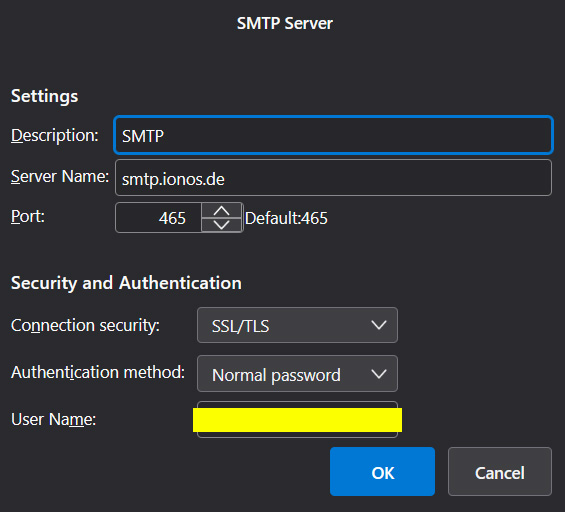
__________________ Sending of the message failed. The message could not be sent because connecting to Outgoing server (SMTP) smtp.ionos.de failed. The server may be unavailable or is refusing SMTP connections. Please verify that your Outgoing server (SMTP) settings are correct and try again. __________________


I have checked the SMTP server settings again, but it didn't solve the problem. I have changed my password of my e-mail account to anew one, reinstalled Thunderbird and recreated my account, but without anything changing. Receiving works, sending does not. Tried to install Outlook (sorry, just temporarily, I hope :) ) and there everything works just fine.

Maybe some Windows Firewall setting? Didn't find anything that seems to prevent Thunderbird from sending thou. Do you have any idea?
Using Thunderbird forever, on my PC and also on my Android. On my PC sending messages stopped working "suddenly". (That means I did not change anything in Thunderbird. Windows related settings - who knows.) __________________ Sending of the message failed. The message could not be sent because connecting to Outgoing server (SMTP) smtp.ionos.de failed. The server may be unavailable or is refusing SMTP connections. Please verify that your Outgoing server (SMTP) settings are correct and try again. __________________ I have checked the SMTP server settings again, but it didn't solve the problem. I have changed my password of my e-mail account to anew one, reinstalled Thunderbird and recreated my account, but without anything changing. Receiving works, sending does not. Tried to install Outlook (sorry, just temporarily, I hope :) ) and there everything works just fine. Maybe some Windows Firewall setting? Didn't find anything that seems to prevent Thunderbird from sending thou. Do you have any idea?
Συνημμένα στιγμιότυπα

Πρέπει να συνδεθείτε στον λογαριασμό σας για να απαντήσετε σε δημοσιεύσεις. Ξεκινήστε μια νέα ερώτηση εάν δεν διαθέτετε ακόμα λογαριασμό.