


shortcut for moving from folder list to message pane

Hi there. I'm looking for a shortcut that takes me from the folderlist pane to the message pane and the first new message, when I'm on the inbox folder. The tab is not good. It moves between to many fields/options.
regards bjarne
Όλες οι απαντήσεις (6)
I don't understand what you describe and what you wish to do. Do we talk about the view in the main window when Thunderbird has been started? Which layout do you use in View > Layout >... ? In Classic View you have the folder pane on the left, on the upper right part is the thread pane (with the message list) and in the lower part the message pane. Do you use the message pane to display the message contents or do you open your messages in tabs?
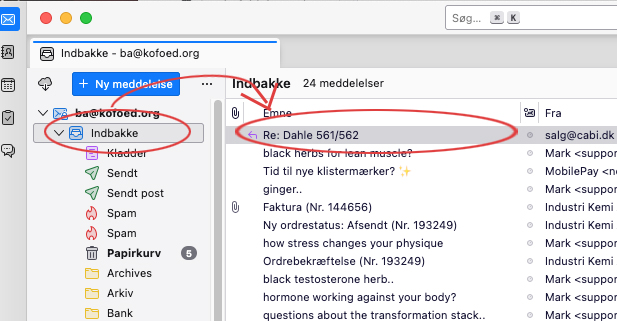
I use the vertical view, if that's the correct term. I have the folder pane to the left, the message list in the middle and the message pane to the right. when I start Thunderbird, the Inbox is chosen by default, the message list is shown, with the message pane empty. I use newest date at the top. Now I want to move, with a keyboard shortcut, from the inbox folder to the first message in the message list, so it's shown in the message pane.
I hope this carified it.
OK, I think I got it. By default Thunderbird on startup always selects the tab which was active when you closed the previous session. If the active tab was the Mail tab TB will open with the Mail tab in focus next time. You are right that there is no message selected in the thread pane and in the message pane the Thunderbird "Start Page" is displayed by default.
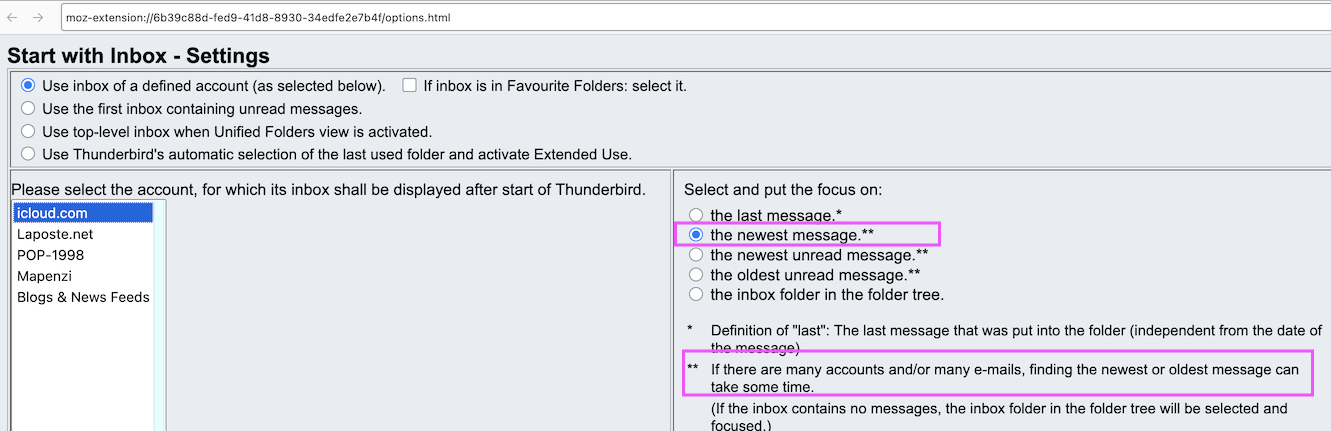
I had forgotten all this since for a long time already I use the add-on "Start with Inbox" https://services.addons.thunderbird.net/En-US/thunderbird/addon/start-with-inbox/ Install this add-on, in its settings you can select an account and put focus on its Inbox on startup, and the newest message will be opened automatically(images)

Great. Now I can go through all my messages only with the arrow-down/-up buttons. Thanx very much.
To go back to first principles of keyboard navigation. Use the F key or the B key to go to the next
and previous messages. That makes the jump for the highlighted folder to the message list.
For the next unread message it is N and the previous unread message it is P
Nice. That does it. I think I tried them once without success. I must have done something wrong. Thanx very much.