Thunderbird not connecting to Gmail "Unable to log in at server. Probably wrong configuration, username or password"

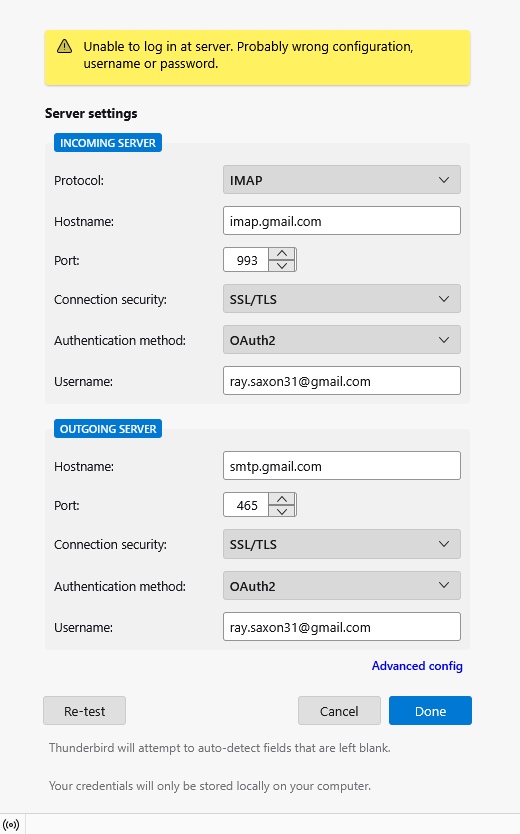
I have been using Thunderbird for ages now with no problem, but I suddenly realised that no recent emails were appearing from my Gmail account. I have tried everything suggested on line to resolve the problem, including uninstalling and reinstalling Thunderbird, and deleting and re-entering my acccount details but neither the IMAP or SMTP servers will connect to Gmail. I have reset all of the server settings on Thunderbird, and have checked that Gmail is IMAP compliant (which, apparently, is is now automatically). I have spent hours trying to sort this out and am just at the point of abandoning Thunderbird completely, but I am loathe to do so if there is a solution. The latest error message i have received is "Unable to log in at server. Probably wrong configuration, username or password" but I don't know what else I can check or change.
Τροποποιήθηκε στις από τον/την Wayne Mery
Όλες οι απαντήσεις (11)

Please post your Troubleshooting Information. At the top right of the Thunderbird window, click the menu button ≡, then select Help > Troubleshooting Information. Press the "Copy text to clipboard button" and paste the information into your reply.
Is there an error or unusual event prior to "Unable to log in at server."?
Thank you for your replies. I will post the data in two separate messages as it exceeds 10000 characters which is the limit for each reply.
Application Basics
   Name: Thunderbird
   Version: 148.0
   Build ID: 20260219215726
   Distribution ID:
   Update Channel: release
   User Agent: Mozilla/5.0 (Windows NT 10.0; Win64; x64; rv:148.0) Gecko/20100101 Thunderbird/148.0
   OS: Windows_NT 10.0 26200
   OS Theme:
   Launcher Process: Enabled
   Multiprocess Windows: 0/0
   Fission Windows: 0/0
             Enabled by default
   Remote Processes: 1
   Enterprise Policies: Inactive
   Google Location Service Key: Missing
   Google Safebrowsing Key: Missing
   Mozilla Location Service Key: Missing
   Safe Mode: false
   Memory Size (RAM): 7.7 GB
   Disk Space Available: 352 GB
 Mail and News Accounts
   account2:
     INCOMING: account2, , (none) Local Folders, 0, 3
Libraries
     Library
     Status
     Expected minimum version
     Version in use
     Path
       RNP (OpenPGP)
       OK
       0.18.1
       0.18.1.MZLA.148.0.botan.3.8.1
       C:\Program Files\Mozilla Thunderbird\rnp.dll
       OTR
       Failed to load. OTR chat encryption will not work.
       -
       -
       -
Calendar Settings
Home
     Name
     Value
     Name:
     Type: storage
     Disabled: true
     Username:
     URI:
     Refresh Interval:
     Read-only:
     Suppress Alarms:
     Cache Enabled:
     iMIP Identity:
     iMIP Disabled:
     iMIP Account:
     Organiser Id:
     Force Email Scheduling:
     Popup Alarms Supported:
     Alarms on Invitation Supported:
     Max Alarms Per Event:
     Attachment Supported:
     Max Categories:
     Privacy State Supported:
     Priority Supported: true
     Event Supported:
     Task Supported:
     Local Time Supported:
     UTC/GMT Supported:
     Auto-Scheduling Supported:
Crash Reports for the Last 3 Days
Remote Processes
Type: Count
GPU: 1
Add-ons
     Name
     Type
     Version
     Enabled
     Location
     ID
       Amazon.co.uk
       extension
       1.1
       true
       app-builtin
       amazon@search.mozilla.org
       Bing
       extension
       1.0
       true
       app-builtin
       bing@search.mozilla.org
       Chambers (UK)
       extension
       1.0
       true
       app-builtin
       chambers-en-GB@search.mozilla.org
       DuckDuckGo
       extension
       1.0
       true
       app-builtin
       ddg@search.mozilla.org
       Google
       extension
       1.0
       true
       app-builtin
       google@search.mozilla.org
       Wikipedia (en)
       extension
       1.0
       true
       app-builtin
       wikipedia@search.mozilla.org
       System theme — auto
       theme
       1.4.2
       true
       app-builtin
       default-theme@mozilla.org
       Dark
       theme
       1.3.2
       false
       app-builtin
       thunderbird-compact-dark@mozilla.org
       Light
       theme
       1.3.2
       false
       app-builtin
       thunderbird-compact-light@mozilla.org
Security Software
Type: Name
     Antivirus: Kaspersky Total Security
     Antispyware:
     Firewall: Kaspersky Total Security
Legacy User Stylesheets
   Active: false
   Stylesheets: No stylesheets found
Graphics
     Features
     Compositing: WebRender
     Font Visibility Debug Info: Windows Platform
     Asynchronous Pan/Zoom: wheel input enabled; scrollbar drag enabled; keyboard enabled; autoscroll enabled; smooth pinch-zoom enabled
     WebGL 1 Driver WSI Info: outOfProcess: false
inProcess: true EGL_VENDOR: Google Inc. (NVIDIA) EGL_VERSION: 1.5 (ANGLE 2.1.19739 git hash: 419cd2c3213b) EGL_EXTENSIONS: EGL_EXT_create_context_robustness EGL_ANGLE_d3d_share_handle_client_buffer EGL_ANGLE_d3d_texture_client_buffer EGL_ANGLE_surface_d3d_texture_2d_share_handle EGL_ANGLE_query_surface_pointer EGL_ANGLE_window_fixed_size EGL_ANGLE_keyed_mutex EGL_ANGLE_surface_orientation EGL_ANGLE_direct_composition EGL_ANGLE_windows_ui_composition EGL_NV_post_sub_buffer EGL_KHR_create_context EGL_KHR_image EGL_KHR_image_base EGL_KHR_gl_texture_2D_image EGL_KHR_gl_texture_cubemap_image EGL_KHR_gl_renderbuffer_image EGL_KHR_get_all_proc_addresses EGL_KHR_stream EGL_KHR_stream_consumer_gltexture EGL_NV_stream_consumer_gltexture_yuv EGL_ANGLE_stream_producer_d3d_texture EGL_ANGLE_create_context_webgl_compatibility EGL_CHROMIUM_create_context_bind_generates_resource EGL_CHROMIUM_sync_control EGL_EXT_pixel_format_float EGL_KHR_surfaceless_context EGL_ANGLE_display_texture_share_group EGL_ANGLE_display_semaphore_share_group EGL_ANGLE_create_context_client_arrays EGL_ANGLE_program_cache_control EGL_ANGLE_robust_resource_initialization EGL_ANGLE_create_context_extensions_enabled EGL_ANDROID_blob_cache EGL_ANDROID_recordable EGL_ANGLE_image_d3d11_texture EGL_ANGLE_create_context_backwards_compatible EGL_KHR_no_config_context EGL_KHR_create_context_no_error EGL_KHR_reusable_sync EGL_EXTENSIONS(nullptr): EGL_EXT_client_extensions EGL_EXT_device_query EGL_EXT_platform_base EGL_EXT_platform_device EGL_ANGLE_platform_angle EGL_ANGLE_platform_angle_d3d EGL_ANGLE_platform_angle_d3d11on12 EGL_ANGLE_platform_angle_device_id EGL_ANGLE_device_creation EGL_ANGLE_device_creation_d3d11 EGL_ANGLE_experimental_present_path EGL_KHR_client_get_all_proc_addresses EGL_KHR_debug EGL_ANGLE_feature_control
     WebGL 1 Driver Renderer: Google Inc. (NVIDIA) -- ANGLE (NVIDIA, NVIDIA GeForce GTX 1650 SUPER Direct3D11 vs_5_0 ps_5_0, D3D11-32.0.15.8195)
     WebGL 1 Driver Version: OpenGL ES 3.0.0 (ANGLE 2.1.19739 git hash: 419cd2c3213b)
     WebGL 1 Driver Extensions: GL_AMD_performance_monitor GL_ANGLE_base_vertex_base_instance GL_ANGLE_base_vertex_base_instance_shader_builtin GL_ANGLE_client_arrays GL_ANGLE_copy_texture_3d GL_ANGLE_depth_texture GL_ANGLE_framebuffer_blit GL_ANGLE_framebuffer_multisample GL_ANGLE_get_serialized_context_string GL_ANGLE_get_tex_level_parameter GL_ANGLE_instanced_arrays GL_ANGLE_lossy_etc_decode GL_ANGLE_memory_size GL_ANGLE_multi_draw GL_ANGLE_multiview_multisample GL_ANGLE_pack_reverse_row_order GL_ANGLE_program_cache_control GL_ANGLE_provoking_vertex GL_ANGLE_request_extension GL_ANGLE_robust_client_memory GL_ANGLE_texture_compression_dxt3 GL_ANGLE_texture_compression_dxt5 GL_ANGLE_texture_multisample GL_ANGLE_texture_usage GL_ANGLE_translated_shader_source GL_CHROMIUM_bind_generates_resource GL_CHROMIUM_bind_uniform_location GL_CHROMIUM_copy_compressed_texture GL_CHROMIUM_copy_texture GL_CHROMIUM_lose_context GL_CHROMIUM_sync_query GL_EXT_EGL_image_external_wrap_modes GL_EXT_base_instance GL_EXT_blend_func_extended GL_EXT_blend_minmax GL_EXT_clip_control GL_EXT_color_buffer_float GL_EXT_color_buffer_half_float GL_EXT_debug_label GL_EXT_debug_marker GL_EXT_discard_framebuffer GL_EXT_disjoint_timer_query GL_EXT_draw_buffers GL_EXT_draw_buffers_indexed GL_EXT_draw_elements_base_vertex GL_EXT_float_blend GL_EXT_frag_depth GL_EXT_instanced_arrays GL_EXT_map_buffer_range GL_EXT_multi_draw_indirect GL_EXT_multisampled_render_to_texture GL_EXT_occlusion_query_boolean GL_EXT_read_format_bgra GL_EXT_robustness GL_EXT_sRGB GL_EXT_shader_texture_lod GL_EXT_texture_compression_bptc GL_EXT_texture_compression_dxt1 GL_EXT_texture_compression_rgtc GL_EXT_texture_compression_s3tc_srgb GL_EXT_texture_filter_anisotropic GL_EXT_texture_format_BGRA8888 GL_EXT_texture_norm16 GL_EXT_texture_rg GL_EXT_texture_storage GL_EXT_texture_type_2_10_10_10_REV GL_EXT_unpack_subimage GL_KHR_debug GL_KHR_parallel_shader_compile GL_KHR_robust_buffer_access_behavior GL_NV_EGL_stream_consumer_external GL_NV_fence GL_NV_framebuffer_blit GL_NV_pack_subimage GL_NV_pixel_buffer_object GL_OES_EGL_image GL_OES_EGL_image_external GL_OES_EGL_image_external_essl3 GL_OES_compressed_EAC_R11_signed_texture GL_OES_compressed_EAC_R11_unsigned_texture GL_OES_compressed_EAC_RG11_signed_texture GL_OES_compressed_EAC_RG11_unsigned_texture GL_OES_compressed_ETC2_RGB8_texture GL_OES_compressed_ETC2_RGBA8_texture GL_OES_compressed_ETC2_punchthroughA_RGBA8_texture GL_OES_compressed_ETC2_punchthroughA_sRGB8_alpha_texture GL_OES_compressed_ETC2_sRGB8_alpha8_texture GL_OES_compressed_ETC2_sRGB8_texture GL_OES_depth24 GL_OES_depth32 GL_OES_draw_buffers_indexed GL_OES_draw_elements_base_vertex GL_OES_element_index_uint GL_OES_fbo_render_mipmap GL_OES_get_program_binary GL_OES_mapbuffer GL_OES_packed_depth_stencil GL_OES_rgb8_rgba8 GL_OES_standard_derivatives GL_OES_surfaceless_context GL_OES_texture_border_clamp GL_OES_texture_float GL_OES_texture_float_linear GL_OES_texture_half_float GL_OES_texture_half_float_linear GL_OES_texture_npot GL_OES_texture_stencil8 GL_OES_vertex_array_object GL_OVR_multiview GL_OVR_multiview2 GL_WEBGL_video_texture
     WebGL 1 Extensions: ANGLE_instanced_arrays EXT_blend_minmax EXT_color_buffer_half_float EXT_float_blend EXT_frag_depth EXT_shader_texture_lod EXT_sRGB EXT_texture_compression_bptc EXT_texture_compression_rgtc EXT_texture_filter_anisotropic MOZ_debug OES_element_index_uint OES_fbo_render_mipmap OES_standard_derivatives OES_texture_float OES_texture_float_linear OES_texture_half_float OES_texture_half_float_linear OES_vertex_array_object WEBGL_color_buffer_float WEBGL_compressed_texture_s3tc WEBGL_compressed_texture_s3tc_srgb WEBGL_debug_renderer_info WEBGL_debug_shaders WEBGL_depth_texture WEBGL_draw_buffers WEBGL_lose_context WEBGL_provoking_vertex
     WebGL 2 Driver WSI Info: outOfProcess: false
inProcess: true EGL_VENDOR: Google Inc. (NVIDIA) EGL_VERSION: 1.5 (ANGLE 2.1.19739 git hash: 419cd2c3213b) EGL_EXTENSIONS: EGL_EXT_create_context_robustness EGL_ANGLE_d3d_share_handle_client_buffer EGL_ANGLE_d3d_texture_client_buffer EGL_ANGLE_surface_d3d_texture_2d_share_handle EGL_ANGLE_query_surface_pointer EGL_ANGLE_window_fixed_size EGL_ANGLE_keyed_mutex EGL_ANGLE_surface_orientation EGL_ANGLE_direct_composition EGL_ANGLE_windows_ui_comp
The latest error message i have received is "Unable to log in at server. Probably wrong configuration, username or password"
As per your Troubleshooting Information there is no Gmail account in your Thunderbird profile. Therefore, are you saying you do get the error when attempting to re-create the Gmail account in Thunderbird?
If so, make sure to allow cookies in Thunderbird. Don't use a VPN when attempting to authenticate. Also make sure there is no local web server running on your computer or any other service listening to TCP port 80. To check this open a command prompt, and run this command:
netstat -an | findstr LISTEN | findstr ":80[^0-9]"
If you are still stuck, please send screenshots illustrating the problem.
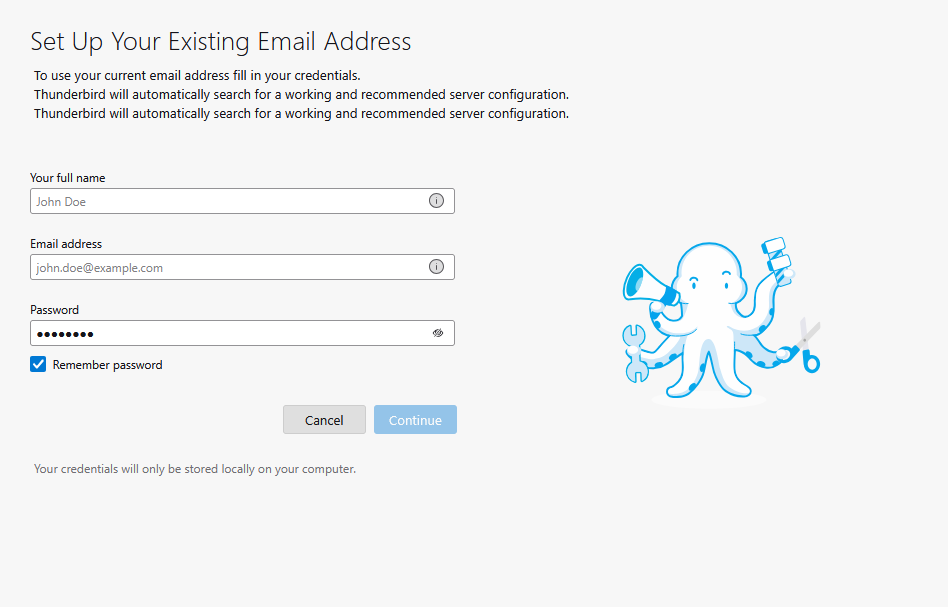
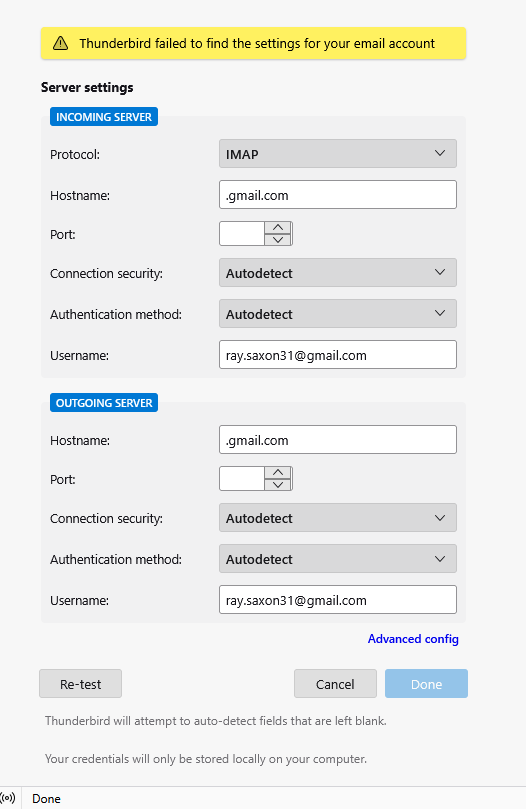
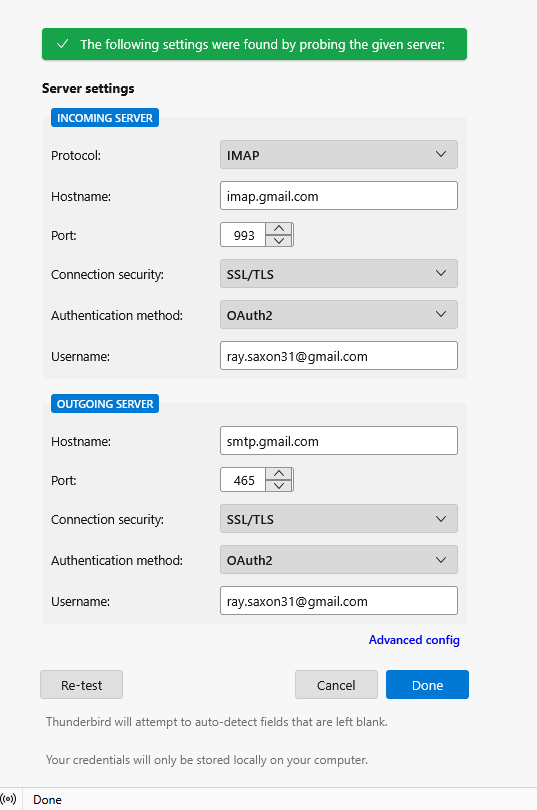
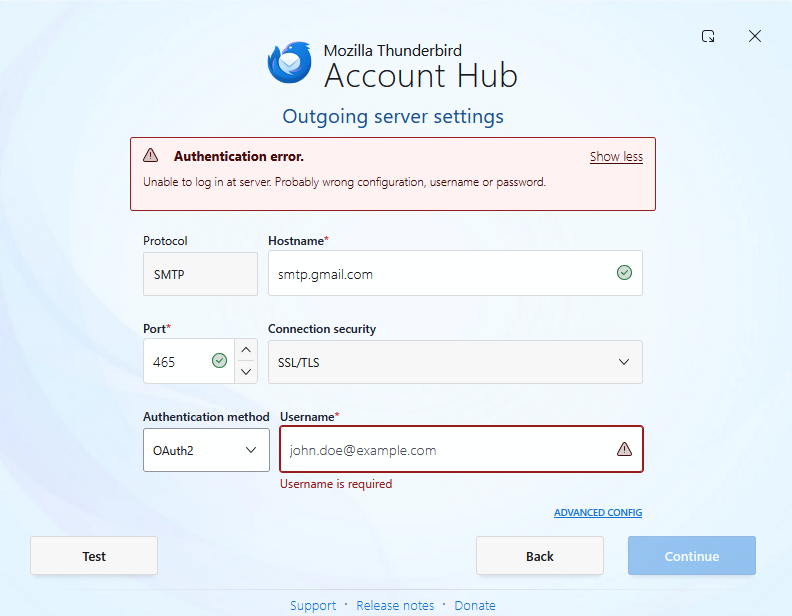
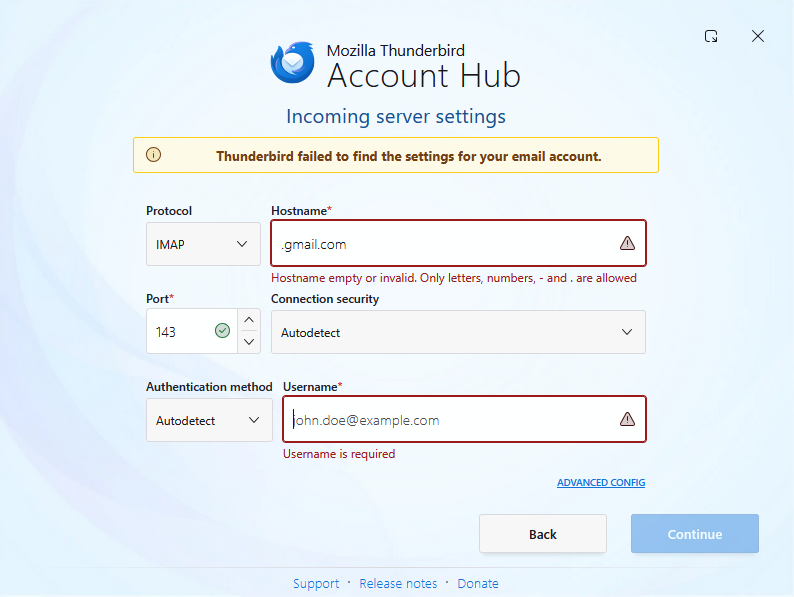
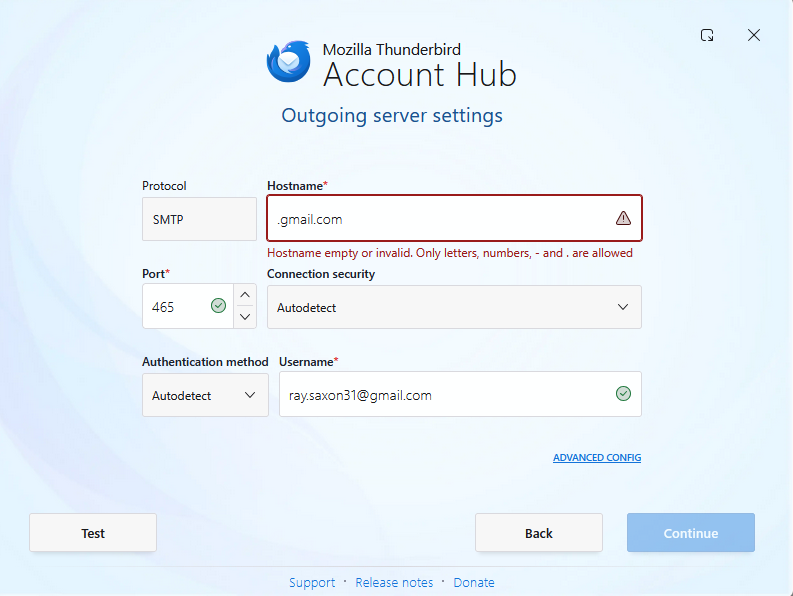
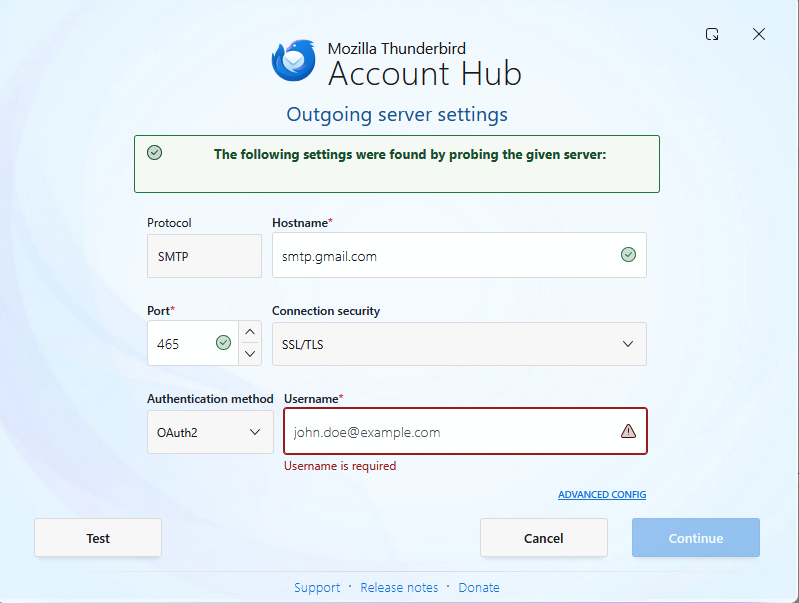
Yes, my problem is in trying to add my Gmail account to Thunderbird. After entering my name and email address on the first page, I get the attached sequence of screens. For obvious reasons, I have removed my email address from the images. I am completing the server screens with the following values : IMAP imap.gmail.com Port 993 Security SSL/TLS Authorisation OAuth2 SMTP smtp.gmail.com Post 465 Security SSL/TLS Authorisation OAuth2
The third screen is the result of clicking Test on screen 2 and screen 4 is after clicking continue on screen 3
I have not tried the Command procedure as I was not confident enough to do so, but nothing has changed since Gmail was working OK on Thunderbird.
Hi christ1,
Did those screenshots help? I have now checked Port 80 and nothing is coming up when I enter the command. I have tried disabling Kaspersky while trying to set up the Gmail account on Thunderbird, but still the same result. Gmail account shows that Thunderbird is permitted access but when I try to set up the Gmail account, Thunderbird cannot find the account settings. I have set up the IMAP and SMTP servers as instructed and I have also tried using POP3 instead of IMAP but to no avail. I have used Thunderbird happily for some years now and didn't have this trouble when I originally added my Gmail account, so can't understand what is different now.
Wrt the screenshots, I'm not sure whether you count from the left or from the right. I'm just assuming it's from the left.
The third screen is the result of clicking Test on screen 2 and screen 4 is after clicking continue on screen 3
Screen 2: both, hostname, and port no. are wrong. Therefore you do get the 'Hostname invalid' error as shown in Screen 3.
when I try to set up the Gmail account, Thunderbird cannot find the account settings.
This is supposed to work. Try to disable the still experimental Account Hub, and use the traditional account wizard instead. In Settings > General > Account Hub, uncheck 'Create accounts in the new Account Hub'.
Then try again to set up your Gmail account.
Sorry, the screens are in reverse order. The screens showing wrong IMAP and SMTP settings are what I get initially. I then complete the correct details as per my previous message. Please read from right to left. I have already tried disabling the experimental Account Hub, but still get the same final rejection message.
Can you post screenshots again when using the New Account Wizard?
Τροποποιήθηκε στις από τον/την christ1
Screenshots as requested.Read from left to right. Details are entered on screen 1 then Continue. Result is screen 2. Details are entered on screen 2 then Re -test. Result is screen 3, then Done. Result is screen 4