


Windows 10 reached EOS (end of support) on October 14, 2025. If you are on Windows 10, see this article.

Avatar for Username

Αναζήτηση στην υποστήριξη

Προσοχή στις απάτες! Δεν θα σας ζητήσουμε ποτέ να καλέσετε ή να στείλετε μήνυμα σε κάποιον αριθμό τηλεφώνου ή να μοιραστείτε προσωπικά δεδομένα. Αναφέρετε τυχόν ύποπτη δραστηριότητα μέσω της επιλογής «Αναφορά παραβίασης».

Μάθετε περισσότερα
Αυτό το νήμα αρχειοθετήθηκε. Κάντε νέα ερώτηση αν χρειάζεστε βοήθεια.
Αρχειοθετήθηκε

Can't create outlook.com account

dschulze747

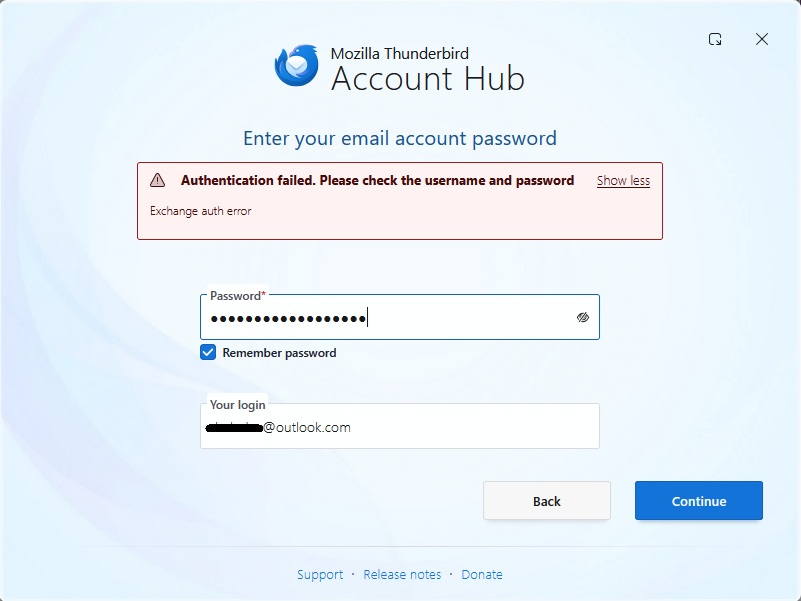
I am trying to create my outlook.com account in Thunderbird. I see the Account Hub box, and have typed in my email address. But when I type in the password, I get an error message, "Authentication failed. Please check the username and password". It then says, "Exchange auth error". I have checked and double- and triple-checked the spelling in the email address and password, and signed in to my email via the Microsoft outlook.com page using the same email and password. I can sign in to my email using the latter method, but Thunderbird keeps giving me the same error message and won't create the account in Thunderbird. What am I doing wrong?
I am trying to create my outlook.com account in Thunderbird. I see the Account Hub box, and have typed in my email address. But when I type in the password, I get an error message, "Authentication failed. Please check the username and password". It then says, "Exchange auth error". I have checked and double- and triple-checked the spelling in the email address and password, and signed in to my email via the Microsoft outlook.com page using the same email and password. I can sign in to my email using the latter method, but Thunderbird keeps giving me the same error message and won't create the account in Thunderbird. What am I doing wrong?
Συνημμένα στιγμιότυπα

Όλες οι απαντήσεις (1)

No answers to my question?

I think I fixed it on my own. I disabled the default "Account Hub" settings, so I don't create a new account using the new experimental account hub. I succeeded in creating the account in the "normal" manner, and it seems to work properly now.