


Accounts out of sync

Thunderbird issues Version 146.0.1 Jan 2026
This is a collection of issues observed in the setup of TB. These have persisted for over 6 months.
1. Subfolders in email folders are not correct. o Specifically, the Drafts, sent or Sent and Archives folders appear in the Local Folders Account and not in the account for the email. It seems that these Local Folder entries follow the email name that is set as the default.
2. I cannot delete these folders in the Local account. Creating new folders in the email accounts does not do anything. 3. I have uninstalled TB and re-installed it, but all the accounts come up the same way. 4. I have imported address books from past savings but they cannot be accessed as an address book. TB sees their names as non addresses. If I retype the names in these to a new address book, I can treat them as a group address as in the past.
It seems that the underlying data base indexing is mis-aligned. Is there a way to re-initialise the indexing to get these accounts in sync?
Peter DeVita
Try email
peterd1@devita.com
Όλες οι απαντήσεις (1)
1. I can not comment on that because what folders an account has varies between protocols (IMAP AND POP) as well as provider for IMAP, for instance Yahoo IMAP has a bulk folder.
2. Why are you trying to do that. Thunderbird has a local folders account that stores things on the local machine. Stuff stored elsewhere can be lost should you close your account in the case of IMAP or disappear if you remove the account from Thunderbird (POP) so having a central store can be quite handy. But if you do not want to see local folders then hide them.
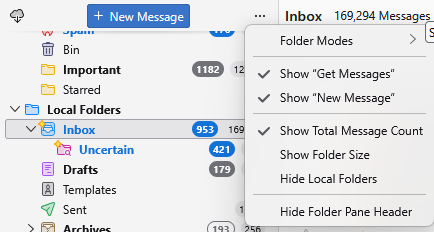
Perhaps set the archive folder and sent folder to use in the account settings. Mostly folder are created following that on first use. You have no need for an archive folder until you archive some mail for instance, sent mail is not required unless you have mail you have sent to store there. Have you looked at the support articles?
Things like the following which cover topics you have directly referenced.
- https://support.mozilla.org/en-US/kb/archived-messages
- https://support.mozilla.org/en-US/kb/imap-synchronization
- https://support.mozilla.org/en-US/kb/glossary-terms-including-types-accounts
- https://support.mozilla.org/en-US/kb/profiles-where-thunderbird-stores-user-data
3. That is by design, your accounts and settings are stored separately to the program and the Microsoft promoted approach of uninstall and reinstall is nothing more than a time water in most circumstances. If Thunderbird stored it's settings in the windows registry and removed them on uninstall, only then would that approach do anything as it is only registry entries that are reset by a reinstall. As MacOS and Linux do not have a registry, clearly Thunderbird will only ever use that to manage Windows system integration
4. I have been dealing with folk that import from CSV files now for probably 30 years and I am assume you are another that is going through the motions, but not understanding what is required of you as the driving intelegance (it is not the computer that decides what goes where).
CSV is the most basic file format, being only plain text, but it is structured text and it is up to you to drive the import by telling the software what column is to be used for what.
The following image is in many regards a best case default import from a CSV file. Not the column names in the fist column of information Vs that field to which Thunderbird will place the data when it imports the file.
Note hoe the name is sort of OK, except the entry is going to be filed under the company name because it is going to be erroneously placed in the display-name field. Then it gets worse as the city is going to be placed in the field that should have the email address
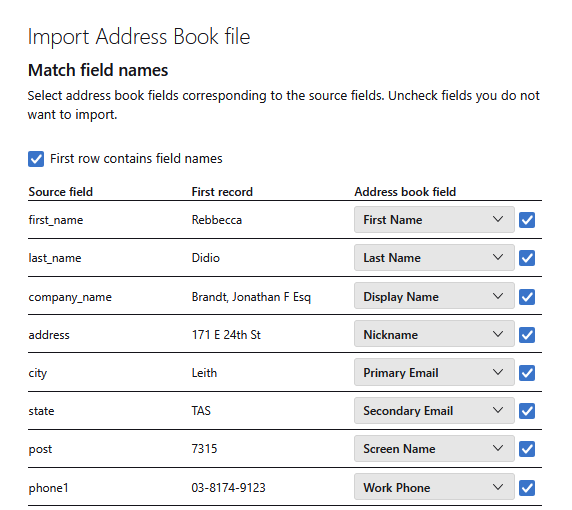
It appear the the manual corrections required at this point are simply ignored by many many people and they say things like "Thunderbird sees the name as a nonaddress", they are not addresses because the import was not done correctly and the address data was placed in the wrong place. You are the intelligence that has to look at the data and where the import is intending to place it and decide if it is correct, or change it using the drop down address book field. These changes are further complicated as Thunderbird will only allow you to use an address book field once. So changes have to be done in the correct order. You can tell Thunderbird to not import city, or not put it against the Primary Email, perhaps selecting the Work city field instead.
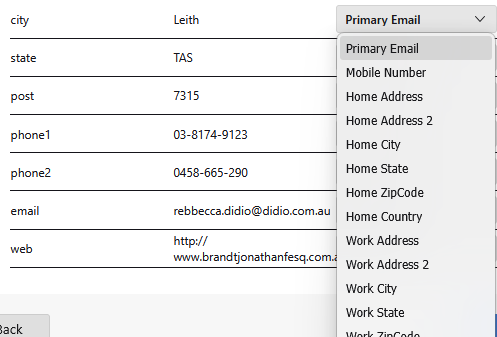
However until you have freed the use of the Primary Email you can not select it where the email is in the list as it is in use.
This part of the import is slow and tedious, it is never just click on through, although that appears to be how most folk that make it as far as this forum have approached the import.