


How do I rebuild thunderbird?

My house was hit by a lightning strike and it blew out my computer. It looks like both the drives in that computer are readable. So I am wondering how I can get all my email back into thunderbird. It was a pop account. All email was saved to computer. I'm using windows 10. I tried to just copy the old file at Users/Mike/AppData/Roaming but that didn't work. It didn't bring back all of the folders. Please let me know if there's anyway to rebuild all the folders and emails. Thanks in advance for your help. Mike
Επιλεγμένη λύση
David, thanks for all your help. It worked! Thanks, again. Mike
Προβολή απάντησης εντός συζήτησης 👍 0Όλες οι απαντήσεις (5)
I suggest you recheck the Thunderbird folder and the profile folder for the account. Browse in windows file explorer to the Mail folder as that has the POP accounts. Once you're at the Mail\<accountname> folder, you should see the message files, such as inbox, inbox.msf. My point is, if you can see them, it will be possible to save them. Please check and report back. If you can do a screenshot, that's even better.
David, thanks for your help. Here's a screenshot. It looks like everything is there.
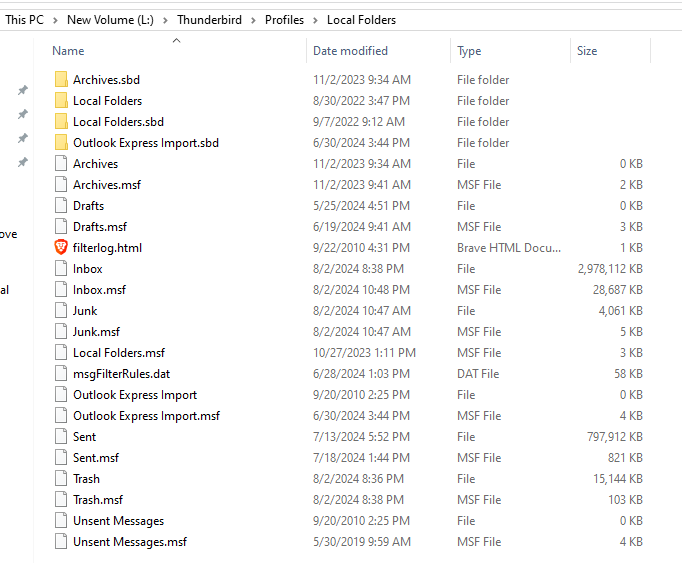
Yes, you have them, but that's not a profile. I suggest you copy that Local Folders folder somewhere else for safety - just in case... :) Now, start thunderbird and allocate an account and then exit thunderbird Now, you have real profile. again, check the profile with windows file explorer and I think you will see the Mail\Local Folders folder is empty. Verify that. I am assumng a POP account will be in Mail folder and an IMAP account in imapmail folder. Assuming Local Folders is empty, copy your Local Folders to overwrite it so it appears as Mail\Local Folders - then restart thunderbird
UPDATE: I say it isn't a profile because, as it appears in screenshot, it is the only folder in the profiles folder. If I am incorrect, let me know.
Επιλεγμένη λύση
David, thanks for all your help. It worked! Thanks, again. Mike