


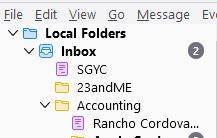
Folders in Inbox have changed icons to a purple text icon and they cannot be rearranged in the list.

Some time ago, two of the folders in my Inbox have had their icons changed to the same icon used for Drafts. I cannot figure out how to get their icons back to the typical Folder icon and these two folders cannot be moved in the list of folders to rearrange their order. Please help.
Όλες οι απαντήσεις (2)
It is is possible for multiple folders to have the drafts flag.
In your case, perhaps multiple accounts have set a folder in Local Folders to be drafts? Check account settings.
https://addons.thunderbird.net/en-us/thunderbird/addon/folderflags/ can help you check the flags.
First check in account settings in the Copies and folders area that those folders are not set as drafts for any of your accounts.
Then use this add-on to reset the flags on the folders to normal if it is not set as a drafts folder anywhere. https://addons.thunderbird.net/en-US/thunderbird/addon/folderflags/?src=ss