


Thunderbird 115 folder pane colours

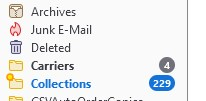
Does anyone know how to change the folderpane colours in 115. I use a userChrome.css, which no longer works in 115, as I beleive the commands have changed.
This is what I use currently, but have no idea what changed need to be made to make it work in 115. Any help would be appreciated.
@namespace url("http://www.mozilla.org/keymaster/gatekeeper/there.is.only.xul");
/* set default namespace to XUL */
treechildren::-moz-tree-row {margin-bottom: -3px !important;}
treechildren::-moz-tree-row(hover),
treechildren::-moz-tree-row(selected) {margin-bottom: -2px !important;}
/**/
   #folderTree > treechildren::-moz-tree-cell-text(folderNameCol, newMessages-true) {
     font-weight: bold !important;
     color: Black !important;
   }
   #folderTree > treechildren::-moz-tree-cell-text(folderNameCol, newMessages-true, selected) {
     font-weight: bold !important;
     color: Black !important;
   }
   #folderTree > treechildren::-moz-tree-cell-text(folderNameCol, hasUnreadMessages-true) {
     font-weight: bold !important;
     color: Black !important;
   }
   #folderTree > treechildren::-moz-tree-cell-text(folderNameCol, hasUnreadMessages-true, selected) {
     font-weight: bold !important;
     color: Black !important;
   }
   #folderTree > treechildren::-moz-tree-cell-text(folderNameCol, closed, subfoldersHaveUnreadMessages-true) {
     font-weight: bold !important;
     color: Black !important;
   }
   #folderTree > treechildren::-moz-tree-cell-text(folderNameCol, closed, subfoldersHaveUnreadMessages-true, selected) {
     font-weight: bold !important;
     color: Black !important;
   }
   #folderTree > treechildren::-moz-tree-cell-text(folderNameCol, closed, newMessages-true),
   #folderTree > treechildren::-moz-tree-cell-text(folderNameCol, newMessages-true),
   #folderTree > treechildren::-moz-tree-cell-text(folderNameCol, specialFolder-Inbox, newMessages-true) {
     font-weight: bold !important;
     color: Black !important;
   }
   #folderTree > treechildren::-moz-tree-cell-text(folderNameCol, closed, newMessages-true, selected),
   #folderTree > treechildren::-moz-tree-cell-text(folderNameCol, newMessages-true, selected),
   #folderTree > treechildren::-moz-tree-cell-text(folderNameCol, specialFolder-Inbox, newMessages-true, selected) {
     font-weight: bold !important;
     color: Black !important;
   }
/**/'''''''
Όλες οι απαντήσεις (2)
There was much new code (part of the goal) in 115 that eliminated much of the CSS that many (including myself) have used through the years. Discovering replacement CSS with the new environment will be a matter of individual experimentation. SO, what that means is that some of the CSS tweaks that we have used may not be available in the near future, if at all. CSS is no specialty of mine so I also am waiting to see what new CSS becomes available.
Thanks David, I will just have to keep trawling through the web, and hope as 115 usage increases, more details emerge. Appreciate you taking the time to reply.