Windows 10 reached EOS (end of support) on October 14, 2025. If you are on Windows 10, see this article.

Avatar for Username

Αναζήτηση στην υποστήριξη

Προσοχή στις απάτες! Δεν θα σας ζητήσουμε ποτέ να καλέσετε ή να στείλετε μήνυμα σε κάποιον αριθμό τηλεφώνου ή να μοιραστείτε προσωπικά δεδομένα. Αναφέρετε τυχόν ύποπτη δραστηριότητα μέσω της επιλογής «Αναφορά παραβίασης».

Μάθετε περισσότερα
Αυτό το νήμα αρχειοθετήθηκε. Κάντε νέα ερώτηση αν χρειάζεστε βοήθεια.
Αρχειοθετήθηκε

Strange Folder Organization? How to fix?

baphijmm

Hey there! We had an employee here who has recently been let go; however, after the fact, one of my employers revealed to me that said employee had done "something" to her email client that made it radically different from before. Upon inspection, the change was immediately obvious, but the solution to change it back was not nearly so obvious. Hence my question.

Under typical, "default" Folder organization in Thunderbird, items are organized as, for example:

- Email Account 1 -- Inbox -- Drafts -- Sent - Email Account 2 -- Inbox -- Drafts -- Sent

Somehow, this former employee had changed her Thunderbird organization schema to:

- Inbox -- Email Account 1 -- Email Account 2 - Drafts -- Email Account 1 -- Email Account 2 - Sent -- Email Account 1 -- Email Account 2

While I can see the utility of this change, this is not what said employer is used to, nor is it something she wanted; she's asked me to revert it, but I have no idea how to do so and cannot find the setting easily. Anyone out there able to help?

Hey there! We had an employee here who has recently been let go; however, after the fact, one of my employers revealed to me that said employee had done "something" to her email client that made it radically different from before. Upon inspection, the change was immediately obvious, but the solution to change it back was not nearly so obvious. Hence my question. Under typical, "default" Folder organization in Thunderbird, items are organized as, for example: - Email Account 1 -- Inbox -- Drafts -- Sent - Email Account 2 -- Inbox -- Drafts -- Sent Somehow, this former employee had changed her Thunderbird organization schema to: - Inbox -- Email Account 1 -- Email Account 2 - Drafts -- Email Account 1 -- Email Account 2 - Sent -- Email Account 1 -- Email Account 2 While I can see the utility of this change, this is not what said employer is used to, nor is it something she wanted; she's asked me to revert it, but I have no idea how to do so and cannot find the setting easily. Anyone out there able to help?

Όλες οι απαντήσεις (2)

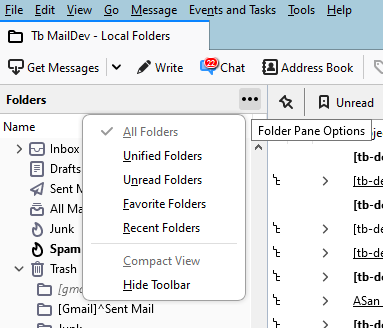
Try using the folder pane options.

Matt said

Try using the folder pane options.

While I did figure it out last night prior to this post, I did in fact attempt that before and could not see the problem. I saw it upon searching more elsewhere. The problem was the check-mark on "Unified Folders"; what I had not processed was that that was the problem, or that it could be reversed.

In any event, it's fixed now, so.