Αυτό το νήμα αρχειοθετήθηκε.
Κάντε νέα ερώτηση αν χρειάζεστε βοήθεια.

Αρχειοθετήθηκε
Windows 7 - Thunderbird-receive emails re INTERAC for very small business, How do I save/organize them for TAXES?

I receive many emails re INTERACT has been deposited. NEED HELP/ADVICE on organizing my emails for TAX purposes. I file taxes with Canada AND IRS/USA. I have tried saving the emails in a WORD type file. but the vital information of the DATES is lost. I now have all the emails in ONE folder in Thunderbird. Now I need to sort them by CLIENT and DATE into a DATAbase. What's the easiest way to do this???? Thanks. Skippyrosa
I receive many emails re INTERACT has been deposited. NEED HELP/ADVICE on organizing my emails for TAX purposes. I file taxes with Canada AND IRS/USA. I have tried saving the emails in a WORD type file. but the vital information of the DATES is lost. I now have all the emails in ONE folder in Thunderbird. Now I need to sort them by CLIENT and DATE into a DATAbase. What's the easiest way to do this???? Thanks. Skippyrosa
Όλες οι απαντήσεις (1)
Save emails as *.eml files or text *.txt files. Right click on email and choose 'Save as' option.
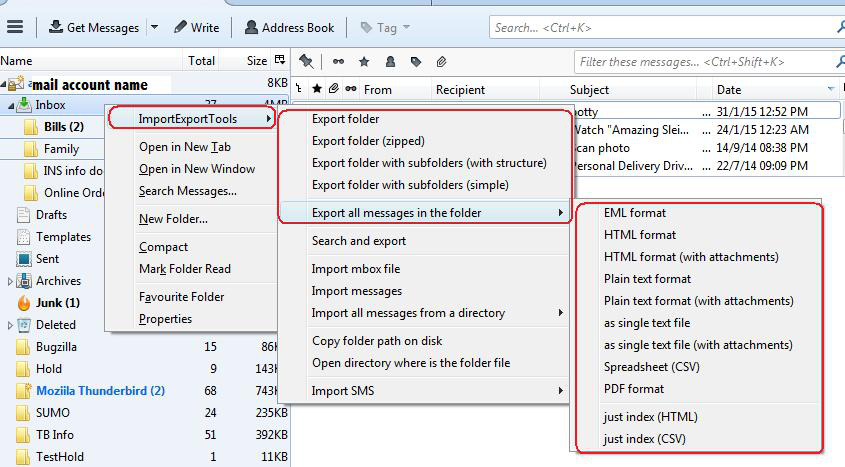
The addon called ImportExportTools can offer options to save all messages in a folder as plain text files
https://addons.thunderbird.net/en-US/thunderbird/addon/importexporttools/