


Completing recurring tasks in the today pane

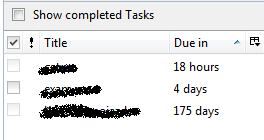
Back when Lightning was a separately installed add-on, I remember I was able to complete an instance of a recurring task by clicking the checkbox next to it in the Today pane, and have the next instance pop up in the list. Now the checkbox is greyed out for cyclical tasks (1 and 3 in the pic), and right clicking them and selecting "mark completed" removes them completely from the Today pane, even though the completion checkbock remains unchecked for them if I go to the Tasks tab. Is this by design, and if so, how do I get the old functionality back?
Τροποποιήθηκε στις από τον/την gumuxug
Όλες οι απαντήσεις (1)

This is exactly what I'm seeing in Thunderbird 52.2.1. Delving deeper, when I look at the Tasks tab, I can see multiple instances of tasks from when it was working in the "Completed" section (this seems correct). I only one time tasks that have not been completed tasks in the "Current Tasks" section (this is problematic in that even newly created recurring tasks don't show here), I see tasks that won't be due for months in the "Today" and "Next Seven Days" sections (this is problematic in that it doesn't match the names of these sections), and I see new recurring tasks in the "Incomplete Tasks" section (this is good, except for the missing recurrences of previously completed recurring tasks). The "All" section only shows one copy of each task, complete, incomplete, or recurring (this makes sense to me, but isn't the normal behavior for competing applications).
So, I would like to know how to get the normal behavior for tasks (they should allow complete marking and reappear for the next recurrence after they are marked complete), but I would also like to point out that there may be other buggy behaviors as discussed above.