


Email window doesn't close

When I've written an email and click on "send", sometimes it happens that the window (in which I did write the email) doesn't close. There is no way to close this window manually, except restarting Thunderbird. The email is sent correctly and also copied to the "sent" folder as expected. The only problem is that the window doesn't close after the email is sent.
Επιλεγμένη λύση
In the profile the 'Sent' folder is really a single text file. So that one document is now close to 2GB in size, which means it could be difficult to open using a text editor like Notepad.
I would suggest that you do one of the following: Set up 'Archive' options and then archive the emails in the Sent folder.
then in 'Sent' folder highlight emails - suggest you do this in batches. highlighted emails will appear in Message Pane as conversations. click on 'Archive' button.
Other option: Manually create folder eg: 'Sent 2015' Move all sent emails dated 2015 into that new 'Sent 2015' folder. Do the same for other years.
If you have deleted any 'sent' emails then after you moved everything, right click on 'Sent' folder and select 'Compact' to remove all traces of deleted emails.
When this has been done, test the 'Write' window auto closing on 'Send'.
Please report back on results.
Τροποποιήθηκε στις από τον/την Toad-Hall
Όλες οι απαντήσεις (3)
How many emails do you have in your 'Sent' folder?
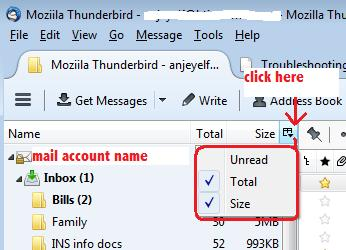
'View' > 'Layout' > select: 'folder pane columns' or 'Menu icon' > 'Options' > 'Layout' > select: 'Folder Pane Columns' enable the 'size' column - see image below.
What size is the 'Sent' folder?
the folder contains 13973 messages and the size is 1987MB
Επιλεγμένη λύση
In the profile the 'Sent' folder is really a single text file. So that one document is now close to 2GB in size, which means it could be difficult to open using a text editor like Notepad.
I would suggest that you do one of the following: Set up 'Archive' options and then archive the emails in the Sent folder.
then in 'Sent' folder highlight emails - suggest you do this in batches. highlighted emails will appear in Message Pane as conversations. click on 'Archive' button.
Other option: Manually create folder eg: 'Sent 2015' Move all sent emails dated 2015 into that new 'Sent 2015' folder. Do the same for other years.
If you have deleted any 'sent' emails then after you moved everything, right click on 'Sent' folder and select 'Compact' to remove all traces of deleted emails.
When this has been done, test the 'Write' window auto closing on 'Send'.
Please report back on results.
Τροποποιήθηκε στις από τον/την Toad-Hall