


Windows 10 reached EOS (end of support) on October 14, 2025. If you are on Windows 10, see this article.

Search Support

Avoid support scams. We will never ask you to call or text a phone number or share personal information. Please report suspicious activity using the “Report Abuse” option.

Learn More
Open

A mess with grayed out folders, Userfolders appearing, unk why this happened

hpdka

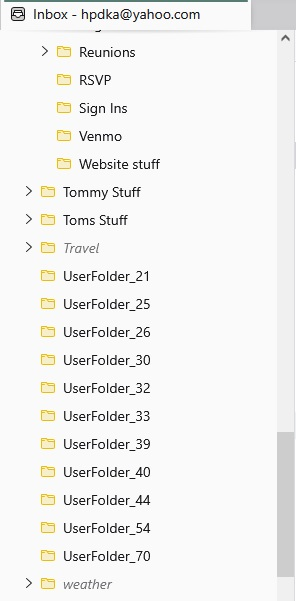
Im not sure what the heck happened about a month or so ago, and I have still not resolved it. I did check on thing that was suggested to me, but it didnt really make much of a difference. After an update at about that time, my email folders I made appeared all wacky in the sense that some folders were grayed out, but still retained subfolders (with their contents) in them. I dont know what that means or why they are grayed out. I also noticed a bunch of folders named Userfolder with a number after that. They contain many emails in each one, like they were removed from the original folder they were in. So I dont know, for most of them, what folder I had them in. Im thinking I can try and match them to the grayed folder they might belong to, but not sure on where some go. I have no idea why this happened, and I have been trying to use Thunderbird since then. Im attaching a photo of what part of my Thunderbird, folders & grayed out folders look like. I just want to know how to correct this and get things back in order. I dont know if I did something in the settings or what. Plus this was over a month ago. Ive just been using my yahoo mail account on the web.
Im not sure what the heck happened about a month or so ago, and I have still not resolved it. I did check on thing that was suggested to me, but it didnt really make much of a difference. After an update at about that time, my email folders I made appeared all wacky in the sense that some folders were grayed out, but still retained subfolders (with their contents) in them. I dont know what that means or why they are grayed out. I also noticed a bunch of folders named Userfolder with a number after that. They contain many emails in each one, like they were removed from the original folder they were in. So I dont know, for most of them, what folder I had them in. Im thinking I can try and match them to the grayed folder they might belong to, but not sure on where some go. I have no idea why this happened, and I have been trying to use Thunderbird since then. Im attaching a photo of what part of my Thunderbird, folders & grayed out folders look like. I just want to know how to correct this and get things back in order. I dont know if I did something in the settings or what. Plus this was over a month ago. Ive just been using my yahoo mail account on the web.
Screen ƒe photowo kpe ɖe eŋu

All Replies (2)

oh, you are correct, it just dawned on me that I should have just added to my previous post. I still have this issue though and have no idea what to do about it.

Bia biabia

You must log in to your account to reply to posts. Please start a new question, if you do not have an account yet.