


Avoid support scams. We will never ask you to call or text a phone number or share personal information. Please report suspicious activity using the “Report Abuse” option.

Learn More
Open

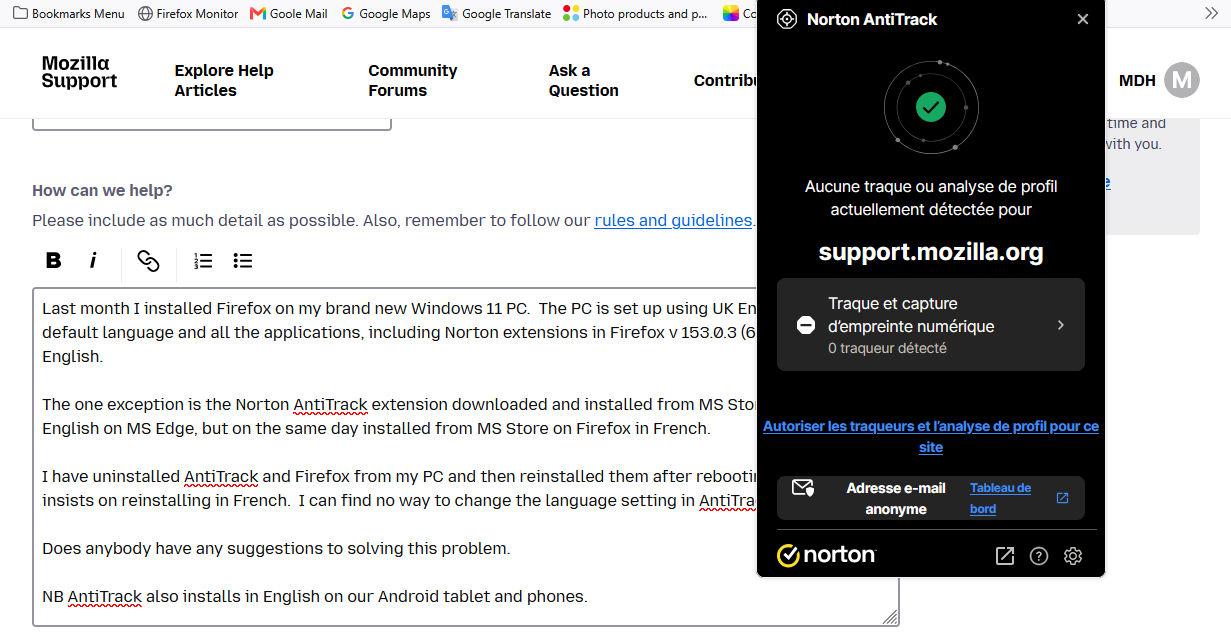
Why does Norton AntiTrack extension install in the French langauage?

MDH

Last month I installed Firefox on my brand new Windows 11 PC. The PC is set up using UK English as the default language and all the applications, including Norton extensions in Firefox v 153.0.3 (64bit), install in English.

The one exception is the Norton AntiTrack extension downloaded and installed from MS Store. It installs in English on MS Edge, but on the same day installed from MS Store on Firefox in French.

I have uninstalled AntiTrack and Firefox from my PC and then reinstalled them after rebooting, but it still insists on reinstalling in French. I can find no way to change the language setting in AntiTrack.

Does anybody have any suggestions to solving this problem.

NB AntiTrack also installs in English on our Android tablet and phones.
Last month I installed Firefox on my brand new Windows 11 PC. The PC is set up using UK English as the default language and all the applications, including Norton extensions in Firefox v 153.0.3 (64bit), install in English. The one exception is the Norton AntiTrack extension downloaded and installed from MS Store. It installs in English on MS Edge, but on the same day installed from MS Store on Firefox in French. I have uninstalled AntiTrack and Firefox from my PC and then reinstalled them after rebooting, but it still insists on reinstalling in French. I can find no way to change the language setting in AntiTrack. Does anybody have any suggestions to solving this problem. NB AntiTrack also installs in English on our Android tablet and phones.
Screen ƒe photowo kpe ɖe eŋu

You must log in to your account to reply to posts. Please start a new question, if you do not have an account yet.