

Wo archive tread sia.
Meɖekuku bia biabia yeye ne ehia kpeɖeŋu.

Solved
Wode archive me
Oauth2 authentication method missing from TB v115 SMTP server outgoing

Trying get TB 115 to work with Outlook.com email account and OAuth2.
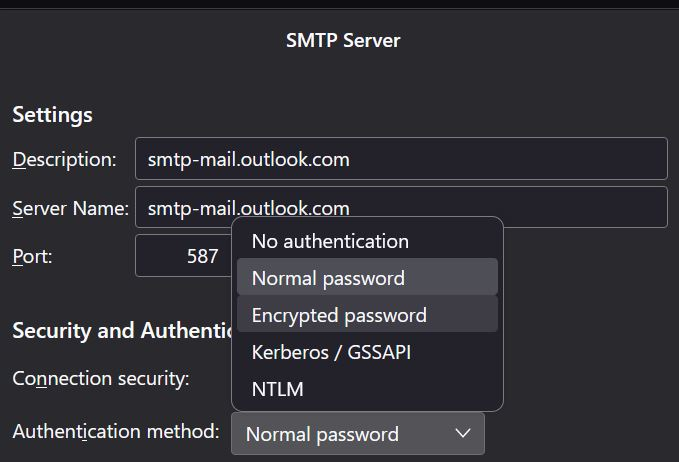
- Outbound email will not work. SMTP Server authentication method does not show the drop down option for oauth2 (see attached screen shot).
- I am using the server names, ports, etc from MS. No issues until forced changed to oauth2.
- Inbound email is working (IMAP) with ouath2 and MS set to 2FID.
- Gmail works fine through TB.
Thank you for your help.
Trying get TB 115 to work with Outlook.com email account and OAuth2.
* Outbound email will not work. SMTP Server authentication method does not show the drop down option for oauth2 (see attached screen shot).
* I am using the server names, ports, etc from MS. No issues until forced changed to oauth2.
* Inbound email is working (IMAP) with ouath2 and MS set to 2FID.
* Gmail works fine through TB.
Thank you for your help.
All Replies (2)
Ɖɔɖɔɖo si wotia
Use outlook.office365.com for the incoming and smtp.office365.com for the outgoing:
https://support.mozilla.org/en-US/questions/1417298#answer-1588949
Thank you sfhowes. I tried those addresses before, but this time I rebooted. Outbound works fine now.