

Wo archive tread sia.
Meɖekuku bia biabia yeye ne ehia kpeɖeŋu.

Solved
Wode archive me
How do I make TB go back to the main list of messages rather than the next message after I delete the message I'm reading?
How do I make TB go back to the main list of messages rather than the next message after I delete the message I'm reading? I'm using TB v 68.4.1
How do I make TB go back to the main list of messages rather than the next message after I delete the message I'm reading? I'm using TB v 68.4.1
All Replies (2)
Ɖɔɖɔɖo si wotia
Go to the Thunderbird Menu and select Preferences. (On Windows this may be called "Options") In the left navigation pane click on Display At the Top, click on the Advanced Tab Click the Radio Button "open Messages in" ----> "A new tab" and check the Checkbox for "Close message window/tab on move or delete" Close the preferences tab. Double click on a message to read it. When you deal with it ... you'll be back at the Inbox.
Set it like this:
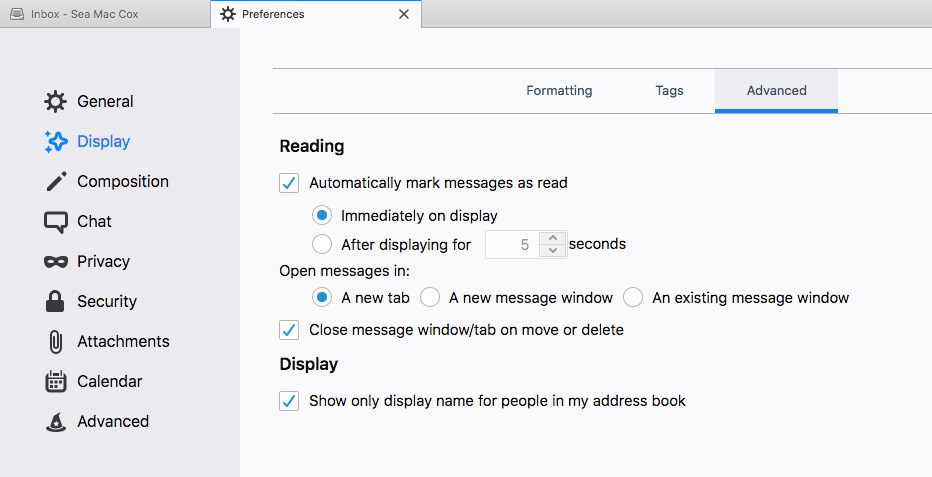
Sea Mac trɔe
If you view messages in the Message Pane (F8) instead of a tab or window, the Deselect on Delete add-on may be useful.