


Have current version of TB but cannot edit events, have the cehck mark set to edit in tab but doesn't provide that. what config.sys changes need to be done

I cannot edit an event in calendar. I thought turning on 'edit calendar events in tabs' would work but I don't get those edits in tabs. Perhaps, a config setting was changed by mistake.
Ɖɔɖɔɖo si wotia
Okay, it works on Win7 Laptop with older version and current version. So, I am testing which events have a problem. Those that I am not 'organizer' do not work, those in the past do not work, but some do work and I don't know why yet. I will continue to cross check and advise later.
Analysis, I created most events on OUTLOOK but sent them as ICAL's to TB where they were added since TB had identical accounts. I accepted it with a different account than the one sent from OUTLOOK. So, a mismatch in organizer and acceptor.
This is my problem and will find a way to coordinate the various calendars before proceeding with this problem. Hopefully, I will only have one calendar going forward.
RSchlenker trɔe
All Replies (7)

What prevents you from editing events?
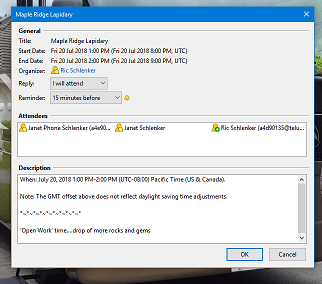
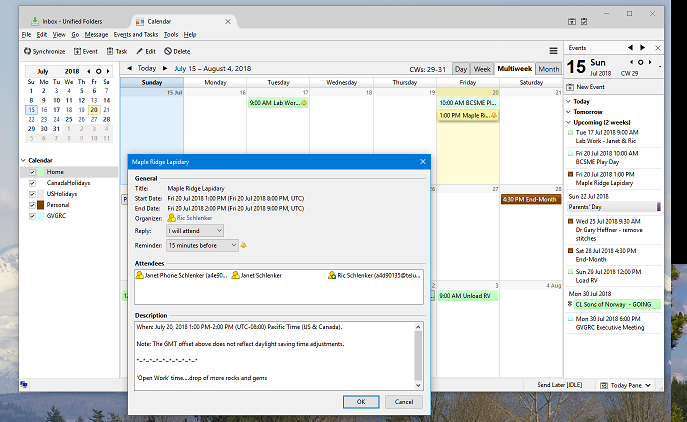
The event is displayed but does not have any fields that can be changed; some are not even displayed. It is a kind of window box rather than a tab.
Please post a screenshot. https://support.mozilla.org/kb/how-do-i-create-screenshot-my-problem
Here is screen shot of the event. It is not part of TB tabs. This is what I get when I 'OPEN' or 'EDIT' the event from calendar.
PrtScn the event and calendar in the background as well
Note: a NEW event goes into tab on calendar and has all fields.
RSchlenker trɔe
I don't know what's wrong with your profile. I'd suggest to create a new profile, and set up your calendar in the new profile. Does the problem still occur?
Problem still occurs. also, occurs on wife's Win10 Notebook. I will test on my older Win7 laptop to see if it occurs there too. Will reply in about 20 minutes.
Ɖɔɖɔɖo si wotia
Okay, it works on Win7 Laptop with older version and current version. So, I am testing which events have a problem. Those that I am not 'organizer' do not work, those in the past do not work, but some do work and I don't know why yet. I will continue to cross check and advise later.
Analysis, I created most events on OUTLOOK but sent them as ICAL's to TB where they were added since TB had identical accounts. I accepted it with a different account than the one sent from OUTLOOK. So, a mismatch in organizer and acceptor.
This is my problem and will find a way to coordinate the various calendars before proceeding with this problem. Hopefully, I will only have one calendar going forward.
RSchlenker trɔe