


Vorsicht vor Support-Betrug: Wir fordern Sie niemals auf, eine Telefonnummer anzurufen, eine SMS an eine Telefonnummer zu senden oder persönliche Daten preiszugeben. Bitte melden Sie verdächtige Aktivitäten über die Funktion „Missbrauch melden“.

Weitere Informationen
Offen

Thunderbird fails to save an inline forwarded email with inherited attachments as a draft on the second save.

IBK-IT

Hello,

we have a reproducible issue in Thunderbird when forwarding emails with attachments.

Environment: Windows 11 Professional Thunderbird version 152.0 (The issue also occurred in the previous Thunderbird version) POP3 account Mail provider Strato AVG Business Antivirus installed, but the issue also occurs after testing AVG related settings Issue occurs with different attachment types and sizes, for example PDF and DXF files

Steps to reproduce:

1. Open an email with an attachment. 2. Forward the email using Forward Inline. 3. Add recipient and some text. 4. Save the message as draft. 5. The first save works. 6. Save the same draft again, with or without changing the text.

Actual result: The second save fails with an error message similar to:

“Your message cannot be saved as a draft. There was an error attaching [filename]. Please check if you have sufficient access rights to the file.”

Expected result: The draft should save repeatedly without an attachment error.

Important observations: The problem occurs with all tested attachments, not only one specific file. The file size does not seem to be the cause. The issue also occurred with a small DXF attachment of about 355 KB. The issue also occurs in Thunderbird Troubleshoot Mode. The issue still occurred after creating a new Thunderbird POP3 profile and downloading the remaining emails again from the Strato POP3 mailbox. Changing the draft folder did not solve the issue. Removing temporary Drafts files and rebuilding the Drafts index did not solve the issue. The issue originally appeared to be related to AVG, but later tests showed that AVG is not the main cause. If the automatically inherited attachment is removed from the forwarded message and then manually dragged again from the original email into the draft, the draft can be saved without problems. Changing forwarding mode from Forward Inline to Forward as Attachment solves the issue.

Conclusion: This looks like a Thunderbird issue with automatically inherited attachments in inline forwarded messages. The first draft save works, but on the second save Thunderbird seems unable to reprocess or resolve the inherited attachment and shows a misleading access rights error.

We would appreciate any advice on how to further troubleshoot or resolve this issue. If this is a known bug, we would also be grateful for any information regarding a planned fix or available workaround. We are happy to provide additional information, screenshots or perform further tests if needed.
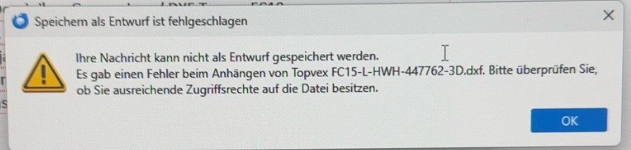
Hello, we have a reproducible issue in Thunderbird when forwarding emails with attachments. '''Environment:''' Windows 11 Professional Thunderbird version 152.0 (The issue also occurred in the previous Thunderbird version) POP3 account Mail provider Strato AVG Business Antivirus installed, but the issue also occurs after testing AVG related settings Issue occurs with different attachment types and sizes, for example PDF and DXF files '''Steps to reproduce:''' 1. Open an email with an attachment. 2. Forward the email using Forward Inline. 3. Add recipient and some text. 4. Save the message as draft. 5. The first save works. 6. Save the same draft again, with or without changing the text. '''Actual result:''' The second save fails with an error message similar to: “Your message cannot be saved as a draft. There was an error attaching [filename]. Please check if you have sufficient access rights to the file.” '''Expected result:''' The draft should save repeatedly without an attachment error. '''Important observations:''' The problem occurs with all tested attachments, not only one specific file. The file size does not seem to be the cause. The issue also occurred with a small DXF attachment of about 355 KB. The issue also occurs in Thunderbird Troubleshoot Mode. The issue still occurred after creating a new Thunderbird POP3 profile and downloading the remaining emails again from the Strato POP3 mailbox. Changing the draft folder did not solve the issue. Removing temporary Drafts files and rebuilding the Drafts index did not solve the issue. The issue originally appeared to be related to AVG, but later tests showed that AVG is not the main cause. If the automatically inherited attachment is removed from the forwarded message and then manually dragged again from the original email into the draft, the draft can be saved without problems. Changing forwarding mode from Forward Inline to Forward as Attachment solves the issue. '''Conclusion:''' This looks like a Thunderbird issue with automatically inherited attachments in inline forwarded messages. The first draft save works, but on the second save Thunderbird seems unable to reprocess or resolve the inherited attachment and shows a misleading access rights error. We would appreciate any advice on how to further troubleshoot or resolve this issue. If this is a known bug, we would also be grateful for any information regarding a planned fix or available workaround. We are happy to provide additional information, screenshots or perform further tests if needed.
Angefügte Screenshots

Sie müssen sich mit Ihrem Benutzerkonto anmelden, um auf Beiträge zu antworten. Bitte stellen Sie eine neue Frage, wenn Sie noch kein Benutzerkonto haben.