


Firefox crashes

i am not able to play any games unable to load them,and constant crash of flash plugins,i have instaled all nesesary plugins..i am guesing that my RAM is problem but i hope that you have any solutions that can help me
Všechny odpovědi (6)

Can you give me your crash reports?
- Enter about:crashes in the Firefox address bar and press Enter. A Submitted Crash Reports list will appear, similar to the one shown below.
- Copy the 5 most recent Report IDs that start with bp- and paste them into your response here.

Hello,
Try Firefox Safe Mode to see if the problem goes away. Firefox Safe Mode is a troubleshooting mode that turns off some settings and disables most add-ons (extensions and themes).
(If you're using an added theme, switch to the Default theme.)
If Firefox is open, you can restart in Firefox Safe Mode from the Help menu by clicking on the Restart with Add-ons Disabled... menu item:
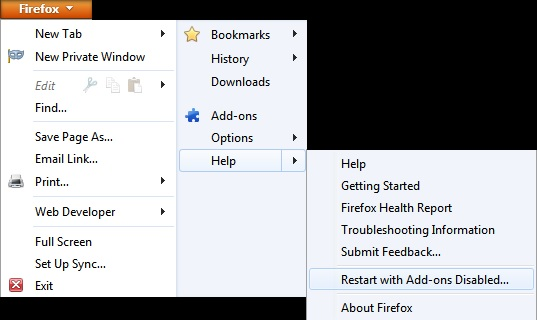
If Firefox is not running, you can start Firefox in Safe Mode as follows:
- On Windows: Hold the Shift key when you open the Firefox desktop or Start menu shortcut.
- On Mac: Hold the option key while starting Firefox.
- On Linux: Quit Firefox, go to your Terminal and run firefox -safe-mode
(you may need to specify the Firefox installation path e.g. /usr/lib/firefox)
Once you get the pop-up, just select "'Start in Safe Mode"
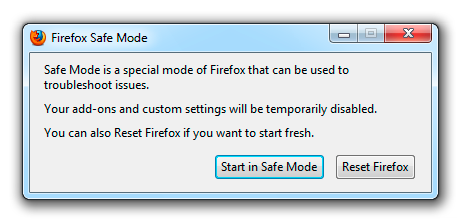
If the issue is not present in Firefox Safe Mode, your problem is probably caused by an extension, and you need to figure out which one. Please follow the Troubleshoot extensions, themes and hardware acceleration issues to solve common Firefox problems article to find the cause.
To exit Firefox Safe Mode, just close Firefox and wait a few seconds before opening Firefox for normal use again.
When you figure out what's causing your issues, please let us know. It might help others with the same problem.
Thank you.
Report ID Date Submitted
dbbac5ef-94ee-40f1-9139-3adcb15ffb2c	4/16/2014	5:37 PM
38cf689d-f9f6-4ab7-bc82-28da77e12aec	4/16/2014	5:13 PM
bp-8245b888-ceab-4a93-bba5-a8bed2140416	4/16/2014	5:07 PM
fbfac3ba-74a9-4731-8aef-a02af666ef41	4/16/2014	2:15 AM
bp-6cb6952b-9c2c-4e73-b58c-1a78b2140225	2/25/2014	1:52 PM
f0b030d8-56a1-44d3-9ac9-f0a44441af36	2/16/2014	10:59 AM
05764862-a328-4096-863b-48047bc2da78	2/12/2014	10:23 PM
Upravil uživatel mjbrm dne
i tried firefox in safe mode i have same problem as in normal mode.the thing is this is computer that i use until i repair my own.but this one has very Low RAM and i guess that makes problem i need solution for this until i get my machine back.so i am not planing to upgrade RAM on this it is anccient.also cant play games on google chrome either...so basicly i need settings in computer.any tips?
Your first crash @ hang | ZwYieldExecution is caused by Flash hanging.
You should try to disable hardware acceleration in Flash Player:
- Go to this Adobe Flash Player Help page.
- Right-click on the Flash Player logo on that page.
- Click on Settings in the context menu. The Adobe Flash Player Settings screen will open.
- Click on the icon at the bottom-left of the Adobe Flash Player Settings window to open the Display panel.
The image "fpSettings1.PNG" does not exist.
- Remove the check mark from Enable hardware acceleration.
- Click Close to close the Adobe Flash Player Settings Window.
- Restart Firefox.
This Flash Player Help - Display Settings page has more information on Flash Player hardware acceleration, if you're interested.
The second crash report has a signature @ MaybePushMarkStackBetweenSlices which I've never seen before. Try to disable hardware acceleraton and see if that solves it.
You should also disable hardware acceleration completely if you have low RAM and if your problems still persist after disabling HA in Flash.
You might need to restart Firefox in order for this to take effect, so save all work first (e.g., mail you are composing, online documents you're editing, etc.).
Then perform these steps:
- Click the orange Firefox button at the top left, then select the "Options" button, or, if there is no Firefox button at the top, go to Tools > Options.
- In the Firefox options window click the Advanced tab, then select "General".
- In the settings list, you should find the Use hardware acceleration when available checkbox. Uncheck this checkbox.
- Now, restart Firefox and see if the problems persist.
Upravil uživatel mjbrm dne
mkay i have done what you told me,but still same thing .it is not like i have to play any game but it is irritating that i cant if i want to.here are some snapshots after i did what you suggest http://i1350.photobucket.com/albums/p765/kpixl/untitled_zps8efb237f.png http://i1350.photobucket.com/albums/p765/kpixl/untitled1_zps05bb1962.png http://i1350.photobucket.com/albums/p765/kpixl/untitled2_zps3f3f8e1c.png http://i1350.photobucket.com/albums/p765/kpixl/untitled3_zps83179b4b.png


