

Windows 10 reached EOS (end of support) on October 14, 2025. If you are on Windows 10, see this article.

Prohledat stránky podpory

Vyhněte se podvodům. Za účelem poskytnutí podpory vás nikdy nežádáme, abyste zavolali nebo poslali SMS na nějaké telefonní číslo nebo abyste sdělili své osobní údaje. Jakékoliv podezřelé chování nám prosím nahlaste pomocí odkazu „Nahlásit zneužití“.

Zjistit více
Archivováno

Thunderbird creates spam folder when I already have a junk folder (bug1985372)

Wes

I use Thunderbird desktop to access IMAP email from my hosting provider. My hosting provider includes a junk email folder named "Junk" with the path "...hosting.com/INBOX/Junk. I cannot delete this folder.

Whenever I run Thunderbird, it creates a second folder named "Junk" with the path "...hosting.com/INBOX/spam. If I right-click on this folder and delete it, it is re-created the next time I start Thunderbird. I have gone into "Junk Settings" unchecked the "Move new junk message to..." checkbox thinking that this is causing Thunderbird to mistakenly create an extra junk/spam folder but it continues to create that extra junk folder.

How do I stop this from happening? I should only require one junk/spam folder.
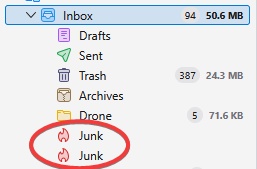
I use Thunderbird desktop to access IMAP email from my hosting provider. My hosting provider includes a junk email folder named "Junk" with the path "...hosting.com/INBOX/Junk. I cannot delete this folder. Whenever I run Thunderbird, it creates a second folder named "Junk" with the path "...hosting.com/INBOX/spam. If I right-click on this folder and delete it, it is re-created the next time I start Thunderbird. I have gone into "Junk Settings" unchecked the "Move new junk message to..." checkbox thinking that this is causing Thunderbird to mistakenly create an extra junk/spam folder but it continues to create that extra junk folder. How do I stop this from happening? I should only require one junk/spam folder.
Přiložené obrázky

Upravil uživatel Wayne Mery dne

Všechny odpovědi (1)

Please create a bug report at https://bugzilla.mozilla.org/enter_bug.cgi?product=thunderbird with details including your provider/domain name.