


Outlook.com on Thunderbird

I can download my Outlook.com incoming mail to Thunderbird, no problem. But when I try to send mail from Thunderbird (version 128.3.3esr (32-bit) - earlier versions same problem) I get the following error message:
"Sending of the message failed. The message could not be sent because connecting to Outgoing server (SMTP) smtp-mail.office365.com failed. The server may be unavailable or is refusing SMTP connections. Please verify that your Outgoing server (SMTP) settings are correct and try again."
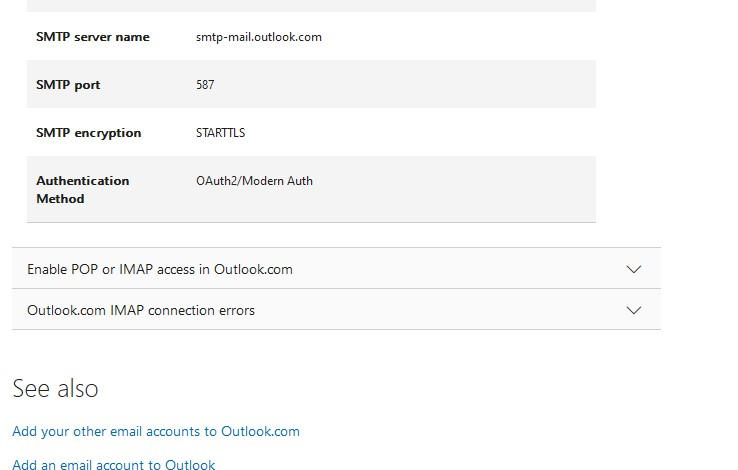
Microsoft provides settings requiring 0auth2/Modern Auth for SMTP mail: (screenshot)
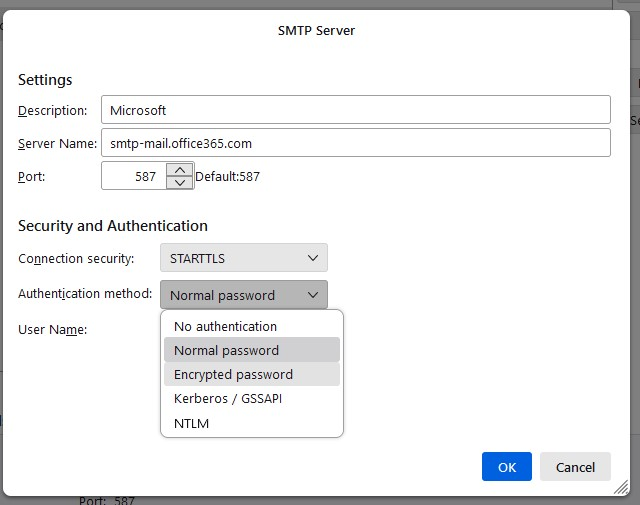
Checking account settings in Thunderbird reveals that Oauth2/Modern Auth, as specified by Microsoft, is not among the options given for SMTP authentication: (screenshot)
I know there has been quite a bit of discussion on this topic but I haven't found anything specific to help; I've been circling around the problem to no avail and I'm sure you clever people will have an answer!
Have I missed or misinterpreted something here, or is Thunderbird no longer able to send Outlook.com mail?
Zvolené řešení
smtp.office365.com is the correct server, 587 STARTTLS and Oauth2. This article may be of interest:
https://support.mozilla.org/en-US/kb/microsoft-oauth-authentication-and-thunderbird-202Přečíst dotaz v kontextu 👍 0
Všechny odpovědi (5)
the server is smtp.office365.com port 587 STARTTS and oauth2. Try that.
Thanks for your input, david - but as you can see from the screenshots, there is no option in Thunderbird settings for 0auth2 in the dropdown authentication method menu.
Also, Microsoft gives the server name (again, see screenshot) as <smtp-mail.outlook.com>, not <smtp.office365.com>. So which is correct?
I know there have been changes to Outlook.com authentication this year so maybe the screenshot from Microsoft is out of date. But that still doesn't help with 0auth2 not being available in Thunderbird settings.
The port and encryption appear to be correct. Can you shed any more light on it?
Zvolené řešení
smtp.office365.com is the correct server, 587 STARTTLS and Oauth2. This article may be of interest:
https://support.mozilla.org/en-US/kb/microsoft-oauth-authentication-and-thunderbird-202
Well, it's very strange. Up till now 0auth2 was not listed as an option in the Thunderbird dropdown - then suddenly it changed, before my very eyes! I have no idea how or why that option was suddenly restored.
Anyway, a test message was sent successfully so thanks for your patience.
You are most welcome. :)