

Toto vlákno bylo archivováno.
Pokud potřebujete pomoci, založte prosím nový dotaz.

Vyřešeno
Archivováno
change firefox account region from arabic to english
Hi
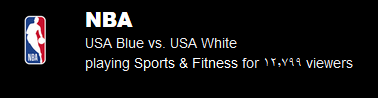
i made my firefox account in an arabic country and now after syncing i always get youtube embedded videos in arabic and sometimes the indian numerals show up (١٢٣٤٥٦٧٨٩) instead of the arabic numerals (123456789) and when i go to https://accounts.firefox.com/ it shows up in arabic with no way to change the language
is there a way to fix this or do i need to make another firefox account?
Hi
i made my firefox account in an arabic country and now after syncing i always get youtube embedded videos in arabic and sometimes the indian numerals show up (١٢٣٤٥٦٧٨٩) instead of the arabic numerals (123456789) and when i go to https://accounts.firefox.com/ it shows up in arabic with no way to change the language
is there a way to fix this or do i need to make another firefox account?

Všechny odpovědi (2)
Zvolené řešení
It's possible that maybe Firefox is syncing the language from your account. You can try changing the language used in Firefox and Choose display languages for multilingual web pages.
If that doesn't help, it might be an issue with your font settings in the Fonts and Colors section of the Firefox settings.
Hope this helps.