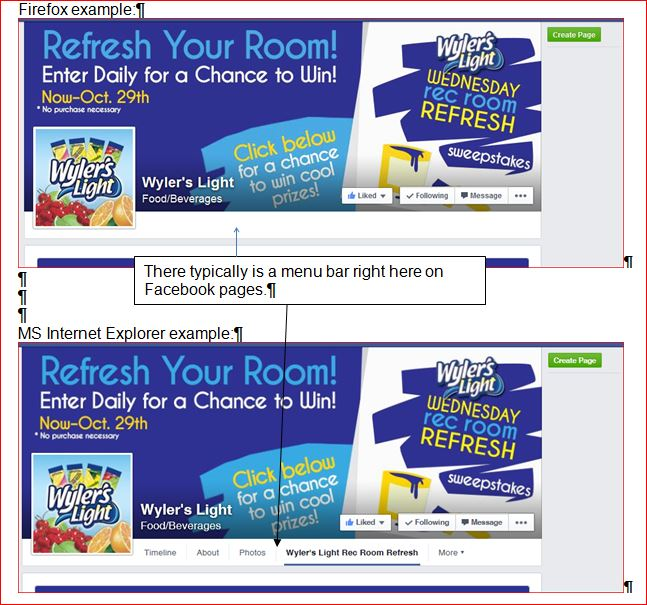
When upgraded to v33, menu bar on Facebook pages is missing (line below the "Like" button) - is there a fix or setting?

After v33 was installed, I noticed that the "menu bar" on Facebook pages is now missing. This is the menu that is typically below the "Like" button and the page's picture image on Facebook pages. Therefore, I now cannot get anywhere that is offered by the menu.
Všechny odpovědi (5)
You can try these steps in case of issues with web pages:
You can reload web page(s) and bypass the cache to refresh possibly outdated or corrupted files.
- Hold down the Shift key and left-click the Reload button
- Press "Ctrl + F5" or press "Ctrl + Shift + R" (Windows,Linux)
- Press "Command + Shift + R" (Mac)
Clear the cache and remove cookies only from websites that cause problems.
"Clear the Cache":
- Firefox/Tools > Options > Advanced > Network > Cached Web Content: "Clear Now"
"Remove Cookies" from sites causing problems:
- Firefox/Tools > Options > Privacy > "Use custom settings for history" > Cookies: "Show Cookies"
Start Firefox in Safe Mode to check if one of the extensions (Firefox/Tools > Add-ons > Extensions) or if hardware acceleration is causing the problem.
- Switch to the DEFAULT theme: Firefox/Tools > Add-ons > Appearance
- Do NOT click the Reset button on the Safe Mode start window
I tried the above and unfortunately nothing solved the problem with Facebook pages.
I failed to mention in first posting that this lack of Facebook menu/tab display only happens in Firefox.
Can you attach a pair of comparing screenshots?
- http://en.wikipedia.org/wiki/Screenshot
- https://support.mozilla.org/kb/how-do-i-create-screenshot-my-problem
- Use a compressed image type like PNG or JPG to save the screenshot
- Make sure that you do not exceed the maximum size of 1 MB
To cor-el: See attached image; hope this is what you mean. Let me know if not. Thank you.